Icon
An icon draws one monochrome symbol, tinted with a color. Use it in toolbars, list rows, buttons and status lines, wherever a small picture says more than a word.
ui.Icon takes a ui.Symbol. gift ships two symbol sets, both generated from
Flowbite Icons: icon/outline with 282 stroked icons and icon/solid with 239
filled ones. Each icon is a package level variable, so you name it directly and import nothing else.
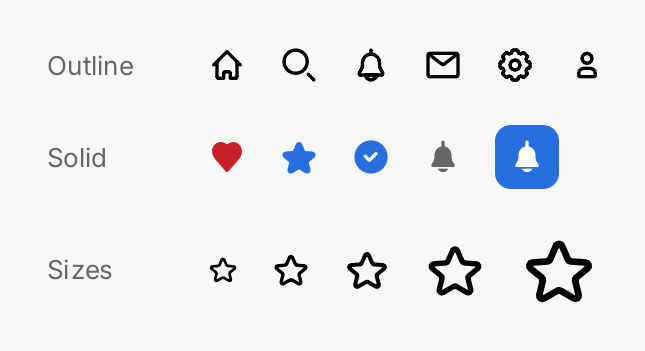
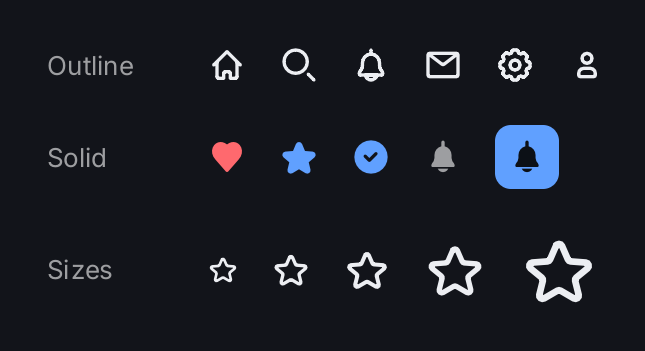
caption := func(s string) gift.View {
	return ui.Text(s).FontSize(13).Foreground(ui.ColorSecondaryLabel).MinWidth(64)
}

return ui.VStack(
	ui.HStack(
		caption("Outline"),
		ui.Icon(outline.Home),
		ui.Icon(outline.Search),
		ui.Icon(outline.Bell),
		ui.Icon(outline.Envelope),
		ui.Icon(outline.Cog),
		ui.Icon(outline.User),
	).Gap(16).Align(geom.Center),
	ui.HStack(
		caption("Solid"),
		ui.Icon(solid.Heart).Foreground(ui.ColorDanger),
		ui.Icon(solid.Star).Foreground(ui.ColorAccent),
		ui.Icon(solid.CheckCircle).Foreground(ui.ColorAccent),
		ui.Icon(solid.Bell).Foreground(ui.ColorSecondaryLabel),
		ui.Icon(solid.Bell).
			Foreground(ui.ColorOnAccent).
			Padding(6).
			Background(ui.ColorAccent).
			CornerRadius(8),
	).Gap(16).Align(geom.Center),
	ui.HStack(
		caption("Sizes"),
		ui.Icon(outline.Star).Size(16),
		ui.Icon(outline.Star),
		ui.Icon(outline.Star).Size(24),
		ui.Icon(outline.Star).Size(32),
		ui.Icon(outline.Star).Size(40),
	).Gap(16).Align(geom.Center),
).Gap(20)
Full demo on GitHub ↗
· run it with go run ./docs/gallery -demo icon
Usage
Pick a set
Import the set you need and name the icon. The identifiers are the SVG file names in Go spelling, so
address-book.svg becomes outline.AddressBook.
import (
	"github.com/worldiety/gift/icon/outline"
	"github.com/worldiety/gift/icon/solid"
	"github.com/worldiety/gift/ui"
)

ui.Icon(outline.User)
ui.Icon(solid.CheckCircle).Size(16).Foreground(ui.ColorAccent)
The outline set reads lighter and suits toolbars and list rows. The solid set suits a selected state and small
sizes, where a stroke starts to close up. Both packages can be imported together, and they do not cover the same
names: only solid has brand icons such as solid.Github, and the close icon is outline.Close but solid.X.
A common pattern switches between the two for a toggled state:
star := outline.Star
if starred {
	star = solid.Star
}
ui.Icon(star).Foreground(ui.ColorAccent)
Importing a set has no side effect and registers nothing. The geometry of a set is one embedded blob, about
36 KB for outline and 57 KB for solid, and every icon is a window into it. Naming one icon links the whole
blob of its set, so a binary pays for a set once, not per icon.
Size
An icon is square. Size sets its edge in logical pixels; the default is ui.DefaultIconSize, 20, which sits
well next to body text. Pass 24 to get the Flowbite artwork at its design size. The icon is rasterized at the
exact device size it is drawn at, so it stays sharp at every size and density.
Frame and Flex change the space the icon takes, not the artwork: the icon stays at its size and is centered
in the larger bounds. Use Size to make the icon itself bigger.
Color
The default foreground is ui.ColorLabel, so an icon follows a light/dark switch like text does. Give it another
semantic color with Foreground, for example ui.ColorSecondaryLabel for a quiet hint or ui.ColorOnAccent on
an accent background:
ui.HStack(
	ui.Icon(outline.Clock).Size(16).Foreground(ui.ColorSecondaryLabel),
	ui.Text("Updated 5 minutes ago").Foreground(ui.ColorSecondaryLabel),
).Gap(6).Align(geom.Center)Background, Border, CornerRadius and Padding style the box around the icon, as on the filled bell in the
screenshot. CornerRadius rounds the background and the border, not the icon, and Shadow is the shadow of the
box, not of the icon’s silhouette.
Accessible name
An icon contributes no text, so a test selector or an accessibility bridge has nothing to find it by. Give an
icon that carries meaning on its own a Label. For an icon-only button, set the label on the button:
ui.Button(ui.Icon(outline.TrashBin), remove).Label("Delete")No icon
The zero ui.Symbol is the “no icon” value. ui.Icon accepts it and leaves its space blank instead of
panicking, so a lookup that misses is harmless. Symbol.IsZero tells you whether a symbol is empty.
var statusIcons = map[string]ui.Symbol{
	"ok":    solid.CheckCircle,
	"error": solid.ExclamationCircle,
}

ui.Icon(statusIcons[status]) // an unknown status draws nothing
Your own icons
cmd/gift-icongen turns a directory of SVG files into a package of symbols, the same way the two built-in sets
are made. It writes icons.bin and icons.gen.go into the output directory, with one ui.Symbol variable per
file:
//go:generate go run github.com/worldiety/gift/cmd/gift-icongen -src ./svg -out . -pkg myicons -set "My icons"
package myicons
The generator accepts only the SVG subset the Flowbite icons use: <path> and <rect> elements, a square
viewBox anchored at the origin, and currentColor as the stroke. A fill of currentColor paints; any other
fill color cuts the shape out of the icon. The generator refuses everything else with an error,
including an even-odd path it cannot convert exactly, rather than producing a wrong icon. The generated code calls ui.NewSymbol with the encoded geometry; calling it
by hand is possible but only useful if you produce that encoding yourself.
API
Constructors
| Constructor | Description |
|---|---|
func Icon(s Symbol) IconView | Icon returns a view of s at DefaultIconSize. |
Methods
| Method | Description |
|---|---|
Foreground(c Color) IconView | Foreground is the colour the mask is tinted with. |
Label(s string) IconView | Label sets the accessible name; see gift.Element.Label. |
Size(px float32) IconView | Size sets the edge of the icon in logical pixels. |
Common modifiers: Background, Border, Clip, CornerRadius, Flex, Frame, Key, MaxHeight, MaxWidth, MinHeight, MinWidth, Padding, PaddingInsets, Shadow. See Modifiers.
Constructors
| Constructor | Description |
|---|---|
func NewSymbol(data []byte, box float32) Symbol | NewSymbol wraps encoded icon geometry produced by cmd/gift-icongen. |
Methods
| Method | Description |
|---|---|
IsZero() bool | IsZero reports whether s carries no geometry. |
Related
- Button takes an icon as its label.
- Image shows pictures in full color.
- Row takes a
Symbolfor its leading icon and its chevron. - Tab Bar takes a
Symbolper tab and an optional one for the selected state. - Icons explains how symbols are rasterized and cached.
- Theming lists the semantic colors.
- Modifiers covers padding, background and frame.