Image
An image shows one picture, such as a photo, a cover or a profile picture. Use it for a single picture in a layout. For hundreds or thousands of pictures, use the image gallery, which draws through the same service.
ui.Image takes an asset.Source. The view does no I/O itself: an application wide image pipeline loads,
decodes and caches the picture in the background. Until the picture is ready, the view draws a placeholder.
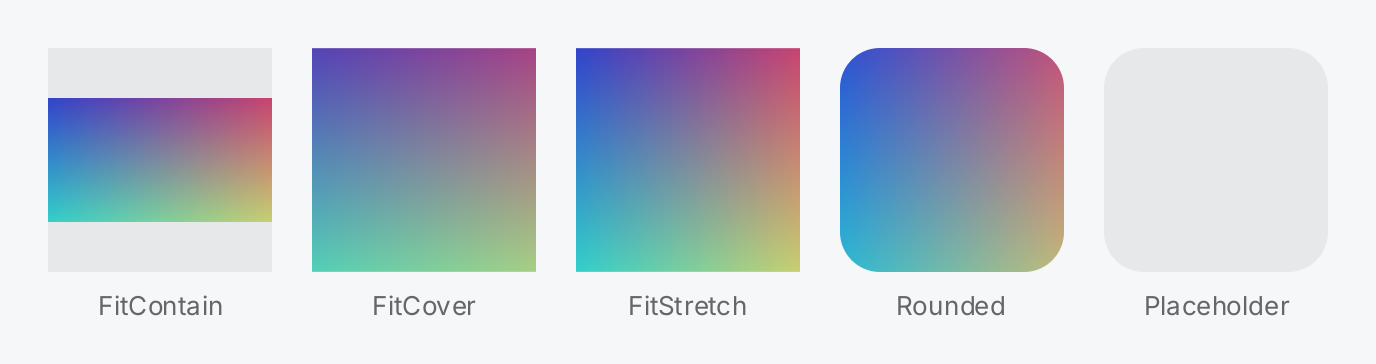
wide := pictures[2] // a 360 x 200 picture
well := ui.Fade(ui.ColorLabel, 0.06)

caption := func(pic gift.View, s string) gift.View {
	return ui.VStack(
		pic,
		ui.Text(s).FontSize(13).Foreground(ui.ColorSecondaryLabel),
	).Gap(8).Align(geom.Alignment{X: 0.5})
}

return ui.HStack(
	caption(ui.Image(wide).Fit(ui.FitContain).Frame(112, 112).Background(well), "FitContain"),
	caption(ui.Image(wide).Fit(ui.FitCover).Frame(112, 112).Background(well), "FitCover"),
	caption(ui.Image(wide).Fit(ui.FitStretch).Frame(112, 112).Background(well), "FitStretch"),
	caption(ui.Image(pictures[1]).Fit(ui.FitCover).Frame(112, 112).
		CornerRadius(20).Clip(true), "Rounded"),
	caption(ui.Image(asset.File("missing.png")).Frame(112, 112).
		CornerRadius(20).Placeholder(well), "Placeholder"),
).Gap(20)
Full demo on GitHub ↗
· run it with go run ./docs/gallery -demo image
Usage
Install the pipeline
Pictures reach the screen through one asset.Pipeline, which you create once and install with
ui.SetImagePipeline. Wire its Deliver field to app.Post, so that finished pictures arrive on the UI
goroutine. The application owns the pipeline: close it when the program ends, then run app.DrainPosts once
more, because the closures Close delivers still have to run.
app := gift.New(gift.Options{Root: root})

cache, _ := os.UserCacheDir()
pipe := asset.NewPipeline(asset.Config{
	Deliver: app.Post,
	Disk:    asset.DiskCacheConfig{Dir: filepath.Join(cache, "myapp", "thumbnails")},
})
defer func() {
	pipe.Close()
	app.DrainPosts()
}()
ui.SetImagePipeline(pipe)
Every other field of asset.Config has a default when left zero. Do not leave Deliver out in an
application: without it, results run on a worker goroutine instead of the UI goroutine, which is only meant for
tests. An empty Disk.Dir switches the persistent thumbnail cache off. Without an installed pipeline, every
image draws its placeholder, which is a quiet, normal state and not an error.
Sources
asset.File and asset.HTTP create a source from a path or a URL. Neither performs I/O, so you can build a
list of sources in a view function. A relative path is resolved against the working directory at the time of
the call. For pictures stored elsewhere, implement the asset.Source interface: Metadata without I/O and
Open returning a fresh reader.
ui.Image(asset.File("photos/beach.jpg"))
ui.Image(asset.HTTP("https://example.com/cover.png"))
The built-in decoders read JPEG and PNG. asset.RegisterDecoder adds further formats.
Size and fit
Without a Frame, an image takes the largest size with the picture’s aspect ratio that fits the space it is
offered. Along the main axis of a stack or a scroll view, where one axis is bounded and the other is not, it
takes the bounded axis whole and derives the other from the aspect ratio: a picture in a VStack is as wide as
the stack and as high as its ratio asks for. Only with no bounded axis at all does an image without a size
collapse to zero.
asset.File and asset.HTTP do not know the dimensions before the pipeline has probed the picture. Until then,
the image fills a bounded box, measures as a square of the bounded axis along a free one, and reflows once the
dimensions arrive. Give it a Frame to keep the layout stable
from the first frame.
Fit decides how the picture fills that frame:
| Fit | Effect |
|---|---|
ui.FitContain | The whole picture is visible, the rest of the frame stays empty. The default. |
ui.FitCover | The picture covers the frame, the overhang is cropped evenly on both sides. |
ui.FitStretch | The picture fills the frame exactly and is distorted. |
The pipeline delivers thumbnails, not the original. By default the view asks for the size it is drawn at in
device pixels, and the pipeline snaps that to a rung of asset.Config.Sizes, which defaults to 128, 256 and
512. The largest rung caps the resolution, so a picture drawn larger than 512 device pixels is magnified. Add a
larger rung to Sizes if you show big pictures. A rung never enlarges a picture: a source smaller than the
rung keeps its own size. Size asks for a fixed number of device pixels on the longest edge instead.
Rounded corners
CornerRadius alone rounds the background, the border and the placeholder, but the picture keeps square
corners. Add Clip(true) to round the picture as well. With FitContain, the rounding applies to the
letterboxed picture itself, not to the empty frame around it.
ui.Image(asset.File("avatar.png")).
	Fit(ui.FitCover).
	Frame(48, 48).
	CornerRadius(24).
	Clip(true).
	Label("Profile picture")
Label sets the accessible name. For a picture, that is its description.
Placeholder
Placeholder sets the color drawn until the picture is resident. The default is a faint white wash, which
barely shows on a light background. A faded semantic color works in both themes:
ui.Image(src).Frame(48, 48).Placeholder(ui.Fade(ui.ColorLabel, 0.08))A transparent placeholder draws nothing. A picture that fails for good, for example a missing file, keeps its
placeholder and is not requested again. To try it again, for example after the user pressed reload, call
Forget on the pipeline and ui.ForgetImage with the picture’s ID. When a picture changed, call Invalidate
on the pipeline and ui.ForgetImage. The ID is src.Metadata().ID. ui.ForgetImage schedules no layout by
itself, so call it next to a state change that lays the image out again; see Images.
Tint multiplies the picture with a color. The default, opaque white, leaves it as it is; a lower alpha fades
it over its background.
API
Constructors
| Constructor | Description |
|---|---|
func Image(src asset.Source) ImageView | Image returns a view of src. |
Methods
| Method | Description |
|---|---|
Fit(f ImageFit) ImageView | Fit selects how the picture is mapped onto the view; see ImageFit. |
Label(s string) ImageView | Label sets the accessible name, which for a picture is its description; see gift.Element.Label. |
Placeholder(c Color) ImageView | Placeholder fills the view until the picture is resident. |
Size(px int) ImageView | Size asks the pipeline for a thumbnail of this many device pixels on the longest edge. |
Tint(c Color) ImageView | Tint multiplies the picture. |
Common modifiers: Background, Border, Clip, CornerRadius, Flex, Frame, Key, MaxHeight, MaxWidth, MinHeight, MinWidth, Padding, PaddingInsets, Shadow. See Modifiers.
ImageFit selects how a picture is mapped onto its frame. Its constants FitContain, FitCover and
FitStretch are described under Size and fit.
| Function | Description |
|---|---|
func ForgetImage(id asset.ID) | ForgetImage drops everything the user interface remembers about one picture: the settled request state of Image and the resident textures of every revision of it. |
func ImagePipeline() *asset.Pipeline | ImagePipeline returns the pipeline installed by SetImagePipeline, or nil. |
func SetImagePipeline(p *asset.Pipeline) | SetImagePipeline installs the application wide image pipeline that Image and every Gallery draw through. |
The configuration of the pipeline is documented in package asset.
Related
- Image gallery: many pictures, virtualized, through the same pipeline
- Icon: monochrome symbols tinted with a color
- Images: how the pipeline loads, caches and uploads pictures
- Modifiers:
Frame,CornerRadius,Clipand the other shared modifiers - Gallery example: a photo browser built on
ui.ImageGallery