Progress Bar
A progress bar shows how much of a task is done. ui.ProgressBar takes a fraction between 0 and 1 and fills
that share of a rounded track. When you cannot say how far along a task is, switch the bar to its indeterminate
mode with Indeterminate(): a short pill then slides across the track again and again.
A progress bar only displays a value. It takes no input, holds no focus and is not a hit target, so a tap on it reaches whatever is behind it.
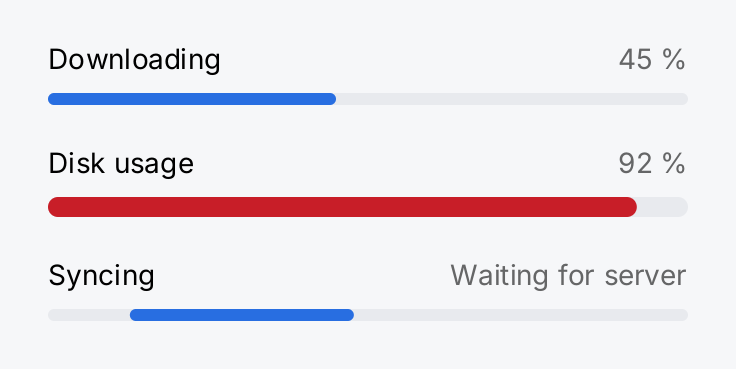
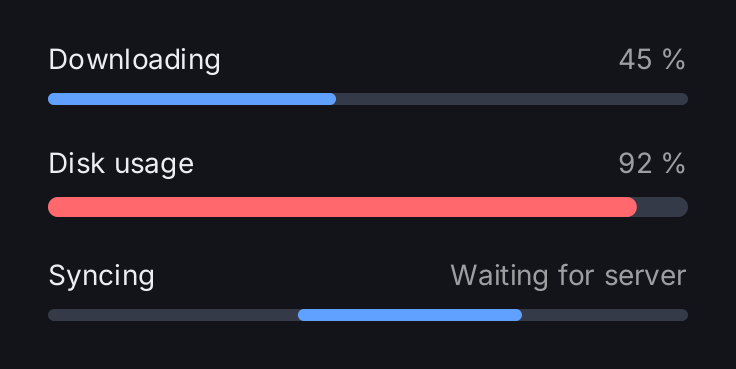
item := func(title, value string, bar ui.ProgressBarView) gift.View {
	return ui.VStack(
		ui.HStack(
			ui.Text(title),
			ui.Spacer(),
			ui.Text(value).Foreground(ui.ColorSecondaryLabel),
		),
		bar.Label(title),
	).Gap(8)
}

return ui.VStack(
	item("Downloading", "45 %", ui.ProgressBar(0.45)),
	item("Disk usage", "92 %", ui.ProgressBar(0.92).
		Tint(ui.ColorDanger).
		Frame(geom.Unbounded(), 10)),
	item("Syncing", "Waiting for server", ui.ProgressBar(0).Indeterminate()),
).Gap(20).Frame(320, geom.Unbounded())
Full demo on GitHub ↗
· run it with go run ./docs/gallery -demo progress-bar
The third bar is indeterminate and moves all the time. The screenshot catches one moment of that animation.
Usage
The fraction. Pass done / total. A value above 1 is clamped for drawing, because a download can overshoot
its declared size. A negative value panics, and so does a value that is not a finite number. Watch out for a total
of zero: done / total is then NaN or infinite and the build panics. Check the total first and show an
indeterminate bar while it is unknown:
func uploadBar(done, total int64) gift.View {
	if total <= 0 {
		return ui.ProgressBar(0).Indeterminate().Label("Upload")
	}
	return ui.ProgressBar(float64(done) / float64(total)).Label("Upload")
}
Indeterminate mode. Indeterminate() ignores the fraction. The pill crosses the track once every
ui.ProgressPeriod (1.2 seconds). Unlike the other animations of package ui, this one never ends on its own: it keeps
the app at its full frame rate for as long as the bar is in the view tree. Scrolling the bar out of view or covering
it with a sheet does not stop it. Remove the bar from the tree when the work is done, or switch to a fraction as
soon as you know one.
Size. The bar is 6 logical pixels tall. It takes the full width its parent offers, and 200 pixels when nothing
bounds its width. In a row, give it Flex(1) so it takes the remaining space:
ui.HStack(
	ui.Text("Upload"),
	ui.ProgressBar(f).Flex(1),
).Gap(12)
Frame(w, h) fixes both axes. Pass geom.Unbounded() for an axis that should stay free, so
Frame(geom.Unbounded(), 10) makes a thicker bar that still fills the width. MinWidth and MaxWidth bound the
width alone. Inside a list row, a fixed frame such as Frame(90, 6) keeps the bar compact as an accessory.
Color. The track uses ui.ColorControl and the fill ui.ColorAccent. Tint replaces the fill color. It
accepts a semantic color, so the bar follows the light and dark theme.
Accessible name. Label names what is making progress. It is never drawn.
API
Constructors
| Constructor | Description |
|---|---|
func ProgressBar(fraction float64) ProgressBarView | ProgressBar returns a determinate progress bar at the given fraction. |
Methods
| Method | Description |
|---|---|
Indeterminate() ProgressBarView | Indeterminate switches the bar to the mode that says “something is happening” without saying how much of it. |
Label(v string) ProgressBarView | Label sets the accessible name of the bar: what is making progress. |
Tint(v Color) ProgressBarView | Tint sets the colour of the filled part, replacing ColorAccent. |
Common modifiers: Flex, Frame, Key, MaxWidth, MinWidth. See Modifiers.
Related
- Slider for a bar that the user drags to set a value
- Row to show a bar as the accessory of a list row
- Colors for the semantic colors you can pass to
Tint - Modifiers for
Frame,Flexand the other common modifiers - Animation for how gift schedules frames and why the indeterminate bar is the exception
- Kitchen sink example uses a determinate and an indeterminate bar