Text
ui.Text shows a run of text: a label, a heading, a caption or a paragraph. You set its font, size, color and
alignment with modifiers, and you limit it to a number of lines with an ellipsis where it is cut.
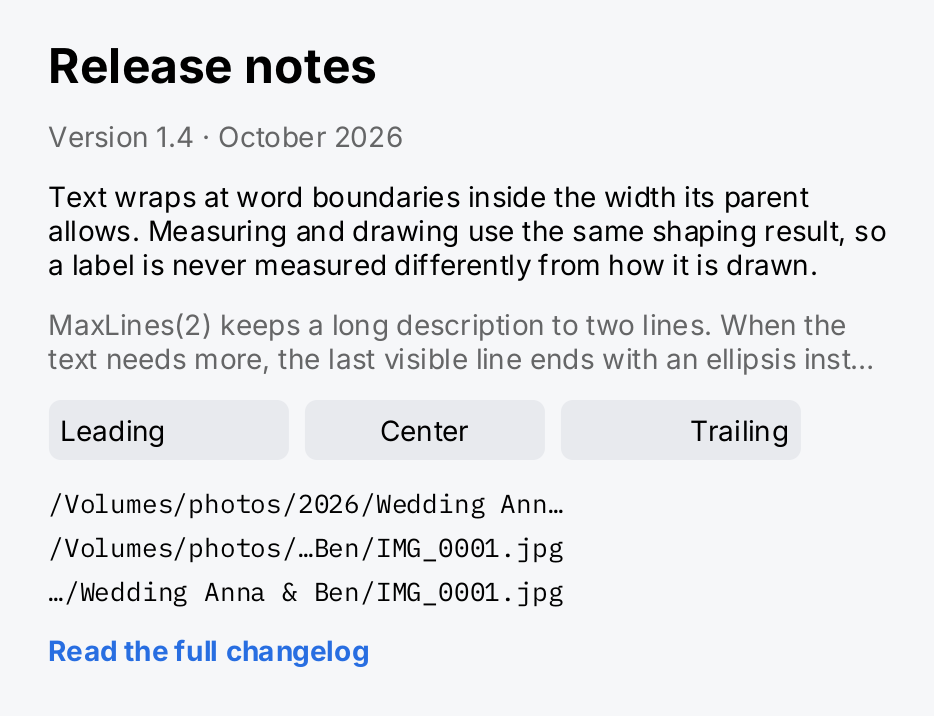
A text view is measured from the same shaping result its glyphs are drawn from. A label is never measured differently from how it is drawn: the lines break in the same places in both.
bold := ui.MustFont(ui.FontQuery{Family: inter.Family, Weight: ui.WeightBold})
mono := ui.MustFont(ui.FontQuery{Family: ibmplexmono.Family})
path := "/Volumes/photos/2026/Wedding Anna & Ben/IMG_0001.jpg"

aligned := func(s string, a ui.TextAlign) gift.View {
	return ui.Text(s).Align(a).MinWidth(120).
		Padding(6).Background(ui.ColorControl).CornerRadius(6)
}
truncated := func(t ui.Truncation) gift.View {
	return ui.Text(path).Truncation(t).Font(mono).FontSize(13).MaxWidth(260)
}

return ui.VStack(
	ui.Text("Release notes").Font(bold).FontSize(24),
	ui.Text("Version 1.4 · October 2026").Foreground(ui.ColorSecondaryLabel),
	ui.Text("Text wraps at word boundaries inside the width its parent "+
		"allows. Measuring and drawing use the same shaping result, so "+
		"a label is never measured differently from how it is drawn.").
		MaxWidth(420),
	ui.Text("MaxLines(2) keeps a long description to two lines. When the "+
		"text needs more, the last visible line ends with an ellipsis "+
		"instead of running on.").
		MaxLines(2).MaxWidth(420).Foreground(ui.ColorSecondaryLabel),
	ui.HStack(
		aligned("Leading", ui.AlignLeading),
		aligned("Center", ui.AlignCenter),
		aligned("Trailing", ui.AlignTrailing),
	).Gap(8),
	ui.VStack(
		truncated(ui.TruncateTail),
		truncated(ui.TruncateMiddle),
		truncated(ui.TruncateHead),
	).Gap(4),
	ui.Text("Read the full changelog").Font(bold).Foreground(ui.ColorAccent),
).Gap(12)
Full demo on GitHub ↗
· run it with go run ./docs/gallery -demo text
Usage
Font, size and color
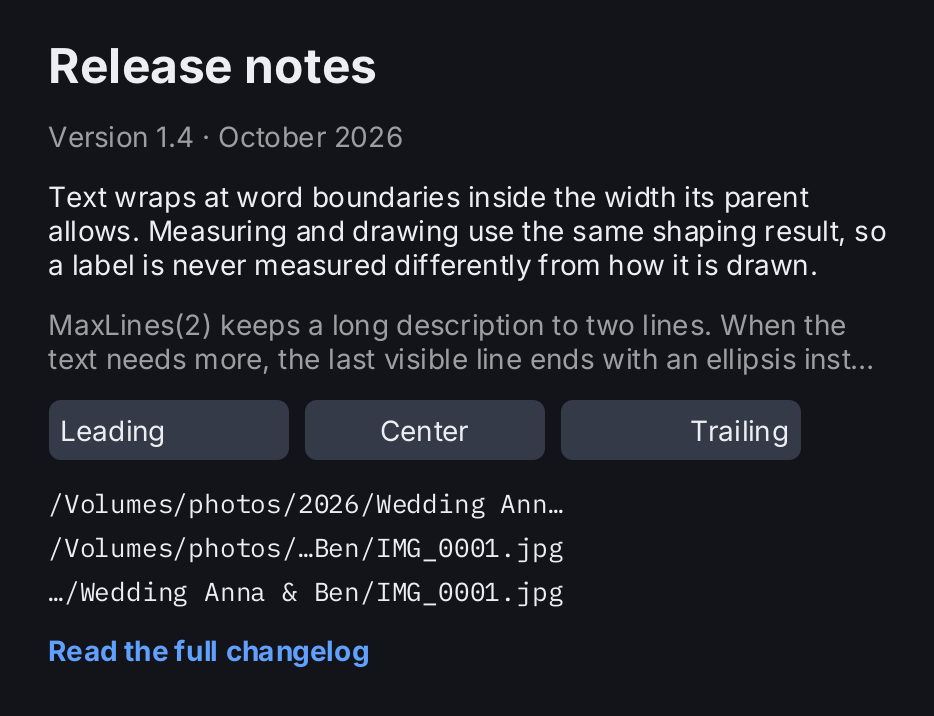
ui.Text(s) draws at ui.DefaultFontSize (14 pixels) in ui.ColorLabel. FontSize sets the em size in pixels
and panics for a value that is not positive and finite. Foreground takes any ui.Color. A semantic color such
as ui.ColorSecondaryLabel resolves against the current theme when the view is built, so the same code works in
the light and the dark theme.
ui.Text("Last synced 5 minutes ago").FontSize(13).Foreground(ui.ColorSecondaryLabel)gift links no font unless you ask for one. A text view uses the font you pass to Font, or the default you install
once with ui.SetDefaultFont. With neither, building the view panics with an explanation. The font packages
font/inter and font/ibmplexmono register their faces when you import them:
import "github.com/worldiety/gift/font/inter"

ui.SetDefaultFont(ui.MustFont(ui.FontQuery{Family: inter.Family}))
There is no weight modifier. A weight is a face of its own, so you resolve it with a ui.FontQuery and pass it to
Font. font/inter ships Regular and Bold; a weight that is not registered resolves to the nearest one that is.
bold := ui.MustFont(ui.FontQuery{Family: inter.Family, Weight: ui.WeightBold})
ui.Text("Settings").Font(bold).FontSize(22)
See Text and fonts for loading your own typeface.
Wrapping
Text wraps at word boundaries inside the width its constraints allow. A vertical stack gives its children the
width it is allowed itself, less its padding, so a long string in a VStack wraps on its own. A horizontal stack
measures its children with an unbounded width, so a label in an HStack stays on one line until you limit it.
MaxWidth or Frame give a label a wrapping width of its own:
ui.Text(paragraph).MaxWidth(320)A single word wider than the limit is not broken, hyphenated or scaled. It keeps its real width, the view reports
the width its constraints permit, and the difference shows up as overflow in gift.Diagnostics. See
Diagnostics.
Alignment
Align takes a ui.TextAlign and places each line inside the width of the view: ui.AlignLeading (the default),
ui.AlignCenter or ui.AlignTrailing. It is only visible when the view is wider than its longest line, so give it
a Frame, a MinWidth or a Flex:
ui.Text("Total").Align(ui.AlignTrailing).Frame(200, geom.Unbounded())Align on a text view aligns its lines. It is not the geom.Alignment that a stack takes.
Line limits and truncation
MaxLines(n) keeps the first n lines. When the text needs more, the last visible line ends with an ellipsis after
as much text as fits. With MaxLines(1), a label that is too wide for its row is shortened the same way. Zero or
less, the default, means no limit.
Truncation decides where the ellipsis goes. The results are the three paths of the screenshot above:
| Value | Result |
|---|---|
ui.TruncateTail | /Volumes/photos/2026/Wedding Ann…, the default |
ui.TruncateMiddle | /Volumes/photos/…Ben/IMG_0001.jpg, for paths and names whose end matters |
ui.TruncateHead | …/Wedding Anna & Ben/IMG_0001.jpg |
ui.TruncateNone | with MaxLines, a hard cut without an ellipsis |
A truncation other than ui.TruncateNone without MaxLines limits the view to one line. That makes a one-line
path with the ellipsis in the middle a single call:
ui.Text(path).Truncation(ui.TruncateMiddle)Only the last visible line is ever shortened. A word too wide for an earlier line of a wrapping label still overflows. What the ellipsis hides and the lines that are cut off are reported as overflow, like any other content that does not fit.
Many strings on one screen
Shaped text is cached in one process-wide budget of a mebibyte, shared by every label, button caption and row of the application. It holds about fifteen hundred short paragraphs. Every visible paragraph asks the cache on every frame, so a screen that shows more distinct strings than fit into the cache misses on every frame and gets slow. Be careful with screens that show more than about a thousand distinct strings at once. ListView explains what this means for long lists.
API
Constructors
| Constructor | Description |
|---|---|
func Text(s string) TextView | Text returns a text view for s at DefaultFontSize in ColorLabel. |
Methods
| Method | Description |
|---|---|
Align(v TextAlign) TextView | Align sets the horizontal alignment of the lines inside the node’s width. |
Font(v Font) TextView | Font sets the font this view is shaped and drawn with, overriding SetDefaultFont for this view only. |
FontSize(v float32) TextView | FontSize sets the em size in pixels. |
Foreground(v Color) TextView | Foreground sets the colour the glyphs are drawn in. |
MaxLines(v int) TextView | MaxLines limits the view to the first n visual lines. |
Truncation(v Truncation) TextView | Truncation sets how the last visible line is shortened when the text does not fit; see Truncation for the modes and TextView.MaxLines for when a line is shortened at all. |
Common modifiers: Background, Border, Clip, CornerRadius, Flex, Frame, Key, MaxHeight, MaxWidth, MinHeight, MinWidth, Padding, PaddingInsets, Shadow. See Modifiers.
Align is listed with the common modifiers, but on a TextView it takes a TextAlign, not a geom.Alignment.
TextAlign is the horizontal alignment of the lines of a TextView inside its own width.
| Constant | Meaning |
|---|---|
AlignLeading | every line at the left edge, the default |
AlignCenter | every line centered |
AlignTrailing | every line at the right edge |
Truncation is how a TextView shortens its last visible line when the text does not fit.
| Constant | Meaning |
|---|---|
TruncateTail | ellipsis after as much text as fits, the default |
TruncateMiddle | keeps the start and the end, ellipsis between them |
TruncateHead | drops the start, keeps the end |
TruncateNone | drops the lines past the limit and leaves the last line as it broke |
Related
- Text and fonts: fonts, the font register and how text is shaped.
- Theming: the semantic colors a label uses.
- Modifiers:
Frame,Padding,Backgroundand the other common modifiers. - Layout: constraints and the width a label wraps in.
- Diagnostics: where overflow is reported.
- Button: a button usually takes a text view as its label.
- Text Field: text the user edits.
- Row: list rows with a title and a subtitle.