Modal
A modal presents one view on top of another and takes the input of everything underneath. ui.Modal(content, modal) draws content, a scrim over it, and modal centered on top. Taps outside the modal hit the scrim and
stop there, and the keyboard focus cannot leave the modal.
Use it for anything the user has to deal with before going on: a confirmation, a short form, a custom dialog. For the common title, message and buttons card, hand it an alert. For a panel that slides up from the bottom edge, use a sheet.
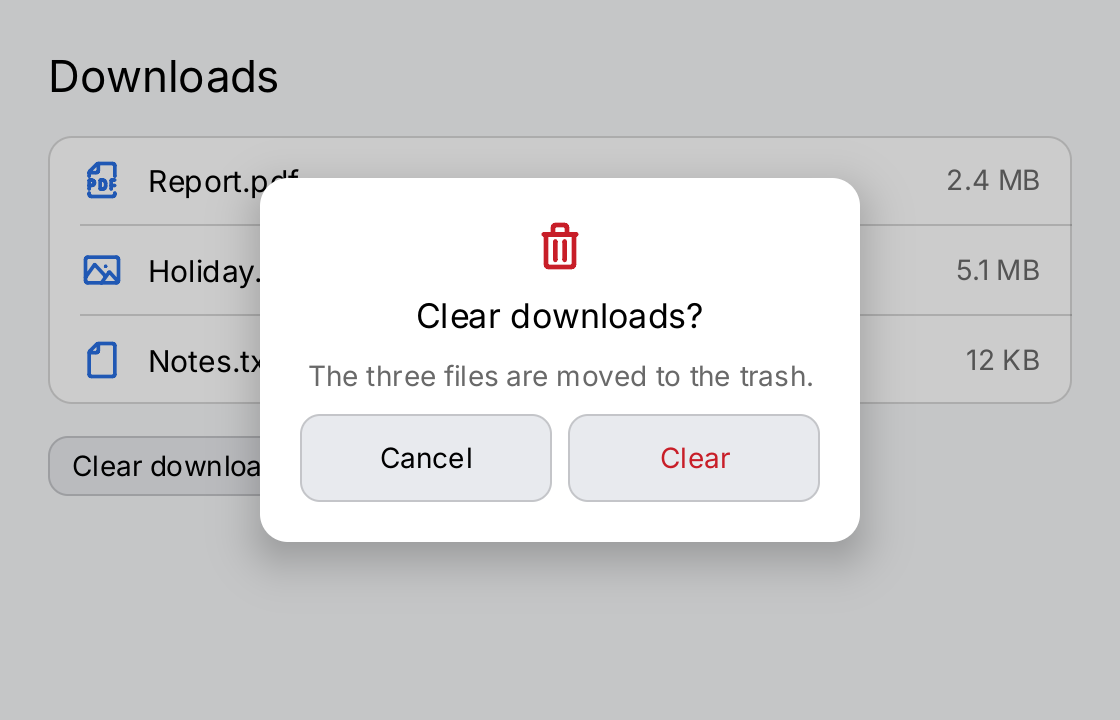
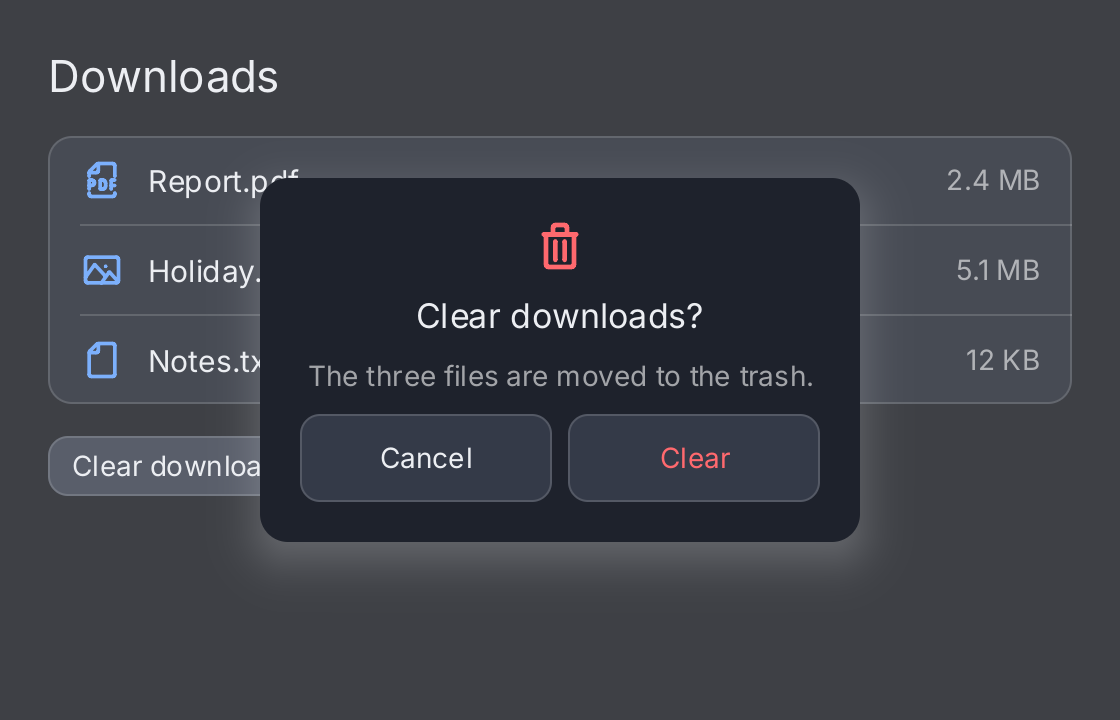
// The application owns the presentation. The demo starts with the
// dialog open.
open := ctx.State("open", true)

screen := ui.VStack(
	ui.Text("Downloads").FontSize(22),
	ui.Card(
		ui.List(
			ui.Row("Report.pdf").Icon(outline.FilePdf).Value("2.4 MB"),
			ui.Row("Holiday.jpg").Icon(outline.Image).Value("5.1 MB"),
			ui.Row("Notes.txt").Icon(outline.File).Value("12 KB"),
		),
	).Padding(0),
	ui.Button(ui.Text("Clear downloads"), func() { open.Set(true) }).CornerRadius(10),
	ui.Spacer(),
).Gap(16).Padding(24)

// The modal is any view. Here it is a card of its own.
dialog := ui.VStack(
	ui.Icon(outline.TrashBin).Size(28).Foreground(ui.ColorDanger),
	ui.Text("Clear downloads?").FontSize(17),
	ui.Text("The three files are moved to the trash.").
		FontSize(14).Foreground(ui.ColorSecondaryLabel),
	ui.HStack(
		ui.Button(ui.Text("Cancel"), func() { open.Set(false) }).
			CornerRadius(10).MinHeight(ui.ControlHitTarget).Flex(1),
		ui.Button(ui.Text("Clear").Foreground(ui.ColorDanger), func() { open.Set(false) }).
			CornerRadius(10).MinHeight(ui.ControlHitTarget).Flex(1),
	).Gap(8),
).Gap(10).Align(geom.Center).Padding(20).
	Frame(300, geom.Unbounded()).
	Background(ui.ColorSurface).
	CornerRadius(14).
	Shadow(ui.Shadow{Blur: 24, OffsetY: 8, Color: ui.Fade(ui.ColorLabel, 0.25)})

// Presented keeps the dialog mounted while it is closed, so it animates
// out as well as in. A tap on the scrim closes it.
return ui.Modal(screen, dialog).
	Presented(ctx.Read(open)).
	OnDismiss(func() { open.Set(false) })
Full demo on GitHub ↗
· run it with go run ./docs/gallery -demo modal
Usage
Nil is the closed state. A nil modal costs nothing: no scrim, no focus trap, and the result draws exactly
what content draws. Build the modal view or nil from your own state. The presence of the value is the
presentation:
confirm := ctx.State("confirm", false)

var dialog gift.View // nil: closed
if ctx.Read(confirm) {
	dialog = ui.Alert("Delete the file?", "This cannot be undone.",
		ui.AlertCancel("Cancel", func() { confirm.Set(false) }),
		ui.AlertDestructive("Delete", func() { confirm.Set(false) }),
	)
}
return ui.Modal(screen, dialog)
Presented animates both ways. A nil modal unmounts the dialog, so it moves in when it opens and disappears
with a cut when it closes. Pass the dialog every time and say with Presented whether it is on the screen, as
the demo does. The dialog then stays mounted and hidden while it is closed, keeps its state, and moves out as
well as in. The dialog rises from a little below its place and the scrim fades. Without Presented, a non-nil
modal is open. The price is that the dialog’s subtree stays mounted; for something expensive, pass nil instead.
The modal is any view. Modal adds the scrim, the focus trap and the drawing order. It does not add a card,
a width or a shadow. The demo builds its own card from a VStack with Frame, Background, CornerRadius and
Shadow. The modal is centered and shrink-wraps, so give it a fixed width or let its content decide.
Dismissing it. OnDismiss is called when the user taps the scrim anywhere outside the modal. Without it, the
scrim swallows the tap and nothing happens, which is what a dialog that demands an answer wants. Either way the
tap never reaches the content below. A modal does not react to the escape key; a sheet does. Closing is always
your state change: set the state to closed in OnDismiss and in the buttons of the dialog.
The scrim. It defaults to ColorLabel at a fifth of its strength, so it darkens the light theme and lightens
the dark one. Scrim sets another color. ui.ColorClear gives an invisible scrim that still blocks input:
ui.Modal(screen, panel).Scrim(ui.ColorClear)It is a screen. An open modal fills the area it is given, and it panics when it is measured with an unbounded
axis, because a scrim of zero size would let every tap through. The check runs only while a modal view is passed,
so a layout that works while the dialog is closed can still panic the first time it opens. Put the modal at the
root of the window, or give it Flex inside a stack. It does not belong inside a scroll view:
ui.Window(ui.VStack(ui.Modal(nav, dialog).Flex(1)))The content keeps running. The content underneath stays mounted, is still drawn and still rebuilds. A modal is a layer, not a pause. If your application must stop work while a dialog is open, it stops the work itself.
Nesting decides the order. A modal covers only the content it was given, and the outer container is drawn
on top. ui.Sheet(ui.Modal(body, alert), panel) draws the sheet over the alert, which is how the
kitchen sink combines the two. To open a dialog over a sheet, put the
Modal outside the Sheet instead.
API
Constructors
| Constructor | Description |
|---|---|
func Modal(content, modal gift.View) ModalView | Modal returns content with modal presented on top of it. |
Methods
| Method | Description |
|---|---|
OnDismiss(fn func()) ModalView | OnDismiss makes a tap on the scrim — anywhere outside the modal itself — call fn. |
Presented(v bool) ModalView | Presented says whether the modal is on the screen right now, separately from whether there is one. |
Scrim(c Color) ModalView | Scrim sets the wash drawn over the content while the modal is open. |
Common modifiers: Flex, Key. See Modifiers.
Related
- Alert: the title, message and buttons card made for
Modal - Sheet: a modal panel that slides up from the bottom edge
- Card and Shadow and Border: building a dialog face
- Window: where a modal usually sits
- Navigation: modals, sheets, tab bars and navigation stacks
- Input and Focus: the focus trap
- Animation: how
Presentedmoves the dialog - Kitchen sink example: an alert presented with
Modal