Box
A box is a styled rectangle without children. ui.Box() returns an empty, unstyled rectangle; you give it a
background, a border, a corner radius or a shadow. Stacks and the other containers paint their own background,
border and shadow the same way.
Use a box for color swatches, bars, plates behind other content, accent stripes and placeholders. When you need
a styled rectangle with content inside, set the same modifiers on the container instead: every stack has
Background, Border, CornerRadius and Shadow too.
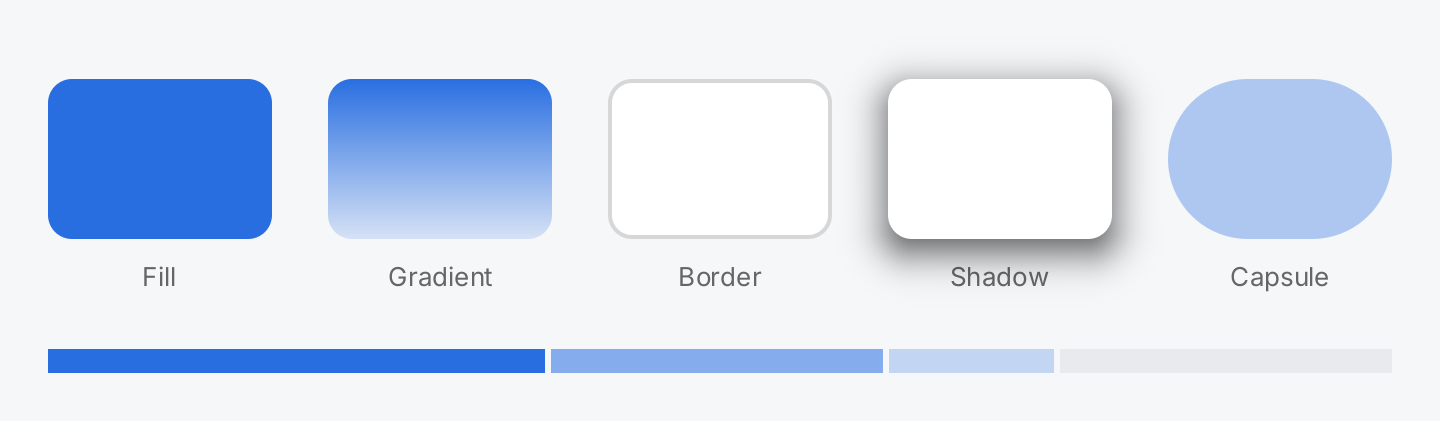
tile := func(caption string, box ui.BoxView) gift.View {
	return ui.VStack(
		box.Frame(112, 80),
		ui.Text(caption).FontSize(13).Foreground(ui.ColorSecondaryLabel),
	).Gap(10).Align(geom.Center)
}

return ui.VStack(
	ui.HStack(
		// A plain fill in a semantic color.
		tile("Fill", ui.Box().Background(ui.ColorAccent).CornerRadius(12)),
		// A vertical gradient, from the top to the bottom.
		tile("Gradient", ui.Box().
			Background(ui.LinearGradient(ui.ColorAccent, ui.Fade(ui.ColorAccent, 0.15))).
			CornerRadius(12)),
		// A border is stroked inside the bounds.
		tile("Border", ui.Box().
			Background(ui.ColorSurface).
			Border(ui.Border{Width: 2, Color: ui.ColorSeparator}).
			CornerRadius(12)),
		// A shadow is painted outside the bounds and takes no space.
		tile("Shadow", ui.Box().
			Background(ui.ColorSurface).
			Shadow(ui.Shadow{Blur: 20, OffsetY: 6, Color: ui.RGBA(0, 0, 0, 170)}).
			CornerRadius(12)),
		// Half the height as radius makes a capsule.
		tile("Capsule", ui.Box().Background(ui.Fade(ui.ColorAccent, 0.35)).CornerRadius(40)),
	).Gap(28),

	// Flex shares a stack's leftover width between boxes.
	ui.HStack(
		ui.Box().Background(ui.ColorAccent).Flex(3),
		ui.Box().Background(ui.Fade(ui.ColorAccent, 0.55)).Flex(2),
		ui.Box().Background(ui.Fade(ui.ColorAccent, 0.25)).Flex(1),
		ui.Box().Background(ui.ColorControl).Flex(2),
	).Gap(3).Frame(geom.Unbounded(), 12),
).Gap(28)
Full demo on GitHub ↗
· run it with go run ./docs/gallery -demo box
Usage
A box is greedy. It has no content and therefore no size of its own. On every axis with a bounded constraint it takes the full extent; on an unbounded axis it collapses to its padding. What that means depends on the parent:
In a
ZStack, every child gets bounded constraints, so a box fills the whole stack. That is how you put a plate behind content:ui.ZStack( ui.Box().Background(ui.ColorSurface).CornerRadius(12), ui.Text("On a plate").Padding(16), )In a
VStackorHStack, a box fills the cross axis as far as the stack’s own constraints reach, and it has no length on the main axis. Give it a length withFrame,MinHeightorMinWidth, or a share of the leftover space withFlex. Passgeom.Unbounded()toFramefor the axis that should stay free:ui.VStack( ui.Box().Background(ui.ColorAccent).Frame(geom.Unbounded(), 4), ui.Text("Below the bar"), )
A box never overflows: it never asks for more than its constraints offer. Since it has no children, its padding is only a minimum size.
Backgrounds. Background takes a ui.Background, which is a color, a gradient or the glass material.
ui.LinearGradient(from, to) runs from the top to the bottom of the shape; both ends may be semantic colors.
A gradient to a transparent color fades the box out:
ui.Box().
	Background(ui.LinearGradient(ui.ColorSurface, ui.Fade(ui.ColorSurface, 0))).
	Frame(geom.Unbounded(), 24)
Without a background, a border and a shadow, a box draws nothing.
Border and corners. Border takes a ui.Border{Width, Color} and strokes the inside of the bounds, so it
does not change the layout size. CornerRadius rounds the background and the border together. A radius of
half the height makes a capsule.
Shadow. Shadow takes a ui.Shadow and draws a blurred copy of the box’s shape behind it. The shape is
the bounds rounded by the corner radius, not the background, so a box without a background casts a shadow too.
It extends what is painted, not the layout size and not the hit area, so it never moves a sibling. A clip on a
parent cuts it.
Blur follows the CSS convention, not the standard deviation, and must not be negative. A negative Spread
tucks the shadow under the box so that only the offset side shows.
The drawing order is fixed. Shadow, background, border, in that order, no matter in which order you call the modifiers. Calling the same modifier twice replaces the value.
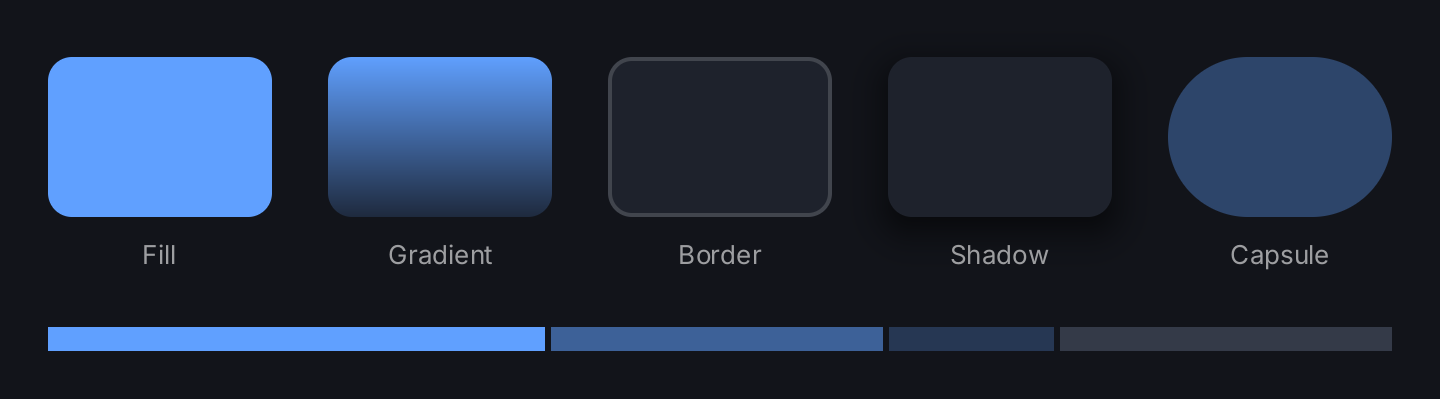
Prefer semantic colors. ui.ColorSurface, ui.ColorAccent, ui.ColorSeparator and the other roles
resolve against the theme when the view is built, so a box follows a switch between light and dark.
ui.Fade lowers the opacity of a color, semantic or not, without fixing it to one theme. The demo uses a fixed
translucent black for the shadow, so the shadow stays black in both themes and reads faintly on a dark
background.
API
Constructors
| Constructor | Description |
|---|---|
func Box() BoxView | Box returns an unstyled, zero sized rectangle. |
Common modifiers: Background, Border, Clip, CornerRadius, Flex, Frame, Key, MaxHeight, MaxWidth, MinHeight, MinWidth, Padding, PaddingInsets, Shadow. See Modifiers.
Background, Border and Shadow take these value types, all re-exported from the render package.
Background is an interface that a ui.Color, a ui.Gradient and ui.Glass() satisfy; Border, Shadow and
Gradient are structs.
| Type | Field | Meaning |
|---|---|---|
ui.Border | Width float32 | stroke width in logical pixels; zero draws nothing |
Color ui.Color | stroke color; a transparent color draws nothing | |
ui.Shadow | Blur float32 | blur diameter in logical pixels, CSS convention: sigma is Blur/2; zero is a hard edge |
Spread float32 | grows the shape before blurring; negative shrinks it | |
OffsetX, OffsetY float32 | moves the shadow, positive right and down | |
Color ui.Color | shadow color at full coverage; the zero Shadow draws nothing | |
ui.Gradient | From, To ui.Color | color at the top and at the bottom of the shape; create it with ui.LinearGradient |
Related
- Stack: the parent that decides a box’s length on the main axis
- ZStack: layers a box behind content
- Card: a surface with content and padding
- Spacer: empty flexible space without any paint
- Shadow and Border
- Gradient
- Glass: the glass material as a background
- Colors: the semantic colors and
Fade - Layout: constraints, greedy views and flex
- Modifiers: the common modifiers and the fixed drawing order
- Theming