Stack
A stack places its children one after another along an axis. ui.VStack arranges them from top to bottom,
ui.HStack from leading to trailing. Most screens are built from nested stacks: a column of sections, each a row
of controls.
Both functions return the same type, ui.Stack. It sets the space between the children, how they line up on the
other axis, and how the free space is shared. Like any container, it can also carry padding, a background, a
border and a corner radius. To layer children on top of each other, use a ZStack instead.
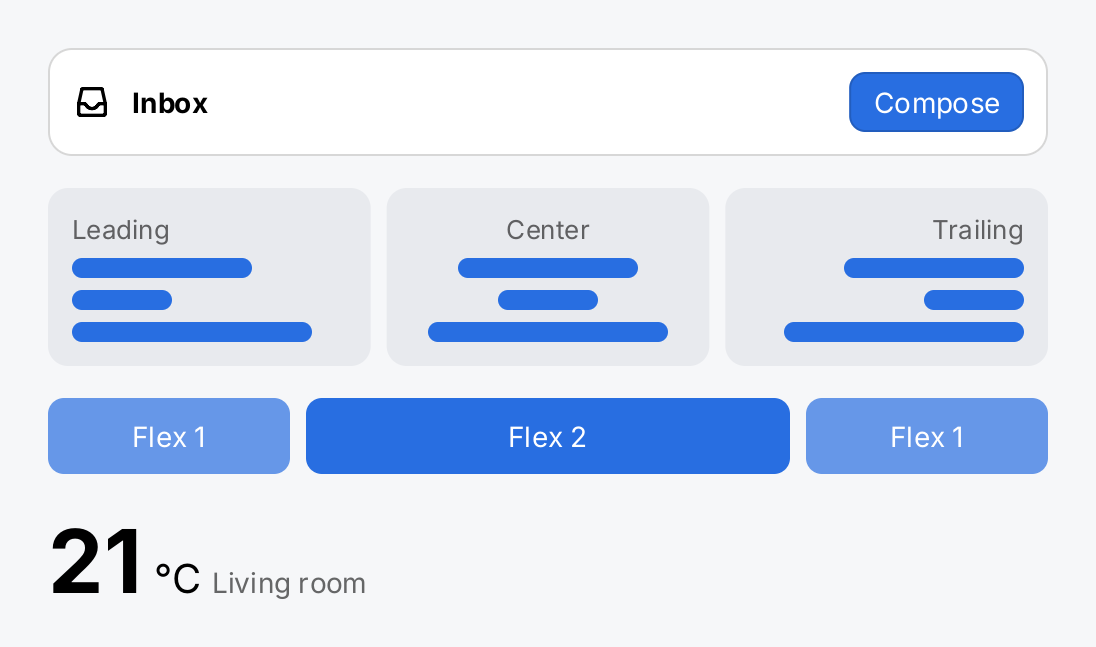
bold := ui.MustFont(ui.FontQuery{Family: inter.Family, Weight: ui.WeightBold})

// A toolbar: the Spacer takes the free width and pushes the button to
// the trailing edge.
toolbar := ui.HStack(
	ui.Icon(outline.Inbox).Size(20),
	ui.Text("Inbox").Font(bold),
	ui.Spacer(),
	ui.Button(ui.Text("Compose").Foreground(ui.ColorOnAccent), func() {}).
		Background(ui.ColorAccent).CornerRadius(8),
).Gap(10).Align(geom.Center).
	Padding(12).Background(ui.ColorSurface).CornerRadius(12).
	Border(ui.Border{Width: 1, Color: ui.ColorSeparator})

// Align moves the children of a VStack along X.
bar := func(w float32) gift.View {
	return ui.Box().Frame(w, 10).Background(ui.ColorAccent).CornerRadius(5)
}
aligned := func(name string, a geom.Alignment) ui.Stack {
	return ui.VStack(
		ui.Text(name).FontSize(13).Foreground(ui.ColorSecondaryLabel),
		bar(90), bar(50), bar(120),
	).Gap(6).Align(a).Padding(12).Background(ui.ColorControl).CornerRadius(10)
}

// Flex splits the free width of the row: one, two and one share.
share := func(label string, flex float32) ui.Stack {
	return ui.VStack(ui.Text(label).Foreground(ui.ColorOnAccent)).
		Align(geom.Center).Padding(10).
		Background(ui.Fade(ui.ColorAccent, 0.4+0.3*flex)).CornerRadius(8).
		Flex(flex)
}

// AlignBaseline puts labels of different sizes on one line.
reading := ui.HStack(
	ui.Text("21").Font(bold).FontSize(44),
	ui.Text("°C").FontSize(20),
	ui.Text("Living room").Foreground(ui.ColorSecondaryLabel),
).Gap(6).AlignBaseline()

return ui.VStack(
	toolbar,
	ui.HStack(
		aligned("Leading", geom.Leading).Flex(1),
		aligned("Center", geom.Center).Flex(1),
		aligned("Trailing", geom.Trailing).Flex(1),
	).Gap(8),
	ui.HStack(share("Flex 1", 1), share("Flex 2", 2), share("Flex 1", 1)).Gap(8),
	reading,
).Gap(16).Frame(500, geom.Unbounded())
Full demo on GitHub ↗
· run it with go run ./docs/gallery -demo stack
Usage
Gap and alignment
Gap sets the space between two adjacent children. It never goes before the first or after the last child. A
negative gap overlaps the children by that much.
Align takes a geom.Alignment and positions the children on the cross axis. A VStack reads only its X
component, an HStack only its Y component, so geom.Leading, geom.Center and geom.Trailing work for both.
Without Align, children sit at the leading edge of a VStack and at the top of an HStack:
ui.VStack(
	ui.Text("Wi-Fi"),
	ui.Text("Connected").Foreground(ui.ColorSecondaryLabel),
).Gap(4)
A stack does not stretch its children on the cross axis. Each child gets its own size, and Align places it in
the width (or height) the stack ended up with. A child that needs a certain extent sets it with Frame or
MinWidth. A Box is the exception: it has no content of its own, so it fills the cross axis and
collapses to its padding on the main axis unless you give it a Frame, a MinHeight (or MinWidth) or a Flex.
Baselines
In an HStack, AlignBaseline lines the children up on their first text baseline instead of an edge or the
center. Labels of different font sizes then sit on one line, as the temperature reading in the demo does. A child
that reports no baseline, such as a Box, is placed by the alignment value of Align instead, so the two
combine when Align comes first: .Align(geom.Center).AlignBaseline() centers the boxes and lines up the text.
An Align after AlignBaseline switches baseline alignment off again.
AlignBaseline on a VStack panics. A baseline positions a child vertically, and in a vertical stack the
stacking already decides that.
Size and flex
A stack measures its children first and is as large as they are together, plus the gaps and its padding, within the limits its parent allows. It offers each inflexible child as much of the main axis as it wants, so a child’s size never depends on its siblings.
A child with a flex takes part in a second pass: the space left after the other children and the gaps is shared
between all flexible children in proportion to their flex. Most views have a Flex modifier, including Stack
itself. Spacer is a flexible, invisible gap with a flex of one; it pushes its neighbors apart:
ui.HStack(
	ui.Text("Inbox"),
	ui.Spacer(),
	ui.Button(ui.Text("Compose"), compose),
).Gap(8).Align(geom.Center)
A fixed sidebar next to a content area that takes the rest of the width:
ui.HStack(
	sidebar.Frame(220, geom.Unbounded()),
	content.Flex(1),
)
Flex only shares space the stack has. When the main axis is unbounded, every flexible child gets zero. That is the
case for the content of a Scroll View along its scroll axis, and for a stack that sits as an
inflexible child in a parent stack along the same axis: an HStack inside another HStack is offered unlimited
width. If a Spacer seems to do nothing, give the stack a Frame or a Flex of its own.
Spacer().MinLength(16) keeps a gap of at least 16 points even when there is no space left.
Overflow
When the children need more than the stack is allowed to take, the stack still reports the allowed size. The
children keep their real sizes and positions and are not cut off; they draw past the edge. Clip(true) confines
them to the bounds of the stack; the clip is a rectangle, even with a corner radius. Every overflowing node is
counted in gift.Diagnostics.OverflowNodes, and a test asserts that there is none with
Harness.AssertNoOverflow from gifttest.
Style
Padding goes inside the stack, between its edge and the children. Background, Border, CornerRadius and
Shadow turn a stack into a panel, as the toolbar of the demo shows:
ui.VStack(ui.Text("Settings")).
	Padding(16).
	Background(ui.ColorSurface).
	Border(ui.Border{Width: 1, Color: ui.ColorSeparator}).
	CornerRadius(12)
For the common case of a raised panel, a Card does this for you. The border is drawn inside the bounds and does not change the layout.
Children and keys
ui.VStack(a, b, c) is always safe. ui.VStack(items...) hands your slice to gift without copying it, so do not
change the slice after that call. When the children come from a loop, give each one a Key, so that its state
stays with it when items are inserted, removed or moved:
rows := make([]gift.View, 0, len(names))
for _, n := range names {
	rows = append(rows, ui.Text(n).Key(n))
}
ui.VStack(rows...).Gap(8)
A VStack and an HStack are different view types. Turning one into the other under the same key mounts a new
subtree, and the state below it starts over.
API
Constructors
| Constructor | Description |
|---|---|
func HStack(children ...gift.View) Stack | HStack arranges its children from leading to trailing. |
func VStack(children ...gift.View) Stack | VStack arranges its children from top to bottom. |
Methods
| Method | Description |
|---|---|
AlignBaseline() Stack | AlignBaseline lines the children up on their first text baseline instead of on an edge or the centre. |
Gap(v float32) Stack | Gap sets the space inserted between two adjacent children. |
Common modifiers: Align, Background, Border, Clip, CornerRadius, Flex, Frame, Key, MaxHeight, MaxWidth, MinHeight, MinWidth, Padding, PaddingInsets, Shadow. See Modifiers.
Constructors
| Constructor | Description |
|---|---|
func Spacer() SpacerView | Spacer returns a flexible gap with a flex of one and no minimum length. |
Methods
| Method | Description |
|---|---|
MinLength(v float32) SpacerView | MinLength sets the smallest main axis extent of the spacer. |
Common modifiers: Flex, Key. See Modifiers.
Related
- Spacer, the flexible gap
- ZStack, which layers its children instead of stacking them
- Box, Card and Scroll View
- List and Row, for rows with a fixed structure
- Layout, how constraints, flex and overflow work in gift
- Modifiers, Views and Diagnostics
- The example kitchen sink, which is built from stacks throughout