ZStack
A ZStack draws its children on top of each other. The first child is at the bottom, the last one on top. The stack is as large as its largest child and places every child inside that box by one alignment.
Use a ZStack whenever two views share the same place: a plate behind a label, a caption over a picture, a badge on
the corner of an icon. ui.ZStack returns an Overlay, the view type that the API section lists.
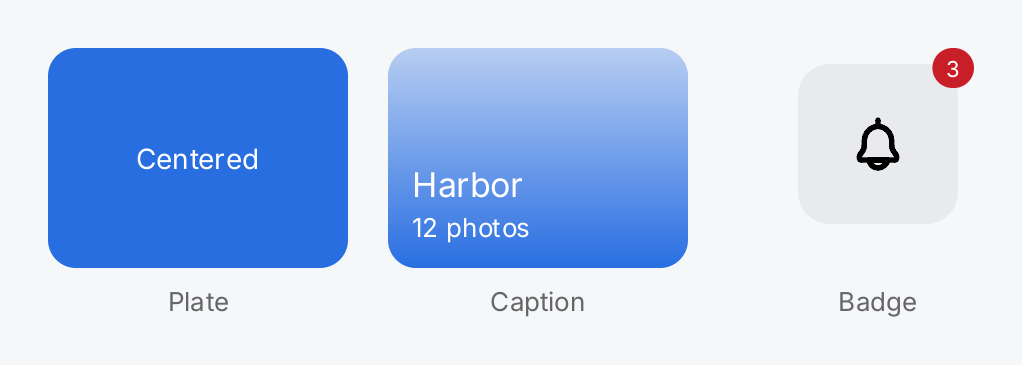
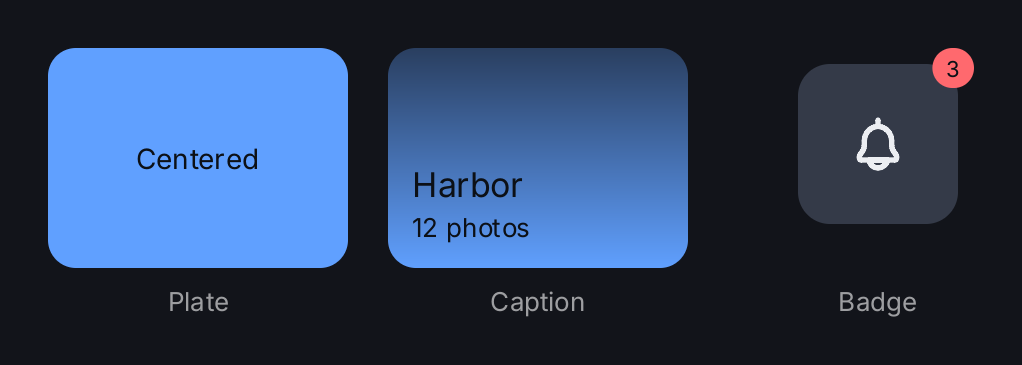
// A plate behind content. The unframed Box is greedy and fills the
// whole box; the alignment centers the text on it.
plate := ui.ZStack(
	ui.Box().Background(ui.ColorAccent).CornerRadius(14),
	ui.Text("Centered").Foreground(ui.ColorOnAccent),
).Align(geom.Center).Frame(150, 110)

// A caption over a picture, here a gradient plate, in the bottom
// leading corner. The padding of the text column keeps it off the edge.
caption := ui.ZStack(
	ui.Box().
		Background(ui.LinearGradient(ui.Fade(ui.ColorAccent, 0.3), ui.ColorAccent)).
		CornerRadius(14),
	ui.VStack(
		ui.Text("Harbor").FontSize(17).Foreground(ui.ColorOnAccent),
		ui.Text("12 photos").FontSize(13).Foreground(ui.ColorOnAccent),
	).Gap(2).Padding(12),
).Align(geom.BottomLeading).Frame(150, 110)

// A badge on the top trailing corner of an icon tile. Without a frame,
// the overlay is as large as its largest child, the padded tile.
tile := ui.ZStack(
	ui.Box().Background(ui.ColorControl).CornerRadius(16),
	ui.Icon(outline.Bell).Size(32),
).Align(geom.Center).Frame(80, 80)
badge := ui.ZStack(
	ui.VStack(tile).Padding(8),
	ui.Badge("3").Color(ui.ColorDanger),
).Align(geom.TopTrailing)

return ui.HStack(
	zstackTile(plate, "Plate"),
	zstackTile(caption, "Caption"),
	zstackTile(ui.VStack(badge).Align(geom.Center).Frame(150, 110), "Badge"),
).Gap(20)
Full demo on GitHub ↗
· run it with go run ./docs/gallery -demo zstack
Usage
Size
Every child is measured with the same loose constraints: the space the parent offers, narrowed by Frame and
the Min…/Max… modifiers of the ZStack, minus its padding. The ZStack then takes the width of its widest child
and the height of its tallest one, plus its padding, within those same modifiers.
A greedy child takes everything it is offered. An unframed Box is greedy on both axes, so it fills the whole
ZStack. That is how you paint a plate behind content:
ui.ZStack(
	ui.Box().Background(ui.ColorSurface),
	content,
).Align(geom.Center).Frame(200, 120)
Because the Box is greedy, it also makes the ZStack as large as the space it is offered. Give the ZStack a
Frame, as above, or let its parent bound it. On an axis the parent leaves unbounded, such as the main axis of a
stack for a child without Flex, the Box collapses to nothing and the plate disappears. The padding of a ZStack insets every child, the plate included; to
keep the plate at the edge and the content off it, pad the content instead, as the caption in the demo does.
Alignment
Align takes a geom.Alignment and uses both components, because a ZStack has no stacking axis. geom.Center
centers every child, geom.BottomLeading puts every child in the bottom left corner, and so on. The zero value,
which is also the default, is geom.TopLeading.
The alignment applies to all children alike. To place two children differently, give each one the size of the box and align its content inside it, or nest another ZStack with its own alignment. In the demo, the badge tile is a ZStack that centers the bell, inside a ZStack that pins the badge to the top trailing corner.
Flex
Flex on a ZStack works as everywhere else: the parent stack gives the ZStack a share of its leftover space.
ui.HStack(
	sidebar,
	ui.ZStack(mapView, pin).Align(geom.Center).Flex(1),
)
Flex on a child of a ZStack does nothing. It is the one documented exception to the rule that a view never
accepts a modifier it then ignores. A ZStack has no main axis, so there is no remainder to divide. To make a child
fill the ZStack, use a greedy child such as an unframed Box; it is already offered the whole box of the ZStack.
Drawing and input
Children draw in order, so the last child covers the ones before it. Hit testing walks the other way: where two
children overlap, the topmost interactive child under the pointer receives the click. A child that does not
handle input, such as a Text or a Box, does not block one below it. The ZStack itself is not a hit target, so
a click on a part that no interactive child covers reaches whatever lies behind it.
Background, Border, CornerRadius and Shadow style the box of the ZStack itself. Clip(true) confines the
children, for drawing and for input, to the rectangle of the ZStack, its padding included. The clip is not
rounded by CornerRadius.
On-screen keyboard
A direct child that is an OnScreenKeyboard gets special treatment. While it shows,
the other children are laid out in the part of the box it does not cover, so the field you type into and the
button below it stay visible. Window is a ZStack, so this is the usual composition:
ui.Window(form, ui.OnScreenKeyboard()).Align(geom.Bottom)Only a bottom or top alignment reserves room, and only when the height of the ZStack is bounded. A keyboard
wrapped in another container is not recognized.
AvoidKeyboard(false) turns the behavior off and lets the keyboard cover the content, which suits a full screen
preview that must not re-flow while somebody types:
ui.ZStack(preview, field, ui.OnScreenKeyboard()).
	Align(geom.Bottom).AvoidKeyboard(false)
API
Constructors
| Constructor | Description |
|---|---|
func Window(content ...gift.View) Overlay | Window wraps the root view of an application in the window background. |
func ZStack(children ...gift.View) Overlay | ZStack draws its children on top of each other, first child at the bottom. |
Methods
| Method | Description |
|---|---|
AvoidKeyboard(v bool) Overlay | AvoidKeyboard says whether the other children make room for an OnScreenKeyboard that is a direct child of this overlay. |
Common modifiers: Align, Background, Border, Clip, CornerRadius, Flex, Frame, Key, MaxHeight, MaxWidth, MinHeight, MinWidth, Padding, PaddingInsets, Shadow. See Modifiers.