Row
A row is the standard item of a list: a leading icon, a title over an optional subtitle, and a trailing group made of a value, an accessory and a chevron. Use it for settings screens, menus and any list where each entry names one thing and shows its state or leads somewhere.
Everything except the title is optional. A row is inert until you give it a tap action; then the whole row is a control.
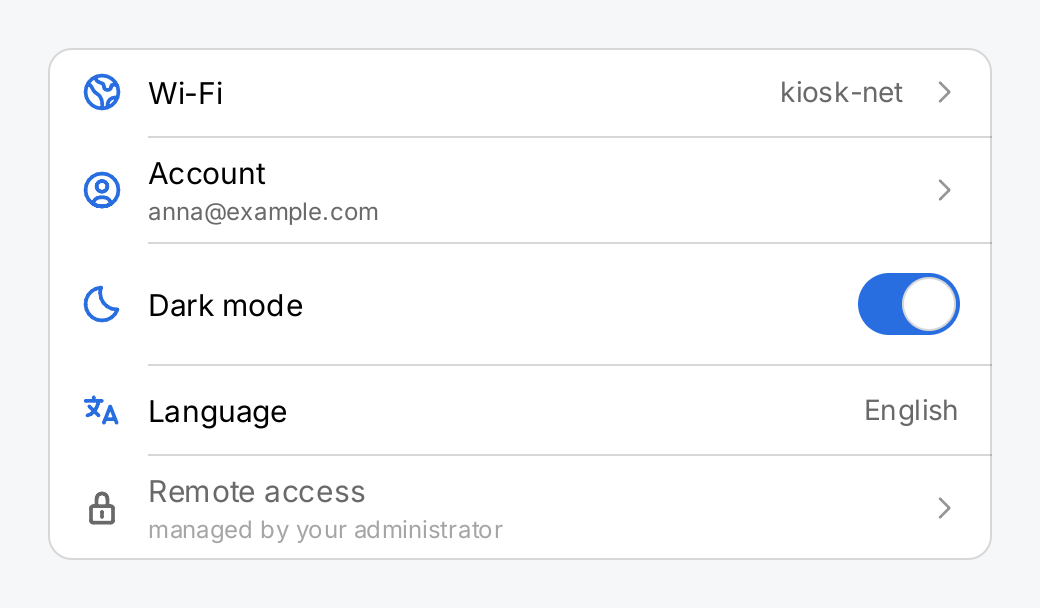
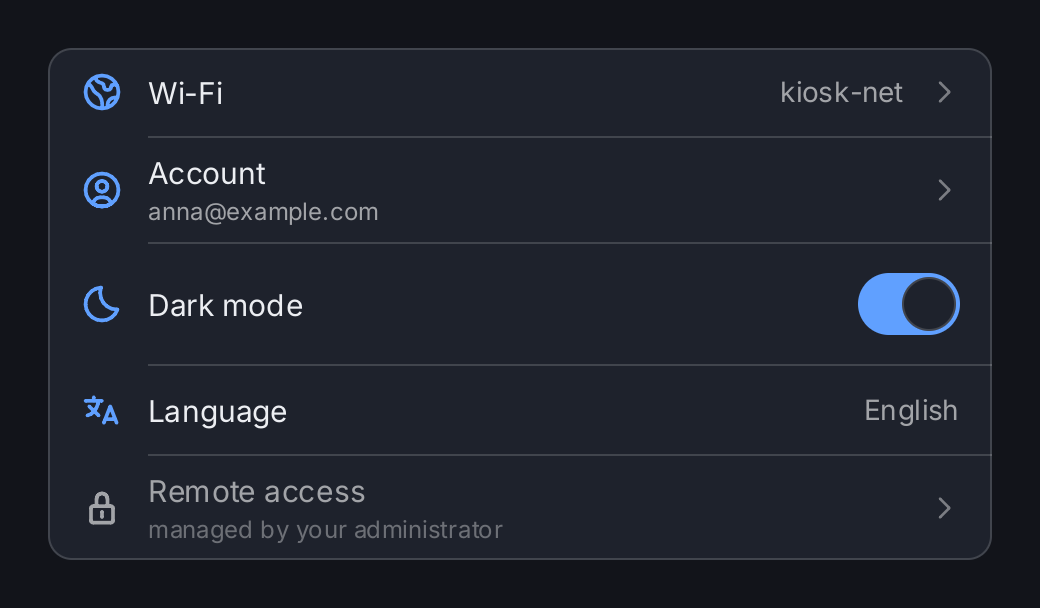
dark := ctx.State("dark", true)
opened := ctx.State("opened", "")

return ui.Card(
	ui.List(
		// Title, value and chevron: a row that leads somewhere.
		ui.Row("Wi-Fi").
			Icon(outline.Globe).
			Value("kiosk-net").
			Chevron(outline.AngleRight).
			OnTap(func() { opened.Set("wifi") }),

		// A subtitle is a second, quieter line under the title.
		ui.Row("Account").
			Icon(outline.UserCircle).
			Subtitle("anna@example.com").
			Chevron(outline.AngleRight).
			OnTap(func() { opened.Set("account") }),

		// An interactive accessory takes its own tap.
		ui.Row("Dark mode").
			Icon(outline.Moon).
			Accessory(ui.Toggle(ctx.Read(dark), dark.Set).Label("Dark mode")),

		// An inert row that only reports a value.
		ui.Row("Language").
			Icon(outline.Language).
			Value("English"),

		// Disabled takes the row out of input and dims its labels.
		ui.Row("Remote access").
			Icon(outline.Lock).
			Subtitle("managed by your administrator").
			Chevron(outline.AngleRight).
			Disabled(true).
			OnTap(func() { opened.Set("remote") }),
	).SeparatorInsets(ui.RowPadding+22+12, 0).MinWidth(380),
).Padding(0)
Full demo on GitHub ↗
· run it with go run ./docs/gallery -demo row
Usage
What a row is made of
ui.Row(title) creates the row. The other parts are set with methods and always appear in the same order, from
leading to trailing:
| Method | Part |
|---|---|
Icon | a leading symbol, drawn in ui.ColorAccent |
Subtitle | a second, smaller line under the title, in ui.ColorSecondaryLabel |
Value | a trailing label for the current setting, such as “Off” or “60 %” |
Accessory | a trailing view of your own: a toggle, a badge, a progress bar, anything |
Chevron | a faint trailing symbol that says “this row leads somewhere” |
When the row has a title, a subtitle or a value, a flexible gap sits between the labels and the trailing group and
pushes the trailing group to the edge. The row is at least ui.RowHeight tall (44 logical pixels, the same as
ui.ControlHitTarget) and insets its content by ui.RowPadding (16) on both sides.
Package ui does not draw a chevron of its own, because it cannot import an icon package. Pass one, usually
outline.AngleRight.
Tapping
Without OnTap the row is inert: it takes no focus, no pointer and has no pressed face. With OnTap the whole row
behaves like a button. It reacts to a tap, to space and to enter, and a release outside the
row does not fire. It shows ui.ColorControlHover under a mouse pointer and ui.ColorControlPressed while pressed.
ui.Row("Network").
	Icon(outline.Globe).
	Chevron(outline.AngleRight).
	OnTap(func() { screen.Set("network") })
The accessible name of the row’s command is its title. Label replaces it, for example when the title alone is
ambiguous.
Accessories take their own tap
An interactive accessory, such as a toggle, answers the tap itself, and the row’s OnTap
does not also run. Tapping the switch flips the switch; tapping anywhere else on the row runs OnTap. Both are in
the focus order, so a keyboard user can reach each of them.
ui.Row("Notifications").
	Icon(outline.Bell).
	Accessory(ui.Toggle(ctx.Read(notify), notify.Set).Label("Notifications")).
	OnTap(func() { notify.Set(!notify.Get()) })
A row with an empty title, no subtitle and no value has no flexible gap, so it gives its whole width to the accessory. That is how you put a full-width slider or segmented control into a list:
ui.Row("").Accessory(ui.Slider(ctx.Read(volume), volume.Set).Flex(1))Disabled
Disabled(true) takes a tappable row out of input. It draws the title and the icon in ui.ColorSecondaryLabel,
the icon instead of the accent color, and fades the subtitle further, so the whole label group steps back. The
value and the chevron keep their colors. On an inert row it only changes those colors,
which is a fine way to show that a setting is unavailable.
The accessory is not disabled with the row. It is your view, so disable it as well:
ui.Row("Remote access").
	Accessory(ui.Toggle(ctx.Read(remote), remote.Set).Label("Remote access").Disabled(managed)).
	Disabled(managed)
Width and long labels
A row is made for a parent that gives it a bounded width, such as a list or a card. The title, the subtitle and the value are one line each. When the row is too narrow, these labels are shortened with an ellipsis; the icon, the accessory and the chevron keep their width. The label group and the value are each guaranteed half of the width that is left, and a side that needs less gives the rest to the other. A cut label is still reported in the diagnostics.
As an inflexible child of an HStack, a row has no bounded width and shrink-wraps its content instead. Flex gives
it a share of the stack, but a row in a list needs none.
In a list of rows with icons, line the hairlines up with the text with
SeparatorInsets(ui.RowPadding+22+12, 0): 22 is the size of the row’s icon and 12 the gap after it.
API
Constructors
| Constructor | Description |
|---|---|
func Row(title string) RowView | Row returns a row with the given title. |
Methods
| Method | Description |
|---|---|
Accessory(a gift.View) RowView | Accessory sets the trailing view: a ToggleView, a BadgeView, anything. |
Chevron(s Symbol) RowView | Chevron sets the trailing symbol that says “this row leads somewhere”, drawn faintly at the very end of the row: |
Disabled(b bool) RowView | Disabled takes the row out of input and draws its title and leading icon in ColorSecondaryLabel and its subtitle fainter still; see RowView. |
Icon(s Symbol) RowView | Icon sets the leading symbol, drawn in ColorAccent. |
Label(s string) RowView | Label sets the accessible name of the row’s command, replacing the title. |
OnTap(fn func()) RowView | OnTap makes the whole row a control that runs fn when it is activated. |
Subtitle(s string) RowView | Subtitle sets a second, quieter line under the title. |
Value(s string) RowView | Value sets a trailing label, for the current setting of whatever the row names: “kiosk-net”, “60 %”, “Off”. |
Common modifiers: Flex, Key. See Modifiers.
Related
- List holds rows and draws the hairlines between them
- Virtual List for long lists
- Card as the face around a list of rows
- Toggle, the typical accessory
- Icon
- Navigation Stack for the screen a chevron row leads to
- Input and Focus
- Icons
- Kitchen sink example