Virtual List
A virtual list shows a very long list of uniform rows, such as a directory with ten thousand files or a log with a
hundred thousand entries. Only the rows on screen have nodes. When you scroll, the list reuses the rows that leave
the viewport for the items that enter it, so scrolling costs the same at a thousand items as at a hundred thousand.
No view function runs while you scroll, and gift.Diagnostics.Builds does not move.
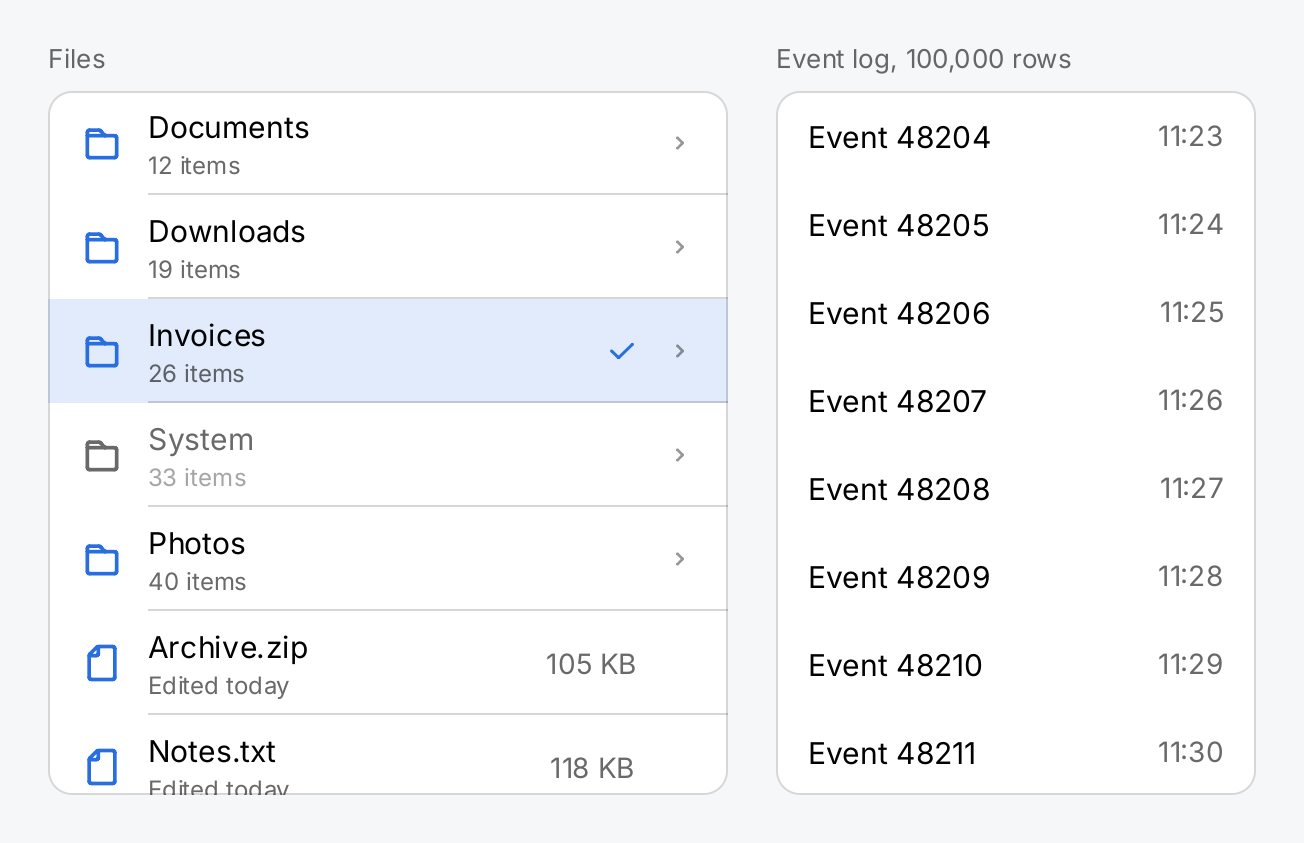
The price is a fixed row layout. A row is data, a ui.ListRow, not a view: a leading icon, a title over an optional
subtitle, a trailing value and a chevron, all rows the same height. Use a List when you need arbitrary
views in your rows, sections or rows of different heights, and the list stays short (a ListView builds every row
it has; its documentation puts the limit at about 280 rows on a Raspberry Pi 4).
// The retained half of each list lives in state, so the pool of rows and
// the scroll position survive every build.
files := ctx.State("files", (*ui.ListState)(nil))
if files.Get() == nil {
	files.Set(ui.NewListState())
}
log := ctx.State("log", (*ui.ListState)(nil))
if log.Get() == nil {
	s := ui.NewListState()
	s.Reveal(48_210) // start in the middle of the log
	log.Set(s)
}

// Which row is selected is your model; the list only draws it. Read it
// with ctx.Read, so that a tap rebuilds the list and rebinds its rows.
selected := ctx.State("selected", 2)
sel := ctx.Read(selected)

names := []string{"Documents", "Downloads", "Invoices", "System", "Photos",
	"Archive.zip", "Notes.txt", "Report.pdf", "Budget.xlsx"}

// A file browser: icons, subtitles, trailing values, a check mark for
// the selected row and a disabled row.
browser := ui.VirtualList(files.Get(), len(names), func(i int) ui.ListRow {
	row := ui.ListRow{
		Icon:     outline.Folder,
		Title:    names[i],
		Subtitle: fmt.Sprintf("%d items", 12+i*7),
		Chevron:  outline.ChevronRight,
		Selected: i == sel,
		Disabled: names[i] == "System",
	}
	if strings.Contains(names[i], ".") {
		row.Icon, row.Chevron = outline.File, ui.Symbol{}
		row.Subtitle, row.Value = "Edited today", fmt.Sprintf("%d KB", 40+i*13)
	}
	return row
}).
	OnTap(selected.Set).
	SelectedIcon(outline.Check).
	Label("Files").
	Frame(340, 352).
	Background(ui.ColorSurface).CornerRadius(12).
	Border(ui.Border{Width: 1, Color: ui.ColorSeparator})

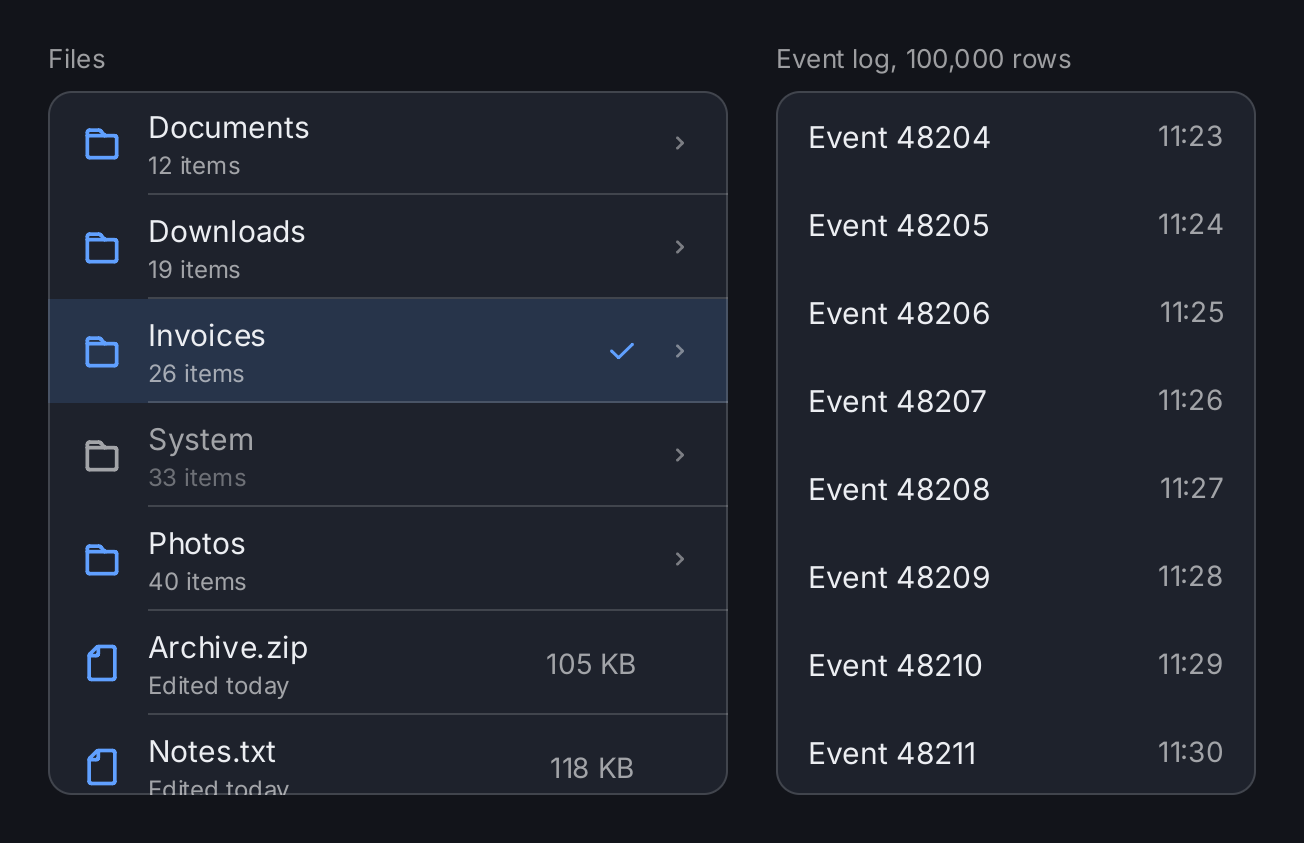
// A hundred thousand rows cost as much as a screenful: only the visible
// rows have nodes, and row is called for those alone. 352 is eight rows
// of ui.RowHeight, so the log shows whole rows.
events := ui.VirtualList(log.Get(), 100_000, func(i int) ui.ListRow {
	return ui.ListRow{
		Title: "Event " + strconv.Itoa(i+1),
		Value: fmt.Sprintf("%02d:%02d", i/60%24, i%60),
	}
}).
	RowHeight(ui.RowHeight).
	Separators(false).
	Label("Event log").
	Frame(240, 352).
	Background(ui.ColorSurface).CornerRadius(12).
	Border(ui.Border{Width: 1, Color: ui.ColorSeparator})

caption := func(s string) gift.View {
	return ui.Text(s).FontSize(13).Foreground(ui.ColorSecondaryLabel)
}
return ui.HStack(
	ui.VStack(caption("Files"), browser).Gap(8),
	ui.VStack(caption("Event log, 100,000 rows"), events).Gap(8),
).Gap(24)
Full demo on GitHub ↗
· run it with go run ./docs/gallery -demo virtual-list
Usage
State and data
ui.VirtualList takes three things: a *ui.ListState, the number of items and a function that returns the
ui.ListRow for item i.
The ListState holds what has to survive a build: the pool of rows, the keyboard cursor and the position of the
last layout. Create it once with ui.NewListState and keep it in state. ctx.State takes a pointer as readily as a
number:
list := ctx.State("files", (*ui.ListState)(nil))
if list.Get() == nil {
	list.Set(ui.NewListState())
}

return ui.VStack(
	ui.VirtualList(ctx.Read(list), len(files), func(i int) ui.ListRow {
		return ui.ListRow{Icon: outline.File, Title: files[i].Name}
	}).OnTap(open).Flex(1),
)
The nil check uses Get because it only fills the state on the first build. The value passed to the list is read
with ctx.Read, like any other state the build depends on.
One ListState belongs to one list. Two virtual lists over the same state panic during layout; create one
ListState per list.
The list calls the row function during layout, and only for the visible items. It must not block and must not write state. It is a lookup into data you already have. Every build of the list reads the visible rows again, so a change to your data reaches the screen like any other state change: write the state your component reads, and the rebuild rebinds the rows.
Rows
A ListRow looks like a Row with a fixed set of parts:
Iconis drawn inui.ColorAccentat the leading edge. Without it the labels start at the leading edge.Titleis the first line. It is also the accessible name of the row, so a test finds it withgifttest.ByText(title).Subtitleis a quieter second line.Valueis a trailing label inui.ColorSecondaryLabel.Chevronis a trailing symbol that says the row leads somewhere.Disabledquietens the labels and the icon and refuses taps and activation.
A row that is too narrow cuts its labels and its value with an ellipsis. A list never overflows.
Selection and taps
OnTap sets the function that receives the index of a tapped row. A drag that starts on a row scrolls the list
instead of tapping it. A disabled row does not call OnTap.
Which rows are selected is your model. Set Selected in the row function, and the list tints the row with a light
ui.ColorAccent. SelectedIcon adds a trailing mark, usually a check mark. The list keeps room for the mark on
every row, so selecting a row does not move its labels.
Read the selection with ctx.Read during the build, not with Get inside the row function. Get registers no
dependency, so a tap would write the state without rebuilding the list, and the rows would keep their old binding:
selected := ctx.State("selected", -1)
sel := ctx.Read(selected)

ui.VirtualList(ctx.Read(list), len(files), func(i int) ui.ListRow {
	return ui.ListRow{Title: files[i].Name, Selected: i == sel}
}).
	OnTap(selected.Set).
	SelectedIcon(outline.Check).
	MaxHeight(400)
For multiple selection, keep the set of selected items in your model and answer Selected from it.
Keyboard
The list as a whole takes the keyboard focus, not its rows. The up and down arrows, page up, page down, home and end
move a cursor through the items and scroll it into view. Without a cursor, the first of these keys puts it on the
first item. Enter or space activates the item under the cursor, which calls OnTap like a tap. A tap on an enabled row also moves the
cursor to that row. While the focus is visible, the row under the cursor draws a focus ring.
The ListState gives you the cursor and the visible items from code:
Cursorreturns the item the cursor is on, or -1.SetCursor(i)moves the cursor to itemiand scrolls it into view. A negativeiremoves the cursor.Reveal(i)scrolls itemiinto view in the next layout, by the shortest distance. An item that is already fully visible does not move. The demo calls it once on a newListStateto start in the middle of the log.VisibleRangereturns the half open range of items the last layout bound to rows.
Size and look
A virtual list needs a bounded height, like a Scroll View: give it a Flex, a Frame
or a MaxHeight.
All rows have one height. The default fits a title over a subtitle. RowHeight sets another one, but never less
than ui.RowHeight (44 points), because a row is a touch target. Separators(false) removes the hairlines between
the rows. The hairlines start where the labels start, not under the icons.
Background, Border, CornerRadius and Shadow style the viewport; the background does not scroll. Padding
is inside the viewport, so the rows scroll through it. ScrollBar styles the indicator along the trailing edge,
Config sets the gesture constants of the scroll container, and Label sets the accessible name of the whole list.
API
Constructors
| Constructor | Description |
|---|---|
func VirtualList(s *ListState, count int, row func(i int) ListRow) VirtualListView | VirtualList returns a list of count rows, each produced by row when it comes into view, kept in the retained state s. |
Methods
| Method | Description |
|---|---|
Config(c gift.ScrollConfig) VirtualListView | Config sets the gesture constants of the scroll container. |
Label(s string) VirtualListView | Label sets the accessible name of the list as a whole. |
OnTap(fn func(i int)) VirtualListView | OnTap sets the function called with the item of a row that is tapped, clicked, or activated with enter or space while the cursor is on it. |
RowHeight(h float32) VirtualListView | RowHeight sets the height of every row. |
ScrollBar(b ScrollBar) VirtualListView | ScrollBar sets the indicator along the trailing edge; see ScrollBar. |
SelectedIcon(s Symbol) VirtualListView | SelectedIcon sets the trailing mark a ListRow.Selected row shows, usually a check mark. |
Separators(on bool) VirtualListView | Separators turns the hairlines between rows on, the default, or off. |
Common modifiers: Background, Border, Clip, CornerRadius, Flex, Frame, Key, MaxHeight, MaxWidth, MinHeight, MinWidth, Padding, PaddingInsets, Shadow. See Modifiers.
Constructors
| Constructor | Description |
|---|---|
func NewListState() *ListState | NewListState returns the retained half of a new VirtualList, with no cursor. |
Methods
| Method | Description |
|---|---|
Cursor() int | Cursor returns the item the keyboard cursor is on, or -1 for none. |
PoolSize() int | PoolSize returns the number of row nodes that exist. |
Reveal(i int) | Reveal scrolls item i into view in the next layout, by the shortest distance: an item that is already fully visible does not move. |
SetCursor(i int) | SetCursor moves the keyboard cursor to item i and scrolls it into view. |
VisibleRange() (first, end int) | VisibleRange returns the half open interval of items the last layout bound to rows. |
ListRow is a plain struct, see ui.ListRow on pkg.go.dev:
| Field | Type | Meaning |
|---|---|---|
Icon | Symbol | leading symbol in ColorAccent; the zero Symbol is no icon |
Title | string | first line and accessible name of the row |
Subtitle | string | quieter second line |
Value | string | trailing label |
Chevron | Symbol | trailing symbol for a row that leads somewhere |
Selected | bool | tints the row and shows the mark set with SelectedIcon |
Disabled | bool | quietens the labels and refuses taps and activation |
Related
- List and Row, for short lists with arbitrary rows
- Image Gallery, the virtual container for pictures
- Scroll View, the scroll bar and the gesture configuration
- State, Input and Focus and Diagnostics
- The example kitchen sink, whose list tab scrolls 100,000 rows