Colors
Every color in gift is a ui.Color. You write one either as a literal, such as ui.RGB(40, 110, 225), or as a
semantic color, such as ui.ColorAccent. A semantic color names a role, not a look. It takes its value from the
theme in force, so the same code draws correctly in the light and the dark theme.
Use semantic colors wherever a role fits, and literals only for colors that must not change with the theme, such as a brand color or a chart series.
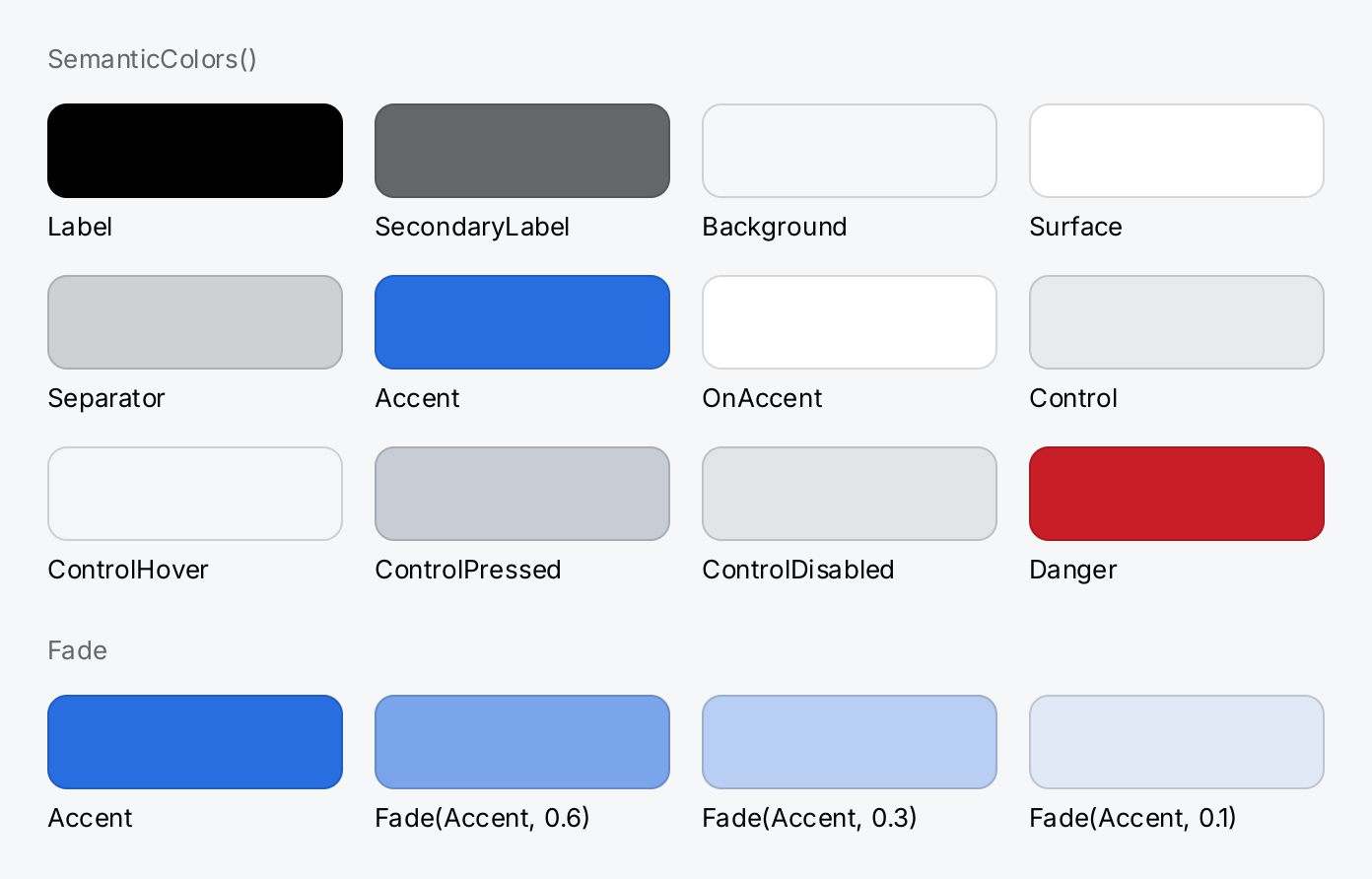
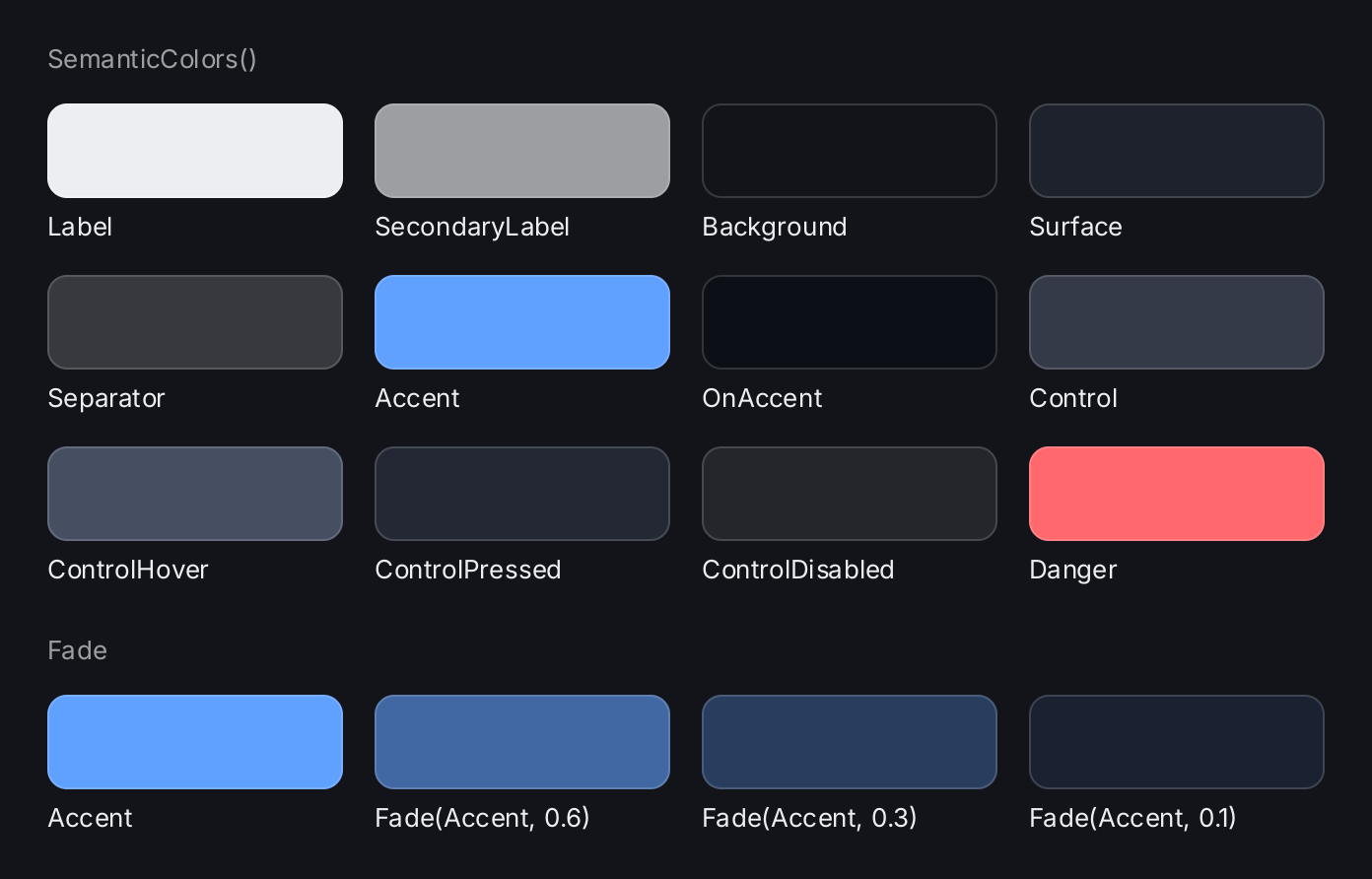
// One swatch per semantic color. The hairline keeps the swatches that
// match the window background visible.
swatch := func(name string, c ui.Color) gift.View {
	return ui.VStack(
		ui.Box().Background(c).Frame(150, 48).CornerRadius(10).
			Border(ui.Border{Width: 1, Color: ui.ColorSeparator}),
		ui.Text(strings.TrimPrefix(name, "Color")).FontSize(13),
	).Gap(6)
}

// The palette, four swatches per row, in declaration order.
var rows []gift.View
var row []gift.View
for _, nc := range ui.SemanticColors() {
	row = append(row, swatch(nc.Name, nc.Color))
	if len(row) == 4 {
		rows = append(rows, ui.HStack(row...).Gap(16))
		row = nil
	}
}

// Fade keeps a semantic color semantic: these follow the theme too.
fades := ui.HStack(
	swatch("Accent", ui.ColorAccent),
	swatch("Fade(Accent, 0.6)", ui.Fade(ui.ColorAccent, 0.6)),
	swatch("Fade(Accent, 0.3)", ui.Fade(ui.ColorAccent, 0.3)),
	swatch("Fade(Accent, 0.1)", ui.Fade(ui.ColorAccent, 0.1)),
).Gap(16)

caption := func(s string) ui.TextView {
	return ui.Text(s).FontSize(13).Foreground(ui.ColorSecondaryLabel)
}
return ui.VStack(
	caption("SemanticColors()"),
	ui.VStack(rows...).Gap(16),
	caption("Fade").PaddingInsets(geom.Insets{Top: 10}),
	fades,
).Gap(14)
Full demo on GitHub ↗
· run it with go run ./docs/gallery -demo colors
Usage
Semantic colors
ui.SemanticColors() returns the twelve roles that a theme assigns, in this order:
| Color | Role |
|---|---|
ui.ColorLabel | primary text |
ui.ColorSecondaryLabel | supporting text: captions, units, hints |
ui.ColorBackground | the page behind everything; only ui.Window paints it |
ui.ColorSurface | a panel raised above the background: a card, a sheet, a bar |
ui.ColorSeparator | a hairline: a border, a divider, the edge of a control |
ui.ColorAccent | what carries attention: a filled primary control, a selection, focus |
ui.ColorOnAccent | content drawn on ui.ColorAccent |
ui.ColorControl | the face of a control at rest |
ui.ColorControlHover | the face of a control under the pointer |
ui.ColorControlPressed | the face of a control being pressed |
ui.ColorControlDisabled | the face of a disabled control |
ui.ColorDanger | a choice that destroys something, such as the Delete button of an alert |
A thirteenth color, ui.ColorClear, is explicit transparency. It is not part of a theme and is not in the list.
You need it because the zero Color means “not set” in style structs such as ui.ButtonStyle, where the theme
then picks a default. When you really want nothing drawn there, write ui.ColorClear.
You pass semantic colors anywhere a Color goes:
ui.Text("3 files").Foreground(ui.ColorSecondaryLabel)Pair colors by role: text on ui.ColorAccent uses ui.ColorOnAccent, text on a surface or a control uses
ui.ColorLabel. The built-in themes keep these pairs legible.
Literal colors
ui.RGB(r, g, b) makes an opaque color from 8-bit components. ui.RGBA(r, g, b, a) adds a straight alpha, so
ui.RGBA(255, 149, 0, 128) is a half-transparent orange:
ui.Box().Background(ui.RGBA(255, 149, 0, 128)).Frame(40, 40)A Color stores premultiplied components in the range 0 to 1. RGBA does the premultiplication for you; build a
Color struct by hand only if you already have premultiplied values. The zero Color is fully transparent.
Fade
ui.Fade(c, f) returns c at f times its opacity, with f between 0 and 1. Any other value panics. On a
semantic color the result stays semantic: the fade is applied after the theme is consulted. So a faded color works
as a package variable and still follows every later theme change:
var track = ui.Fade(ui.ColorLabel, 0.08)Use Fade to express emphasis without a new role: the theme decides the hue, you decide how present it is.
Resolving colors
A semantic color is resolved to a literal one when a view is built. The views in ui do this for you. If you write
your own view that emits render operations, resolve every color yourself, once, in Build:
accent := ui.ResolveColor(ui.ColorAccent)    // the accent of the theme in force
dark := ui.DarkTheme().Color(ui.ColorAccent) // the accent of the dark theme
ok := ui.IsSemantic(ui.ColorAccent)          // true
ResolveColor returns a literal color unchanged, so it is safe to call on any color. Theme.Color does the same
against a given theme instead of the installed one. IsSemantic tells the two kinds apart.
giftdebug build tag, render.List.Add panics on an
operation that still carries one, but only if your painter does not skip it as transparent first. So check the color
where you decide whether to draw.Themes
A ui.Theme assigns a literal color to each role. ui.LightTheme() and ui.DarkTheme() are the built-in ones,
and the light theme is the default. You derive your own with Theme.With and install it with ui.SetTheme, which
also rebuilds the whole application:
ui.SetTheme(app, ui.DarkTheme().With(ui.ColorAccent, ui.RGB(255, 149, 0)))With takes a semantic color as its first argument and a literal one as its second, and panics otherwise. It
also panics on ui.ColorClear, which no theme can redefine. Theme.IsDark reports whether a theme is dark:
DarkTheme sets the flag, With keeps it, and Theme.Dark sets it on a palette you build yourself. The
Theming page covers switching themes in depth.
To list the palette, for a theme editor or a contrast check, iterate SemanticColors. Each entry is a
ui.NamedColor with the Go name and the color:
for _, c := range ui.SemanticColors() {
	fmt.Println(c.Name, ui.CurrentTheme().Color(c.Color))
}
The slice is freshly allocated on each call. Do not call it per frame.
API
Color
ui.Color is an alias of render.Color:
| Field | Type | Description |
|---|---|---|
R, G, B | float32 | the color channels, premultiplied by A, 0 to 1 |
A | float32 | the alpha channel, 0 fully transparent, 1 opaque |
It has two methods: IsOpaque() reports whether A is 1, and IsTransparent() whether A is 0. Do not call them
on a semantic color; resolve it first.
Constructors
| Constructor | Description |
|---|---|
func Fade(c Color, f float32) Color | Fade returns c at f times its opacity, where f is between 0 and 1. |
func RGB(r, g, b uint8) Color | RGB returns the fully opaque Color for the given 8 bit components. |
func RGBA(r, g, b, a uint8) Color | RGBA returns the Color for the given straight alpha 8 bit components. |
func ResolveColor(c Color) Color | ResolveColor turns a semantic colour into the literal colour of the theme in force. |
| Function | Description |
|---|---|
func IsSemantic(c Color) bool | IsSemantic reports whether c is one of the named colours of this package rather than a literal one. |
Theme
Constructors
| Constructor | Description |
|---|---|
func CurrentTheme() Theme | CurrentTheme returns the theme in force. |
func DarkTheme() Theme | DarkTheme returns the built in dark theme. |
func LightTheme() Theme | LightTheme returns the built in light theme. |
Methods
| Method | Description |
|---|---|
Color(semantic Color) Color | Color returns the literal colour the theme gives to one of the named colours. |
Dark(v bool) Theme | Dark returns a copy of the theme marked as dark or light. |
IsDark() bool | IsDark reports whether the theme describes a dark appearance. |
With(semantic, value Color) Theme | With returns a copy of the theme in which the given semantic colour resolves to value: |
| Function | Description |
|---|---|
func SetTheme(app *gift.App, t Theme) | SetTheme installs t as the process wide theme and asks app to rebuild everything, which is what puts the new colours on the screen. |
NamedColor
| Field | Type | Description |
|---|---|---|
Name | string | the Go identifier, for example ColorAccent |
Color | Color | the semantic color itself |
Constructors
| Constructor | Description |
|---|---|
func SemanticColors() []NamedColor | SemanticColors returns every semantic colour of this package that a theme assigns a value to, in declaration order. |
Related
- Theming: light and dark themes, custom themes, switching at run time.
- Modifiers:
Background,BorderandShadowtake colors. - Shadow and border: the style values that carry a color.
- Gradient and Glass: backgrounds that are more than one color.
- Custom views: resolving colors in a view of your own.
- Button and Badge: components styled with semantic colors.