Gradient
A gradient is a background that runs from one color at the top of a shape to another at the bottom.
ui.LinearGradient(from, to) returns a ui.Gradient, and you pass it to Background wherever you would pass a
color.
Use a gradient for a sheen on a surface, an accent plate whose color thins out towards the bottom, or a fade that hides the end of a list or a paragraph. It costs what a plain fill costs: the backend gives the corners of the shape their colors and the GPU interpolates between them, so a fade to transparent is smooth and not a staircase of bands.
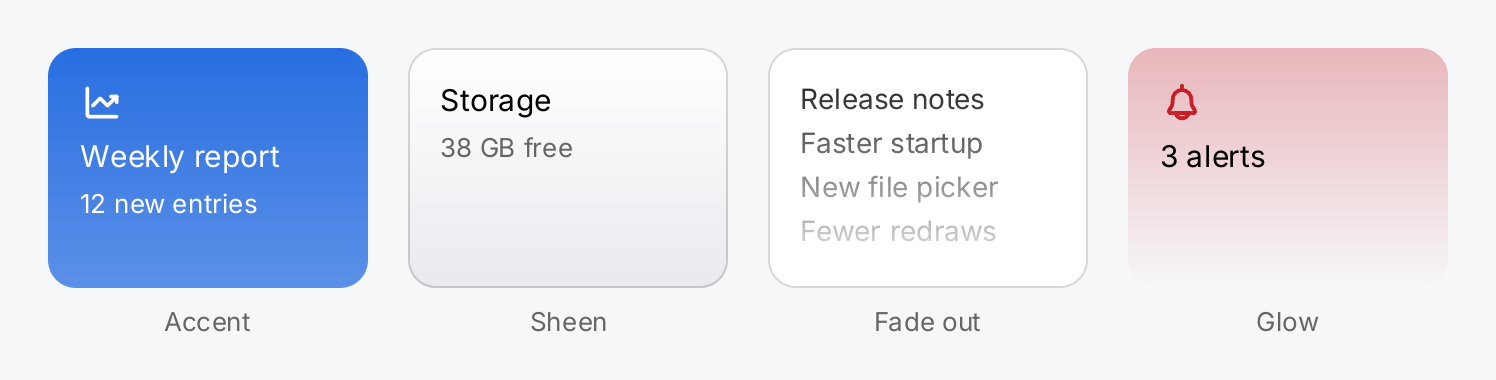
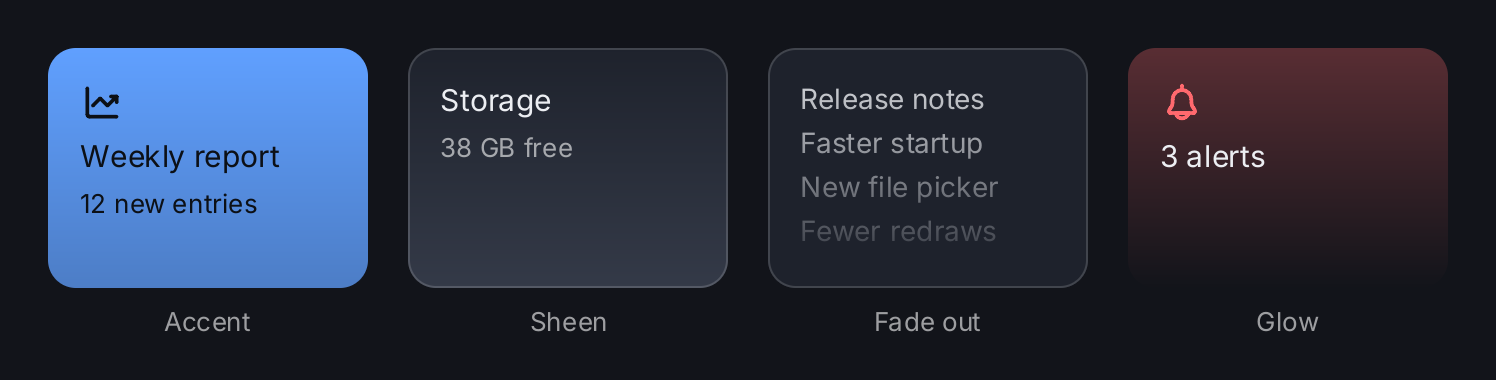
// An accent plate whose color thins out towards the bottom.
accent := ui.VStack(
	ui.Icon(outline.ChartLineUp).Size(22).Foreground(ui.ColorOnAccent),
	ui.Text("Weekly report").FontSize(15).Foreground(ui.ColorOnAccent),
	ui.Text("12 new entries").FontSize(13).Foreground(ui.ColorOnAccent),
).Gap(6).Padding(16).
	Background(ui.LinearGradient(ui.ColorAccent, ui.Fade(ui.ColorAccent, 0.75))).
	CornerRadius(14).Frame(160, 120)

// A quiet sheen: from the surface color to the control face.
sheen := ui.VStack(
	ui.Text("Storage").FontSize(15),
	ui.Text("38 GB free").FontSize(13).Foreground(ui.ColorSecondaryLabel),
).Gap(6).Padding(16).
	Background(ui.LinearGradient(ui.ColorSurface, ui.ColorControl)).
	Border(ui.Border{Width: 1, Color: ui.ColorSeparator}).
	CornerRadius(14).Frame(160, 120)

// A gradient from a transparent color fades out what is under it. The
// overlay repeats the corner radius of the card it lies on.
fade := ui.ZStack(
	ui.VStack(
		ui.Text("Release notes"),
		ui.Text("Faster startup"),
		ui.Text("New file picker"),
		ui.Text("Fewer redraws"),
	).Gap(4).Padding(16),
	ui.Box().
		Background(ui.LinearGradient(ui.Fade(ui.ColorSurface, 0), ui.ColorSurface)).
		CornerRadius(14),
).Background(ui.ColorSurface).
	Border(ui.Border{Width: 1, Color: ui.ColorSeparator}).
	CornerRadius(14).Frame(160, 120)

// A tinted glow that fades from a translucent color to nothing.
glow := ui.VStack(
	ui.Icon(outline.Bell).Size(22).Foreground(ui.ColorDanger),
	ui.Text("3 alerts").FontSize(15),
).Gap(6).Padding(16).
	Background(ui.LinearGradient(ui.Fade(ui.ColorDanger, 0.3), ui.Fade(ui.ColorDanger, 0))).
	CornerRadius(14).Frame(160, 120)

return ui.HStack(
	gradientTile(accent, "Accent"),
	gradientTile(sheen, "Sheen"),
	gradientTile(fade, "Fade out"),
	gradientTile(glow, "Glow"),
).Gap(20)
Full demo on GitHub ↗
· run it with go run ./docs/gallery -demo gradient
Usage
A gradient is a background. Background takes a ui.Background, which is a color, a gradient or the
glass material. Every view with a Background modifier accepts a gradient: stacks, a
ZStack, Box, Text, Icon, Image, lists and scroll views among them. The exception is a button; see
Buttons below.
ui.VStack(ui.Text("Title")).
	Padding(16).
	Background(ui.LinearGradient(ui.ColorAccent, ui.Fade(ui.ColorAccent, 0.75))).
	CornerRadius(14)
It is always vertical. From is the color at the top of the shape, To the color at the bottom. There is no
angle and there are no further color stops.
Use semantic colors. Both ends may be semantic colors such as ui.ColorAccent or ui.ColorSurface. They
are resolved against the theme when the view is built, so the gradient follows a switch between light and dark.
ui.Fade lowers the opacity of either end without fixing it to one theme.
Fade to transparent. ui.Fade(c, 0) is c at zero opacity. A gradient from a color to its faded copy, or
the other way round, fades content in or out. Lay it over content in a ZStack to fade out what is under it, as
the demo does, or put it under a bar to soften its edge:
ui.Box().
	Background(ui.LinearGradient(ui.ColorBackground, ui.Fade(ui.ColorBackground, 0))).
	Frame(geom.Unbounded(), 24)
A gradient with one transparent end still draws; only a gradient with two transparent ends draws nothing.
Shape and border. CornerRadius rounds the gradient like any other background. A Border is stroked on top
of it in its own, single color. A clip set with Clip is rectangular even with a corner radius, so an overlay
that should end at the rounded corners needs the same CornerRadius itself.
The last background wins. A gradient, a color and the glass material are mutually exclusive. Setting a color after a gradient replaces the gradient, and the other way round.
Buttons. A button takes its look per interaction state from a ui.ButtonStyle. Its BackgroundTo field
makes the face of that state a gradient from Background at the top to BackgroundTo at the bottom. This works
for the normal state through Style and for the styles you pass to HoverStyle, PressedStyle and
DisabledStyle. Each of these replaces the whole look of its state, so repeat the corner radius in it:
face := ui.ButtonStyle{
	Background:   ui.ColorAccent,
	BackgroundTo: ui.Fade(ui.ColorAccent, 0.7),
	CornerRadius: 10,
}
ui.Button(ui.Text("Save").Foreground(ui.ColorOnAccent), save).Style(face)
A hover or pressed state you do not declare keeps the gradient of the normal state. Background with a
ui.LinearGradient gives the normal state the same face. In Style, a BackgroundTo without a Background
starts the gradient at the themed face, ui.ColorControl.
API
Constructors
| Constructor | Description |
|---|---|
func LinearGradient(from, to Color) Gradient | LinearGradient returns a background that runs from from at the top to to at the bottom. |
ui.Gradient is an alias of render.Gradient, a plain struct:
| Field | Type | Meaning |
|---|---|---|
From | ui.Color | color at the top of the shape |
To | ui.Color | color at the bottom of the shape |
The colors are interpolated in premultiplied alpha. The gradient field of a button is ButtonStyle.BackgroundTo;
see Button for the whole style.
Related
- Colors: the semantic colors and
Fade - Shadow and Border: the other styling modifiers
- Glass: the other background material
- Box: a styled rectangle, the simplest view to carry a gradient
- ZStack: layers a fade over content
- Button:
ButtonStyleand the interaction states - Modifiers: the common modifiers and the fixed drawing order
- Theming: how semantic colors resolve