Counter
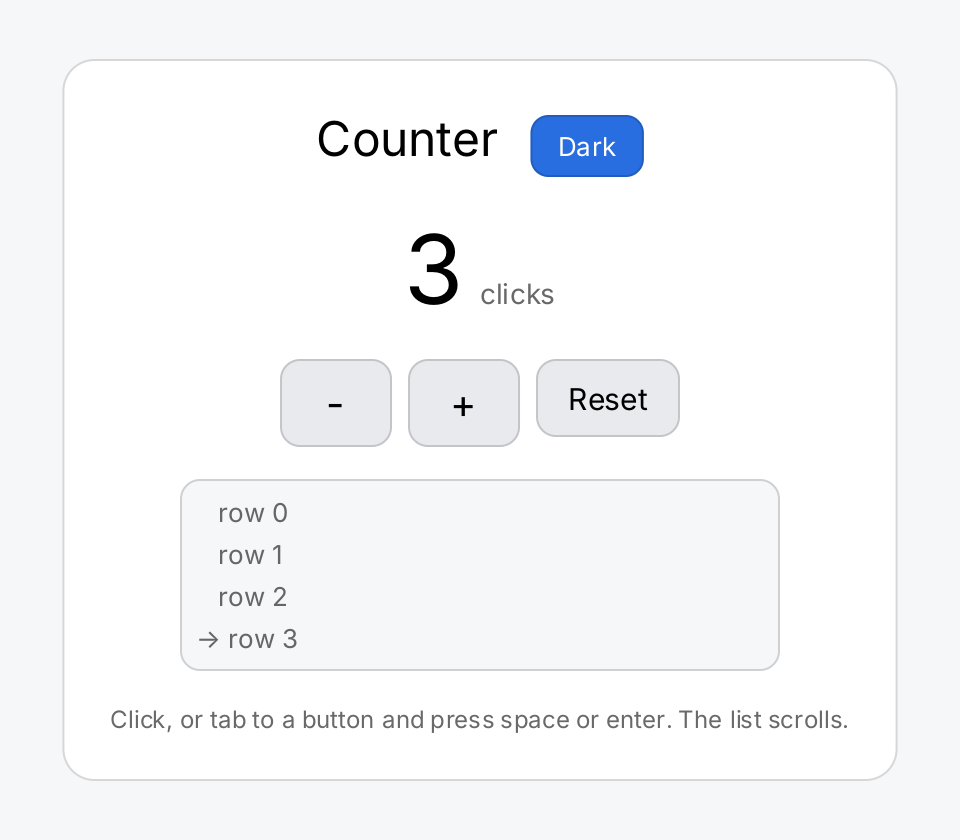
The counter is the first gift program to read. It fits in one file and shows the core loop of the toolkit: a view
function reads a piece of state, a button writes it, and
gift rebuilds the view. The - and Reset buttons are disabled while the count is zero. Below them, a
scroll view holds forty rows, and an arrow marks the row that matches the
count.
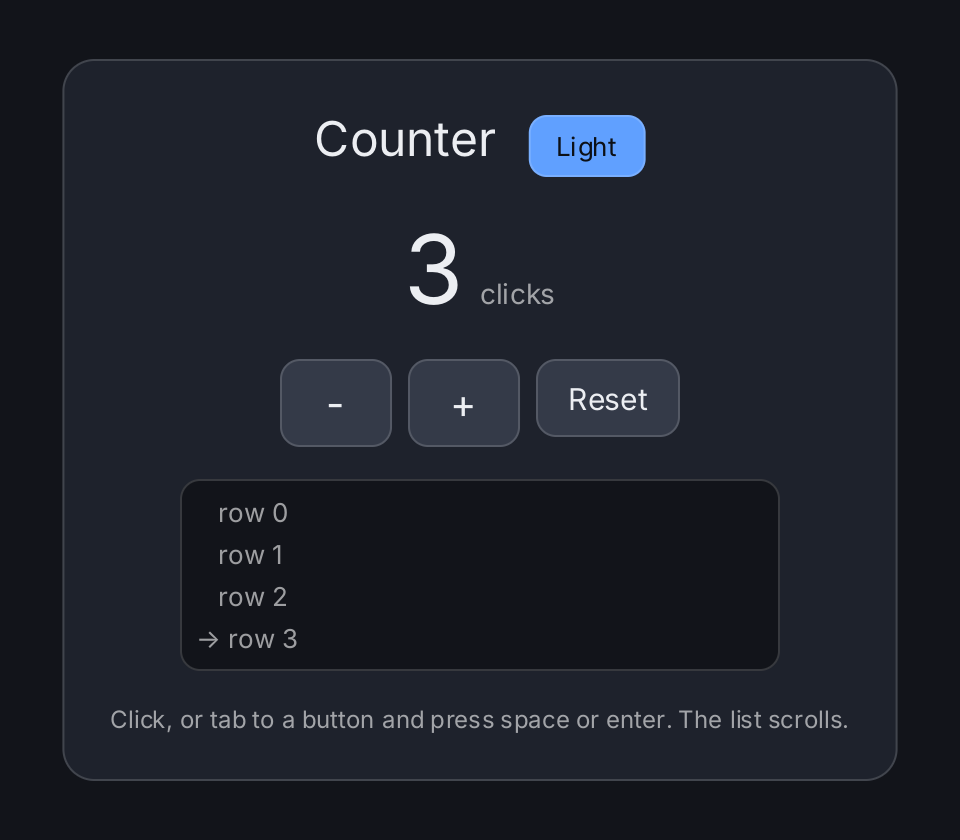
The example is also the theming demo. Every color in it is a semantic color such as
ui.ColorSurface or ui.ColorControl. The accent button next to the title calls ui.SetTheme and switches the whole
window between the light and the dark theme at runtime. No other line changes: the same view function produces both
appearances.
What to try
- Click
+and-. The number and the arrow in the list follow the count. - Press Tab to move the focus to a button, then press Space or Enter to activate it. See Input and Focus.
- Scroll the list with the mouse wheel, drag it and let go to fling it, or drag the thumb of the scroll bar.
- Click Dark or Light to switch the theme. The label shows the theme you switch to next.
- Hover over and press the buttons. The
-,+and Reset buttons change their background for the hovered and pressed state, and-and Reset have a style for the disabled state. The theme button keeps its accent color and shows its state with a ring instead.
Run it
From the repository root:
go run ./cmd/example-counterThe program takes no flags. Two environment settings change what it does:
GIFT_FONTnames a font file. The example then uses that typeface instead of Inter, so you can see the layout under another font. If the file cannot be read or parsed, the program exits with an error. See Text and Fonts.GIFT_METRICS=1together with thegiftmetricsbuild tag prints a performance report to standard output when the program exits. See Diagnostics.
GIFT_METRICS=1 go run -tags giftmetrics ./cmd/example-counterHow it is built
ctx.State("count", 0)creates the state, andctx.Read(count)reads it and makes the view depend on it. The button closures callcount.Set, which rebuilds the view. See State.ui.Windowfills the window withui.ColorBackground, and itsAligncall centers the panel. The panel is aui.VStackwith a background, a corner radius and a border.- The
-,+and Reset buttons share fourui.ButtonStylevalues for their states. They are package variables that hold semantic colors, and they still follow every later theme switch. See Colors. ui.VScrollgets a fixedFrame(300, 96). Without it, the stack would give the scroll view as much height as its content needs, and there would be nothing to scroll. See Layout.- The theme button reads
ui.CurrentTheme().IsDark()for its label instead of keeping its own state. Its text usesui.ColorOnAccent, which stays legible on the accent color in both themes.
Source
// Command example-counter is the first gift program to read: the counter from
// the project plan, section 4, with the styling and the keyboard handling that
// make it a real control rather than a click handler.
//
//	go run ./cmd/example-counter
//	GIFT_METRICS=1 go run -tags giftmetrics ./cmd/example-counter
//
// Click the buttons, or tab to one and press space or enter. The text is set
// in Inter, which the example pulls in from gift's opt-in font package; set
// GIFT_FONT to a font file to see the layout under another typeface.
//
// # It is also the theme demo
//
// This example used to carry a hand rolled dark palette of nine package
// variables. It does not any more: every colour in it is one of the semantic
// colours of the project plan, section 20, and the button in the top right
// switches the whole window between the light and the dark theme at runtime.
// That is the demonstration the section asks for, and it is here rather than
// in a demo of its own because the interesting part is that *nothing else in
// this file changed* — no colour is passed down, no view is re-styled, the
// same view function produces both appearances.
//
// The other two examples, example-gallery and example-effects, kept their own
// palettes on purpose. They are the other half of the evidence: an application
// that has a design of its own still overrides everything, and the theme is
// the default rather than a policy.
package main

import (
	"fmt"
	"os"
	"strconv"

	"github.com/worldiety/gift"
	backend "github.com/worldiety/gift/backend/ebiten"
	"github.com/worldiety/gift/geom"
	"github.com/worldiety/gift/internal/example"
	"github.com/worldiety/gift/ui"
)

// app is the handle the theme switch needs.
//
// [ui.SetTheme] takes it because a theme change only reaches the screen
// through a rebuild, and a view function is given a [gift.Context], which has
// no application handle — deliberately, since almost nothing should reach the
// whole application from inside a view. A package variable in a program with
// one window is the honest way to close that gap; a library would take the
// handle as a parameter.
var app *gift.App

func main() {
	if err := example.LoadFont(); err != nil {
		fmt.Fprintln(os.Stderr, "example-counter:", err)
		os.Exit(1)
	}
	app = gift.New(gift.Options{Root: counter})
	if err := backend.Run(app, backend.Config{Title: "gift counter", Width: 480, Height: 420}); err != nil {
		fmt.Fprintln(os.Stderr, "example-counter:", err)
		os.Exit(1)
	}
}

// The looks of the three controls, in semantic colours.
//
// They are package variables holding *unresolved* colours, which is the point
// of the encoding: they are written once, at initialisation, and they still
// follow every later theme switch. A helper that resolved eagerly would have
// frozen the light theme into these three variables for ever.
var (
	step = ui.ButtonStyle{Background: ui.ColorControl, Border: hair, CornerRadius: 10}
	hot  = ui.ButtonStyle{Background: ui.ColorControlHover, Border: hair, CornerRadius: 10}
	sunk = ui.ButtonStyle{Background: ui.ColorControlPressed, Border: hair, CornerRadius: 10}
	off  = ui.ButtonStyle{Background: ui.ColorControlDisabled, CornerRadius: 10}

	hair = ui.Border{Width: 1, Color: ui.ColorSeparator}
)

// rows is the content of the scroller: forty lines, far more than its ninety
// six pixel viewport, so there is always something to scroll.
//
// It is rebuilt whenever the count changes, which is the point: scrolling it
// afterwards rebuilds nothing at all, because the offset lives in the retained
// node. See ui.ScrollView.
func rows(n int) []gift.View {
	out := make([]gift.View, 0, 40)
	for i := range 40 {
		mark := "   "
		if i == n {
			mark = "-> "
		}
		out = append(out, ui.Text(mark+"row "+strconv.Itoa(i)).
			FontSize(13).Foreground(ui.ColorSecondaryLabel).Key(strconv.Itoa(i)))
	}
	return out
}

// counter is the view function from the project plan, section 4. The state
// write in a button's closure invalidates this scope and nothing else; a hover
// or a press invalidates no scope at all, because interaction state lives in
// the retained node.
func counter(ctx *gift.Context) gift.View {
	count := ctx.State("count", 0)
	n := ctx.Read(count)

	// [ui.Window] fills the window with ColorBackground and puts the panel on
	// top of it. gift paints no background of its own — see ui.Window for why
	// that is the application's obligation — and this line is the whole of
	// meeting it.
	return ui.Window(ui.VStack(
		// No Spacer between the two: a flexible child would stretch this row
		// to the full window width and take the panel with it, and a panel
		// that is as wide as the window is not the counter of section 4.
		ui.HStack(
			ui.Text("Counter").FontSize(24),
			themeSwitch(),
		).Gap(16).AlignBaseline(),
		ui.HStack(
			ui.Text(strconv.Itoa(n)).FontSize(48),
			ui.Text("clicks").FontSize(14).Foreground(ui.ColorSecondaryLabel),
		).Gap(8).AlignBaseline(),
		ui.HStack(
			ui.Button(ui.Text("-").FontSize(20), func() {
				count.Set(count.Get() - 1)
			}).Style(step).HoverStyle(hot).PressedStyle(sunk).DisabledStyle(off).
				Frame(56, 44).Disabled(n == 0),
			ui.Button(ui.Text("+").FontSize(20), func() {
				count.Set(count.Get() + 1)
			}).Style(step).HoverStyle(hot).PressedStyle(sunk).Frame(56, 44),
			ui.Button(ui.Text("Reset").FontSize(15), func() {
				count.Set(0)
			}).Style(step).HoverStyle(hot).PressedStyle(sunk).DisabledStyle(off).
				PaddingInsets(geom.Insets{Top: 10, Right: 16, Bottom: 10, Left: 16}).
				Disabled(n == 0),
		).Gap(8),
		// A scroll container, so that the wheel, the drag and the kinetic
		// fling are exercised by a real window and not only by tests. It is
		// given a Frame because a stack measures an inflexible child with an
		// unbounded main axis, and a scroller with an unbounded axis has a
		// viewport as large as its content and nothing to scroll.
		//
		// Its background is the window colour on top of the panel, which is
		// the one place this file spends a semantic colour on a *relation*
		// rather than on a thing: a well is the background showing through a
		// surface, and that reads correctly in both appearances.
		ui.VScroll(rows(n)...).Gap(4).Padding(8).
			Frame(300, 96).
			Background(ui.ColorBackground).CornerRadius(10).Border(hair),
		ui.Text("Click, or tab to a button and press space or enter. The list scrolls.").
			FontSize(12).Foreground(ui.ColorSecondaryLabel),
	).Gap(16).Padding(24).Align(geom.Alignment{X: 0.5}).
		Background(ui.ColorSurface).CornerRadius(16).Border(hair),
	).Align(geom.Alignment{X: 0.5, Y: 0.5})
}

// themeSwitch is the runtime switch of the project plan, section 20.
//
// Two things in four lines are worth naming. The label comes from
// [ui.CurrentTheme] rather than from a piece of view state, because the theme
// is process wide and a second copy of "are we dark" in a state slot could
// disagree with it. And the button is the one accent coloured control in the
// window, which is what [ui.ColorOnAccent] exists for: white on the light
// theme's blue, near black on the dark theme's brighter one, decided by the
// theme instead of by this call site.
func themeSwitch() ui.ButtonView {
	dark := ui.CurrentTheme().IsDark()
	label, next := "Dark", ui.DarkTheme()
	if dark {
		label, next = "Light", ui.LightTheme()
	}
	// The face is the full accent in all three states, and the ring around it
	// carries the state instead. That is forced rather than chosen, and the
	// arithmetic behind it is worth writing down, because it is exactly the
	// kind of thing a design review waves through.
	//
	// [ui.Fade] composites towards whatever is behind the control. A faded
	// accent therefore moves towards white under the light theme and towards
	// the surface under the dark one, and *both* directions reduce the
	// contrast against [ui.ColorOnAccent], whose entire job is to stay legible
	// on the accent. Measured: the unfaded accent carries ColorOnAccent at a
	// contrast of 4.76 under the light theme, which clears WCAG AA by 0.26.
	// There is no headroom at all. The previous version of this function faded
	// the resting face to 85 % and the pressed face to 65 %, which measure
	// 3.68 and 2.62 — both below AA, on the one control in this window whose
	// job is to show that the theme gets legibility right.
	//
	// The palette has no accent-hover role, and section 20 of the project plan
	// stops the colour set where it does on purpose. So the honest move is to
	// leave the face alone and let the border say what state the button is in.
	// ColorOnAccent is legible on the accent by definition, which makes it the
	// one colour guaranteed to read as a ring here. See
	// TestFadingTheAccentDestroysItsLegibility in ui, which pins the fact this
	// paragraph rests on.
	face := func(ring float32) ui.ButtonStyle {
		s := ui.ButtonStyle{Background: ui.ColorAccent, Border: hair, CornerRadius: 9}
		if ring > 0 {
			s.Border = ui.Border{Width: ring, Color: ui.ColorOnAccent}
		}
		return s
	}
	return ui.Button(ui.Text(label).FontSize(13).Foreground(ui.ColorOnAccent), func() {
		ui.SetTheme(app, next)
	}).
		Style(face(0)).
		HoverStyle(face(1)).
		PressedStyle(face(2)).
		PaddingInsets(geom.Insets{Top: 7, Right: 14, Bottom: 7, Left: 14})
}
View on GitHub ↗
· run it from the repository root with go run ./cmd/example-counter