Effects
The effects example puts gift’s drawing effects on one screen. A masonry gallery of 4000 colored placeholder tiles fills the window. A glass panel floats across the top of it, and a row of four cards sits along the bottom. The window is always dark, in light and dark system themes alike.
The cards show borders and shadows. Each card is the same rounded rectangle with a 1-pixel border. From left to right, the shadows are: none, a blur of 8, a blur of 24 with an offset of 8 down, and a blur of 20 with an offset of 10 down and a spread of -6. The negative spread shrinks the shadow’s shape, so it tucks in under the card and shows mostly below it. The backend draws every shape and shadow analytically in its shape shader, without an offscreen image.
The panel shows the experimental glass material. It sits over the gallery as a sibling in a ZStack, not inside
it, so there is one glass region however many tiles lie under it. Scroll the gallery with the wheel or by dragging,
and watch the backdrop follow. A glass panel that never moves is still redrawn every frame while the content behind
it moves.
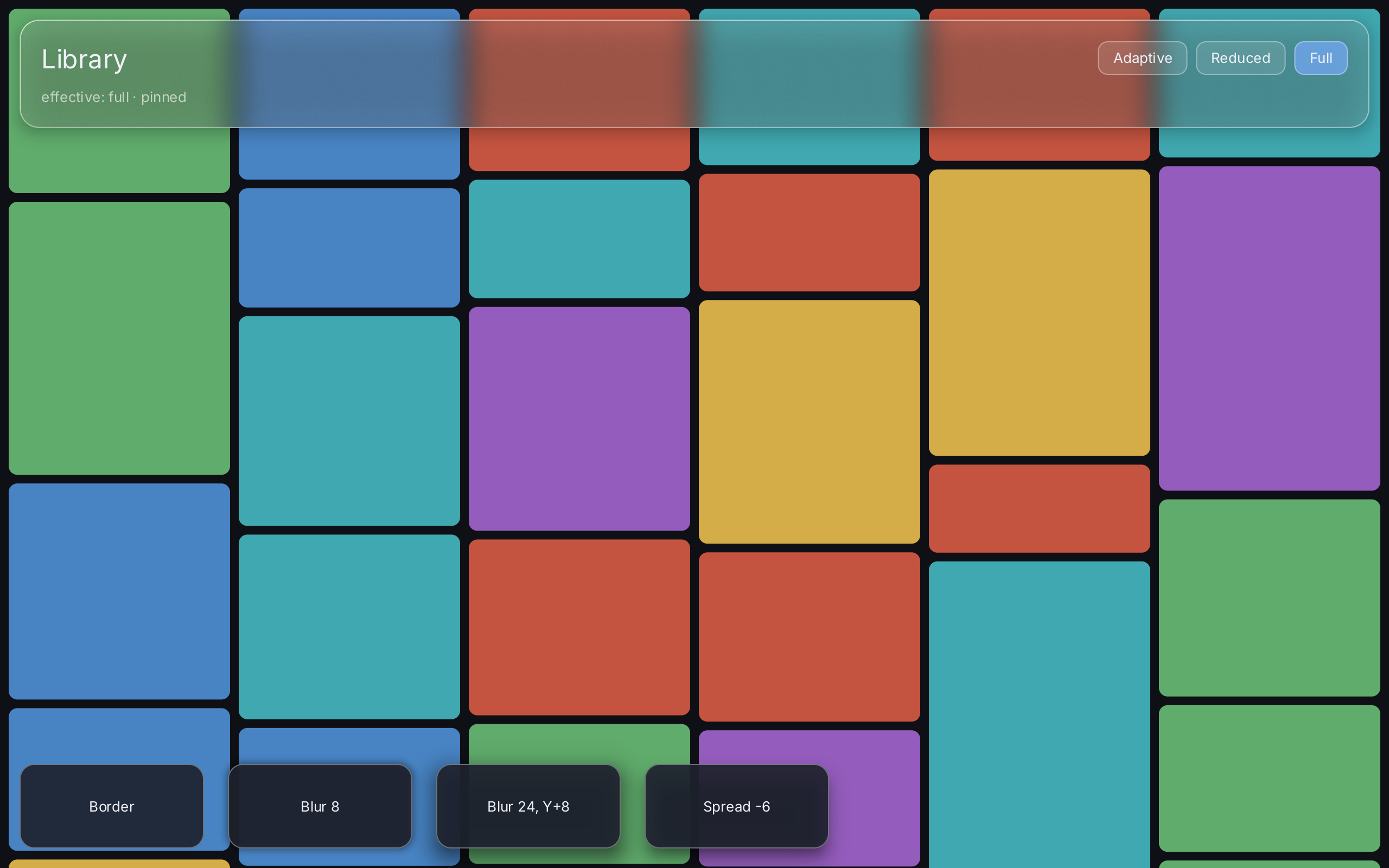
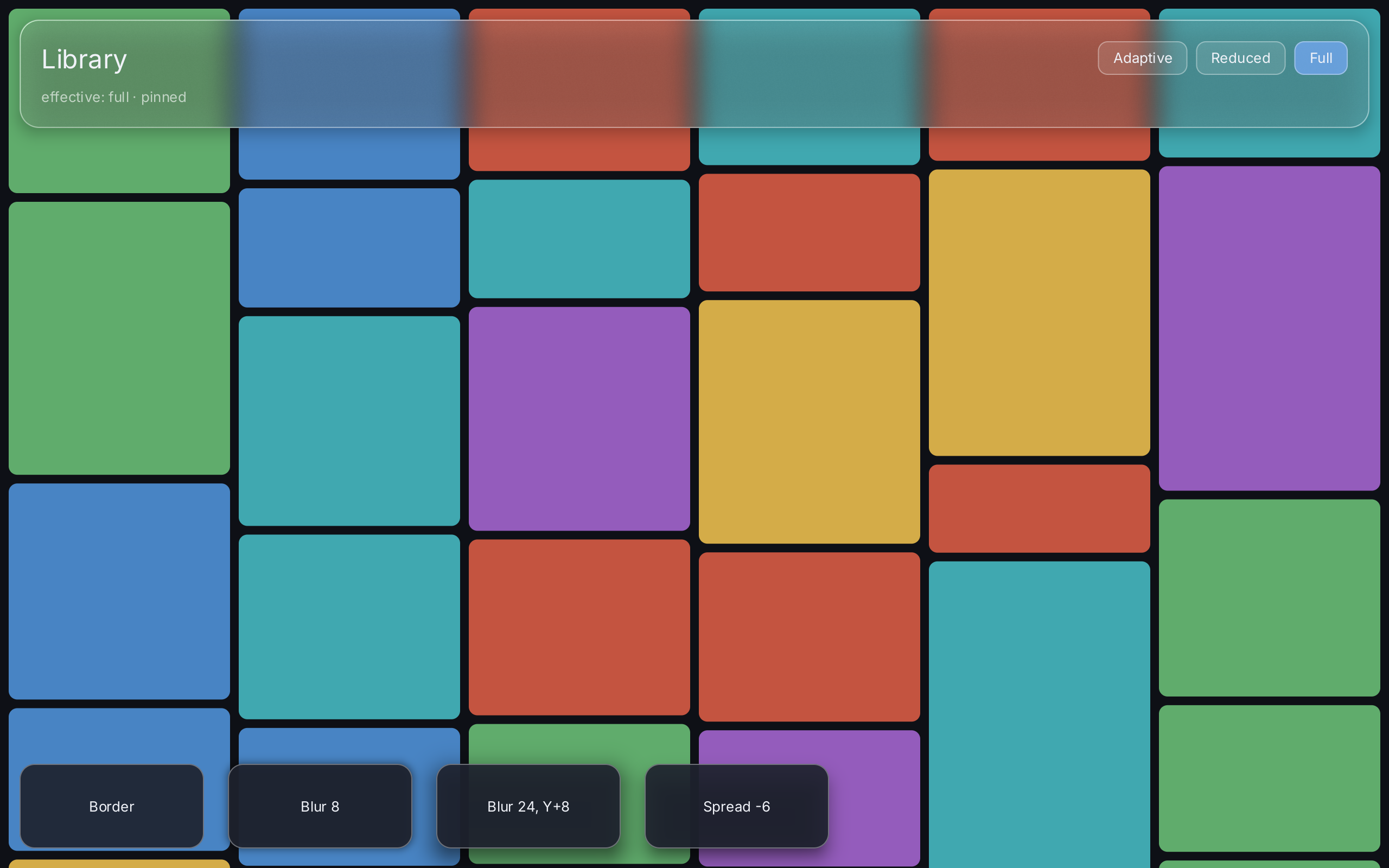
The screenshot is taken with -quality=full, so the panel blurs the tiles behind it.
What to try
- Scroll the gallery under the panel and compare how the tiles look through the glass with how they look beside it.
- Click Reduced and Full to pin a quality level. Click Adaptive to hand the choice back to the backend. The line under the title shows the effective level and whether it is pinned or chosen by measurement. It follows the adaptive policy: twice a second the example compares the level in effect with the one shown and rebuilds the panel when they differ. The log on stderr reports those switches as well.
- On Reduced the backdrop is not blurred. The panel reads as a surface through the thin dark and bright lines along its rim and the slight bend of the backdrop at the edge.
- Compare the four cards along the bottom to see what blur, offset and spread each contribute.
Running it
Run it from the repository root:
go run ./cmd/example-effects
go run ./cmd/example-effects -quality=full
The example takes two flags:
| Flag | Default | Meaning |
|---|---|---|
-quality | adaptive | The glass quality to pin at start: adaptive, reduced or full. |
-count | 4000 | The number of placeholder tiles behind the panel. |
The flag pins the level in the renderer through backend.Config.GlassQuality, and the buttons in the panel start
on the same level, so with -quality=full Full is highlighted and the line under the title says the level is
pinned.
Under adaptive, the backend starts at Full and chooses between Reduced and Full from the measured frame
intervals and from how much of the screen the glass covers. The example passes an slog logger to the backend, so
each change the adaptive policy makes shows up on stderr: a warning when quality drops to Reduced and an info
line when it returns to Full. Pinning a level, by flag or by button, logs nothing.
To see frame metrics as well, build with the giftmetrics tag and set GIFT_METRICS:
GIFT_METRICS=1 go run -tags giftmetrics ./cmd/example-effectsSource
// Command example-effects is the effects demonstration of the project plan,
// section 12, step 5: border, shadow and a glass panel over the gallery.
//
//	go run ./cmd/example-effects
//	go run ./cmd/example-effects -quality=full
//	GIFT_METRICS=1 go run -tags giftmetrics ./cmd/example-effects
//
// Scroll the gallery behind the panel with the wheel or by dragging. The three
// buttons in the panel pin the glass quality level, which is what the project
// plan, section 13, requires before two measurements may be compared; the
// label next to them says which level is actually in effect, because under
// Adaptive that is a decision the backend takes from the frame intervals and
// not something the application knows.
//
// # What to look at
//
// The card row along the bottom is border and shadow: the same rounded
// rectangle with a growing blur, an offset and a spread, all of it analytic in
// the shared shape shader with no offscreen image anywhere.
//
// The panel across the top is the material. Scroll underneath it and watch the
// backdrop follow: a glass panel that never moves is still re-blurred every
// frame, because what is behind it moved. The project plan, section 8, says
// that outright — "Beim Scrollen darunter wird er dirty" — and it is the
// reason there is no cache to look for here.
//
// # Honest limits
//
// The material is experimental and the project plan, section 8, says so. It
// makes no claim to be anybody else's glass. On Reduced there is no blur at
// all: the backdrop is sampled unblurred, and what makes it read as a surface
// is the rim brightening, the specular streak and the refraction at the edge.
// Over a busy backdrop that is convincing; over a plain flat colour it is a
// slightly tinted rectangle with bright edges, and no amount of shader will
// change that, because there is nothing behind it to bend.
package main

import (
	"flag"
	"fmt"
	"log/slog"
	"os"
	"strings"
	"time"

	"github.com/worldiety/gift"
	"github.com/worldiety/gift/asset"
	backend "github.com/worldiety/gift/backend/ebiten"
	"github.com/worldiety/gift/geom"
	"github.com/worldiety/gift/internal/example"
	"github.com/worldiety/gift/render"
	"github.com/worldiety/gift/ui"
)

var (
	quality = flag.String("quality", "adaptive", "glass quality to pin: adaptive, reduced or full")
	count   = flag.Int("count", 4000, "number of placeholder tiles behind the panel")
)

func main() {
	flag.Parse()
	if err := run(); err != nil {
		fmt.Fprintln(os.Stderr, "example-effects:", err)
		os.Exit(1)
	}
}

func run() error {
	if err := example.LoadFont(); err != nil {
		return err
	}
	q, err := parseQuality(*quality)
	if err != nil {
		return err
	}
	startQuality = q

	// No image pipeline on purpose. The tiles draw their placeholder colours,
	// which is a cheap, deterministic, endlessly scrollable backdrop — and
	// the backdrop is what this example is about. example-gallery is where
	// real pictures live.
	gallery = ui.NewGallery(asset.NewCollection(placeholders(*count)))

	app := gift.New(gift.Options{Root: root})
	// A logger, because this is the example where the adaptive policy runs.
	// The project plan, section 15, wants `Warn` for degraded quality and
	// names a fall back to Glass Reduced as the example of it; without a
	// logger gift stays silent, and the one event section 15 names by name
	// would be invisible outside a giftmetrics build. Nothing is logged per
	// frame: the level is a counter and only a *change* is a line.
	log := slog.New(slog.NewTextHandler(os.Stderr, &slog.HandlerOptions{Level: slog.LevelInfo}))
	go refresh(app)
	return backend.Run(app, backend.Config{
		Title: "gift effects", Width: 1280, Height: 800,
		Logger:       log,
		GlassQuality: q,
		OnRenderer:   func(r *backend.Renderer) { renderer = r },
	})
}

// gallery and renderer are package level because a view function is called
// every build and must not construct either of them. The gallery owns an index
// over thousands of entries and the renderer owns the GPU; both outlive any
// number of builds. This is the correction the project plan, section 10,
// records: the long lived object belongs to the application and the view is
// the short lived declaration on top of it.
var (
	gallery  *ui.Gallery
	renderer *backend.Renderer
)

// startQuality is the level -quality pinned the renderer to, and so the level
// the buttons have to show before anybody presses one. A state that started
// at Adaptive regardless would light the Adaptive button and say "chosen by
// measurement" over a renderer that is in fact pinned.
var startQuality = ui.Adaptive

// shownLevel is the effective level the panel's label last said, written by
// [panel] and compared by [refresh], both on the UI goroutine.
var shownLevel ui.GlassQuality

// effectiveLevel is the level the renderer draws glass at, or Reduced before
// the renderer exists, which is what [backend.Renderer.GlassLevel] reports
// without a policy too.
func effectiveLevel() ui.GlassQuality {
	if renderer == nil {
		return ui.Reduced
	}
	return renderer.GlassLevel()
}

// refresh keeps the "effective" label true. Under Adaptive the level is a
// decision the backend takes between frames, and no state slot changes when
// it does, so the root would otherwise go on showing the level it was built
// with. Twice a second the closure compares on the UI goroutine, where the
// renderer may be read, and rebuilds only when the level moved — which the
// policy's hysteresis keeps rare.
func refresh(app *gift.App) {
	for range time.Tick(500 * time.Millisecond) {
		app.Post(func() {
			if effectiveLevel() != shownLevel {
				app.Invalidate()
			}
		})
	}
}

func parseQuality(s string) (render.GlassQuality, error) {
	switch strings.ToLower(s) {
	case "", "adaptive":
		return ui.Adaptive, nil
	case "reduced":
		return ui.Reduced, nil
	case "full":
		return ui.Full, nil
	}
	return ui.Adaptive, fmt.Errorf("unknown -quality %q: want adaptive, reduced or full", s)
}

// placeholders builds the synthetic catalogue. Varying aspect ratios so the
// masonry columns are not all the same shape and the backdrop has structure to
// refract.
func placeholders(n int) []asset.Metadata {
	if n < 1 {
		n = 1
	}
	items := make([]asset.Metadata, n)
	for i := range items {
		items[i] = asset.Metadata{
			ID:     asset.ID(fmt.Sprintf("tile-%06d", i)),
			Width:  uint32(600 + (i*173)%900),
			Height: uint32(500 + (i*97)%700),
		}
	}
	return items
}

var (
	ink   = ui.RGB(14, 16, 22)
	label = ui.RGB(240, 242, 248)
	muted = ui.RGBA(255, 255, 255, 160)
	hair  = ui.Border{Width: 1, Color: ui.RGBA(255, 255, 255, 90)}

	pill    = ui.ButtonStyle{Background: ui.RGBA(255, 255, 255, 28), Border: hair, CornerRadius: 9}
	pillOn  = ui.ButtonStyle{Background: ui.RGBA(120, 170, 255, 170), Border: hair, CornerRadius: 9}
	pillHot = ui.ButtonStyle{Background: ui.RGBA(255, 255, 255, 60), Border: hair, CornerRadius: 9}

	tiles = ui.TileStyle{
		CornerRadius: 8,
		Palette: []ui.Color{
			ui.RGB(196, 84, 64), ui.RGB(72, 132, 196), ui.RGB(96, 172, 108),
			ui.RGB(212, 172, 72), ui.RGB(148, 92, 188), ui.RGB(64, 168, 176),
		},
	}
)

// root is the whole application: a gallery, a glass panel over it, and a row
// of border and shadow cards.
//
// The panel is a sibling of the gallery in a ZStack and not a child of it.
// That is the arrangement the project plan, section 8, asks for — "ein
// Glass-Panel ueber scrollender Galerie. Kein Blur fuer jede einzelne Kachel"
// — and it is also the only one that is affordable: one material region of a
// few hundred thousand pixels, however many tiles happen to be under it.
func root(ctx *gift.Context) gift.View {
	pinned := ctx.State("pinned", startQuality)

	return ui.ZStack(
		// The window background, spelled the way ui.Window spells it but in
		// this demo's own ink: gift paints none of its own, and the gallery
		// below is not guaranteed to cover every pixel of the viewport. See
		// gift.Options.Root.
		ui.Box().Background(ink),
		ui.ImageGallery(gallery).
			Layout(ui.Masonry().MinColumnWidth(200).Gap(8)).
			Tile(tiles).
			Overscan(200).
			Padding(8).
			Background(ink),
		// The overlay column: the panel at the top, the cards at the bottom,
		// a Spacer between them. A ZStack gives its children bounded
		// constraints on both axes, so this column fills the window and its
		// Spacer does the placing.
		ui.VStack(
			panel(ctx, pinned),
			ui.Spacer(),
			cards(),
		).PaddingInsets(geom.Insets{Top: 18, Right: 18, Bottom: 18, Left: 18}),
	)
}

// panel is the glass material, spelled the way the project plan, section 8,
// spells it.
func panel(ctx *gift.Context, pinned *gift.State[ui.GlassQuality]) ui.Stack {
	want := ctx.Read(pinned)
	shownLevel = effectiveLevel()
	status := "effective: " + shownLevel.String()
	if want == ui.Adaptive {
		status += " · chosen by measurement"
	} else {
		status += " · pinned"
	}

	return ui.VStack(
		ui.HStack(
			ui.Text("Library").FontSize(24).Foreground(label),
			ui.Spacer(),
			levelButton("Adaptive", ui.Adaptive, want, pinned),
			levelButton("Reduced", ui.Reduced, want, pinned),
			levelButton("Full", ui.Full, want, pinned),
		).Gap(8).Align(geom.Alignment{Y: 0.5}),
		ui.Text(status).FontSize(13).Foreground(muted),
	).
		Gap(12).
		Padding(20).
		Background(ui.Glass().Quality(ui.Adaptive)).
		Border(ui.Border{Width: 1, Color: ui.RGBA(255, 255, 255, 90)}).
		CornerRadius(18).
		Shadow(ui.Shadow{Blur: 16, OffsetY: 4, Color: ui.RGBA(0, 0, 0, 70)})
}

// levelButton pins one quality level.
//
// Pinning is a property of the renderer and not of the view tree, because the
// adaptive policy lives where the frame intervals are measured. So the button
// writes the application's state, which redraws the label, and tells the
// renderer, which changes the pixels.
func levelButton(name string, level, want ui.GlassQuality, pinned *gift.State[ui.GlassQuality]) ui.ButtonView {
	style := pill
	if level == want {
		style = pillOn
	}
	return ui.Button(ui.Text(name).FontSize(13).Foreground(label), func() {
		pinned.Set(level)
		if renderer != nil {
			renderer.PinGlassQuality(level)
		}
	}).
		Style(style).HoverStyle(pillHot).PressedStyle(pillOn).
		PaddingInsets(geom.Insets{Top: 7, Right: 14, Bottom: 7, Left: 14})
}

// cards is the border and shadow half: the same rounded rectangle four times,
// with the shadow parameters of the project plan, section 8, varied one at a
// time so that each one is attributable.
func cards() ui.Stack {
	return ui.HStack(
		card("Border", ui.Shadow{}),
		card("Blur 8", ui.Shadow{Blur: 8, Color: ui.RGBA(0, 0, 0, 140)}),
		card("Blur 24, Y+8", ui.Shadow{Blur: 24, OffsetY: 8, Color: ui.RGBA(0, 0, 0, 160)}),
		card("Spread -6", ui.Shadow{Blur: 20, OffsetY: 10, Spread: -6, Color: ui.RGBA(0, 0, 0, 180)}),
		ui.Spacer(),
	).Gap(22)
}

// card centres its label with a Spacer on either side: Align on a stack sets
// the cross axis only, so a VStack centres horizontally and leaves the label at
// the top.
func card(name string, sh ui.Shadow) ui.Stack {
	return ui.VStack(
		ui.Spacer(),
		ui.Text(name).FontSize(13).Foreground(label),
		ui.Spacer(),
	).
		Frame(170, 78).
		Align(geom.Alignment{X: 0.5}).
		Background(ui.RGBA(30, 34, 46, 235)).
		Border(hair).
		CornerRadius(14).
		Shadow(sh)
}
View on GitHub ↗
· run it from the repository root with go run ./cmd/example-effects
Related
- Glass explains the material and its quality levels.
- Shadow and border covers
Shadow,BorderandCornerRadius. - Image gallery is the scrolling backdrop.
- ZStack layers the panel and the cards over the gallery.
- Button styles the three quality buttons.
- Modifiers and State describe the building blocks the example uses.
- Diagnostics covers logging and metrics.
- Gallery shows the same gallery with real pictures.