Image Gallery
This example is a small photo browser built around ui.ImageGallery.
It shows a virtualized gallery with the complete image pipeline behind it: pictures from files and over HTTP,
cold loading, decode errors, and a thumbnail cache on disk that survives a restart.
The window has a toolbar and the gallery. The toolbar shows the number of photos and the pipeline counters:
how many pictures were decoded, how many came from the disk cache, and how many failed. A goroutine checks four
times a second whether the counters or the selection differ from what the toolbar shows and rebuilds it only
then, so the counters keep up with the pictures as they arrive. Two buttons switch
between a masonry layout (ui.Masonry) and a justified layout (ui.Justified) at runtime.
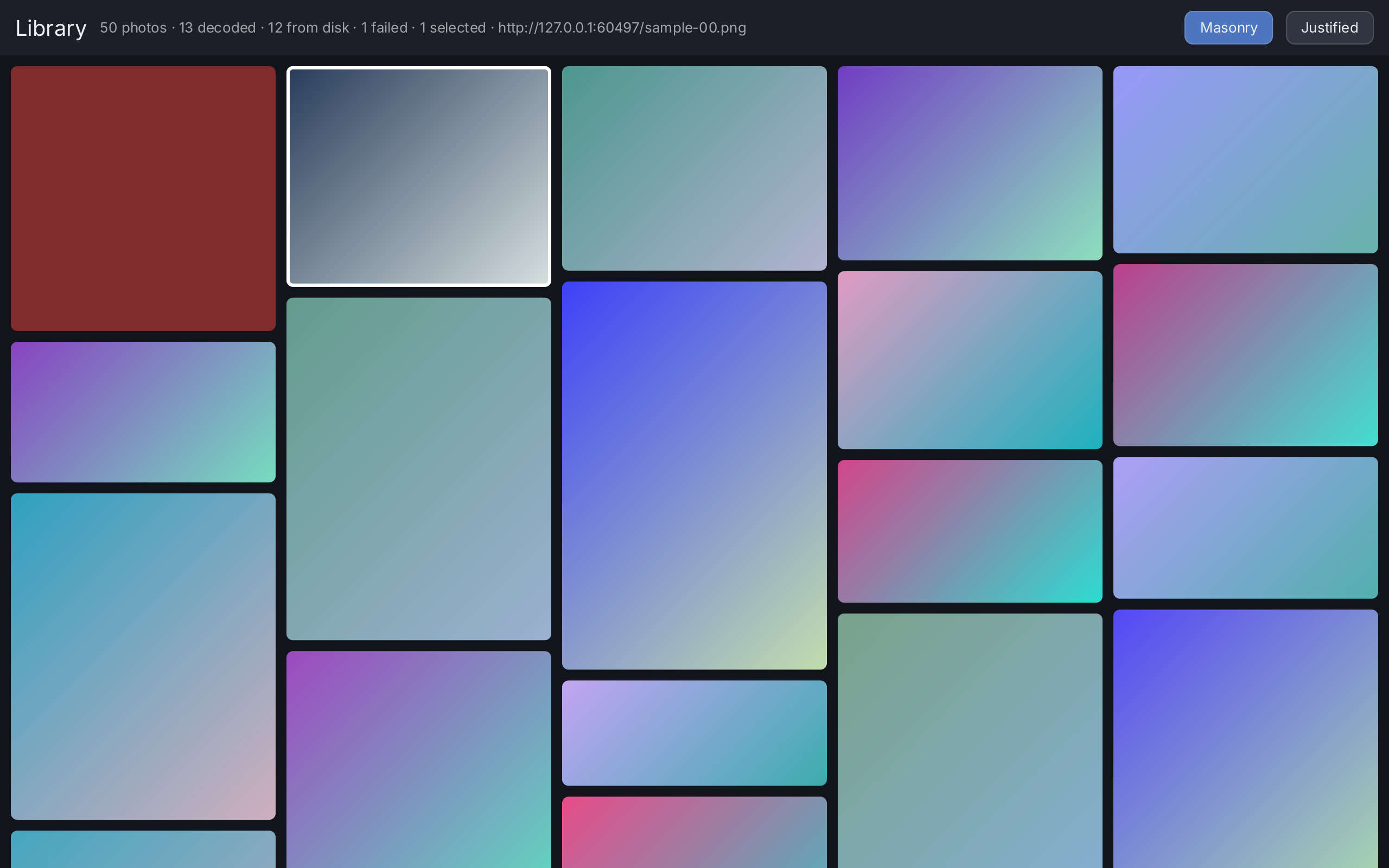
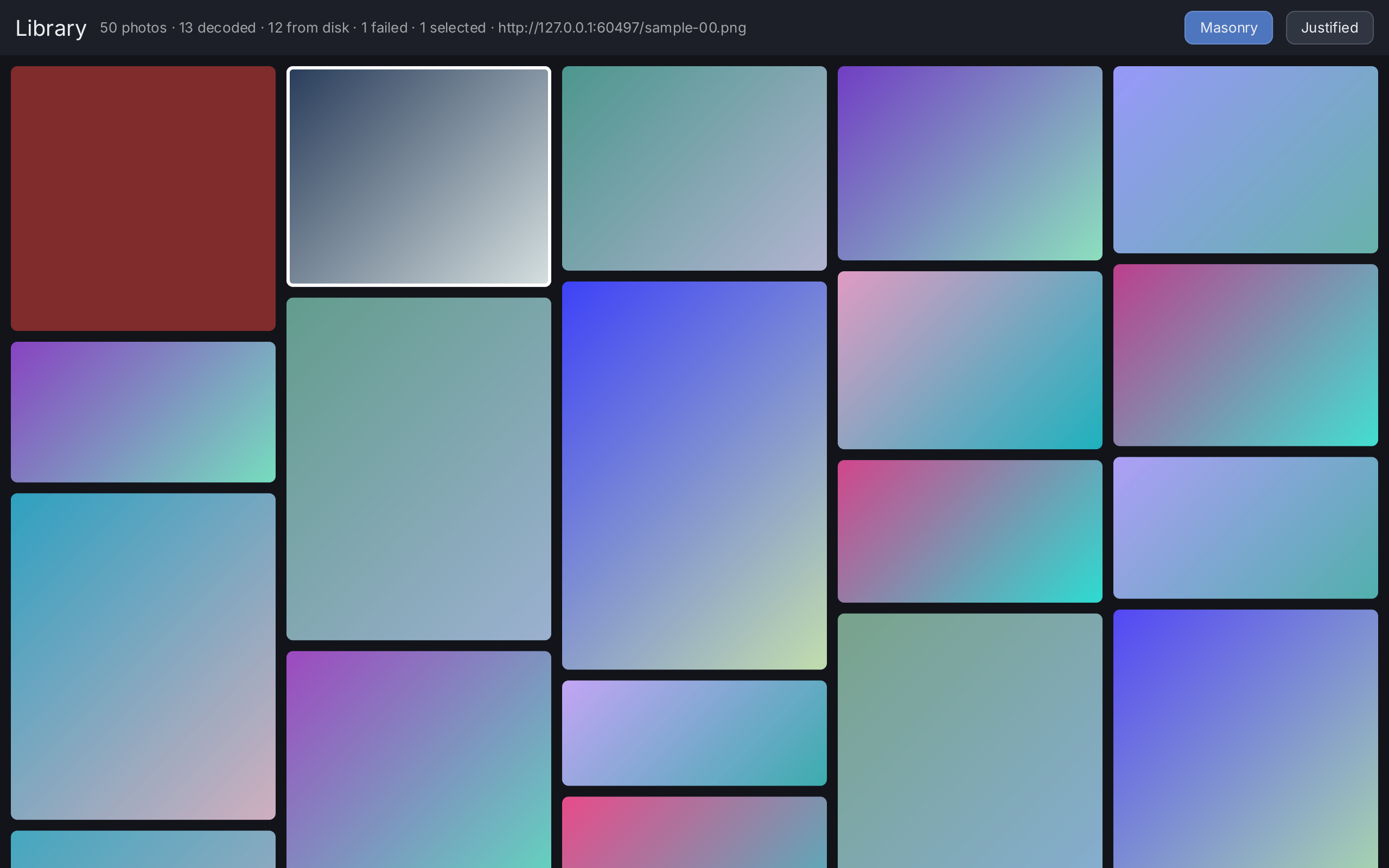
The example uses its own dark palette, because the colors are part of a photo viewer’s design. It looks the same in the light and the dark theme.
What to try
- Scroll with the mouse wheel, or drag the pictures. A fast drag flings, and the gallery keeps going.
- Click a tile to select it. Shift-click selects a range. Control-click or Command-click adds or removes one tile. The toolbar shows the selection count and the ID of the last picked entry, as long as that entry is still selected.
- After a click the gallery has the focus. Use the arrow keys, Page Up, Page Down, Home and End to move. Space toggles the selection of the current tile.
- Switch between Masonry and Justified.
- Look for the red tiles. With the generated samples, two entries are broken on purpose:
broken.pngexists but is not a picture, andmissing.jpgdoes not exist. The example addsmissing.jpgwith-diras well. A failed source becomes a visible tile state, not a broken frame. - Run the example twice. The first run decodes the pictures, the second run answers almost all of them from the thumbnail cache. The “from disk” counter shows the cache hits.
How it works
The program builds an asset.Collection of metadata and a ui.Gallery once, outside the view function. It
creates an asset.Pipeline that delivers its results through app.Post and keeps thumbnails in a disk cache,
and hands it to ui.SetImagePipeline. Every second picture is served by a small HTTP file server on the
loopback interface, so both asset.File and asset.HTTP sources are in use without a network.
The view function holds only two pieces of state: the chosen layout and the last selected ID. The pipeline
counters and the selection are not state, so the toolbar records what it showed, and the refresh goroutine posts
a comparison to the UI goroutine and calls app.Invalidate when they differ. There is no view
and no state per picture. Scrolling does not run the view function at all. The gallery binds a pool of tiles to
the visible entries and decodes the band just outside the viewport as prefetch (Overscan).
Read Images for the pipeline and Concurrency for why
results come back through app.Post.
Run it
From the repository root:
go run ./cmd/example-galleryWithout -dir the example writes 48 generated pictures and broken.png into gift-gallery/samples in the user
cache directory, and shows those. It writes a picture only if the file is not there yet. The -cache flag does not
move this folder.
| Flag | Default | Meaning |
|---|---|---|
-dir | $GIFT_GALLERY_DIR | Directory of JPEG and PNG pictures. Empty generates the samples. |
-cache | gift-gallery in the user cache directory | Persistent thumbnail cache directory. Empty disables the disk cache. |
To browse your own pictures:
go run ./cmd/example-gallery -dir ~/PicturesThe example passes the pipeline counters to the backend, so a build with metrics shows the decode, disk cache and budget numbers in the measurement report:
GIFT_METRICS=1 go run -tags giftmetrics ./cmd/example-gallerySee Diagnostics for the measurement report.
Source
// Command example-gallery is the virtualised image gallery of the project
// plan, section 10, with the complete image pipeline of section 12, step 4:
// real files, real HTTP, cold loading, errors and a thumbnail cache that
// survives a restart.
//
//	go run ./cmd/example-gallery
//	go run ./cmd/example-gallery -dir ~/Pictures
//	GIFT_METRICS=1 go run -tags giftmetrics ./cmd/example-gallery
//
// Scroll with the wheel or by dragging; a fling keeps going. Click a tile to
// select it, shift-click or control-click to extend, and use the arrow keys
// once the gallery has the focus. The two buttons switch layout at runtime.
//
// With no -dir the example writes a few dozen pictures into its own cache
// directory on first run and shows those, half of them over a local HTTP
// server so that both source kinds are exercised without a network. Two
// entries are deliberately broken, so the error state is on screen rather than
// hypothetical. The toolbar counts decodes against disk cache hits: run it
// twice and the second run is almost all cache.
package main

import (
	"flag"
	"fmt"
	"image"
	"image/color"
	"image/jpeg"
	"image/png"
	"log/slog"
	"net"
	"net/http"
	"os"
	"path/filepath"
	"strconv"
	"strings"
	"time"

	"github.com/worldiety/gift"
	"github.com/worldiety/gift/asset"
	backend "github.com/worldiety/gift/backend/ebiten"
	"github.com/worldiety/gift/geom"
	"github.com/worldiety/gift/internal/example"
	"github.com/worldiety/gift/ui"
)

var (
	dir   = flag.String("dir", os.Getenv("GIFT_GALLERY_DIR"), "directory of JPEG/PNG pictures; empty generates samples")
	cache = flag.String("cache", defaultCacheDir(), "persistent thumbnail cache directory; empty disables it")
)

func main() {
	flag.Parse()
	if err := run(); err != nil {
		fmt.Fprintln(os.Stderr, "example-gallery:", err)
		os.Exit(1)
	}
}

func run() error {
	if err := example.LoadFont(); err != nil {
		return err
	}
	srcDir := *dir
	if srcDir == "" {
		var err error
		if srcDir, err = generateSamples(); err != nil {
			return err
		}
	}
	sources, err := scan(srcDir)
	if err != nil {
		return err
	}
	if len(sources) == 0 {
		return fmt.Errorf("no JPEG or PNG files in %s", srcDir)
	}
	// One failure on purpose, and in the generated case a second one: a file
	// that is not there, and broken.png, which exists and is not a picture.
	// The project plan, section 15, wants a failed source to become a visible
	// tile state and never a broken frame.
	sources = append(sources, asset.File(filepath.Join(srcDir, "missing.jpg")))

	items := make([]asset.Metadata, len(sources))
	byID := make(map[asset.ID]asset.Source, len(sources))
	for i, s := range sources {
		items[i] = s.Metadata()
		byID[items[i].ID] = s
	}

	// The knot of this wiring, spelled out because it is the only awkward
	// part: the pipeline needs app.Post for delivery, and the root needs the
	// gallery. The closure below reads the variable rather than a copy, so
	// the two are tied without a second construction.
	var gallery *ui.Gallery
	app := gift.New(gift.Options{Root: func(ctx *gift.Context) gift.View {
		return browser(ctx, gallery)
	}})
	pipe := asset.NewPipeline(asset.Config{
		Deliver: app.Post,
		Disk:    asset.DiskCacheConfig{Dir: *cache},
		Logger:  slog.New(slog.NewTextHandler(os.Stderr, &slog.HandlerOptions{Level: slog.LevelInfo})),
	})
	// Close and then drain, which is the contract [asset.Config.Deliver]
	// states: the closures Close produces still have to run, because each one
	// releases a thumbnail reference. The frame loop has stopped by then, so
	// nothing else would run them.
	defer func() {
		pipe.Close()
		app.DrainPosts()
	}()
	ui.SetImagePipeline(pipe)

	gallery = ui.NewGallery(asset.NewCollection(items))
	gallery.SetSources(func(id asset.ID) asset.Source { return byID[id] })
	stats = pipe.Stats
	go refresh(app, gallery)

	return backend.Run(app, backend.Config{
		Title: "gift gallery", Width: 1280, Height: 800,
		// One line, and the decode, disk cache and budget counters appear in
		// the measurement report. The backend does not own the pipeline, so
		// it cannot wire this itself.
		AssetStats: ui.ImagePipelineStats,
	})
}

// stats is how the toolbar reaches the pipeline counters without every view
// function taking a pipeline argument.
var stats = func() asset.Stats { return asset.Stats{} }

// shown is what the toolbar put on screen the last time it was built.
//
// Nothing in the toolbar is a state slot: the counters belong to the pipeline
// and the selection to the gallery, and both change without a view function
// running — a thumbnail arriving repaints its tile and nothing else, and a
// control-click or space that deselects writes no state. Left alone, the
// status line would show 0 decoded on a cold start until the next click.
// [refresh] compares this against the live figures and rebuilds when they
// differ. Written and read on the UI goroutine only.
var shown toolbarFacts

type toolbarFacts struct {
	decodes, diskHits, failed uint64
	selection                 uint64
}

func facts(g *ui.Gallery) toolbarFacts {
	s := stats()
	return toolbarFacts{
		decodes: s.Decodes, diskHits: s.DiskHits, failed: s.Failed,
		selection: g.Selection().Version(),
	}
}

// refresh keeps the toolbar honest, four times a second. The comparison runs
// in a posted closure and not here, because the gallery and the shown facts
// belong to the UI goroutine; the cost of an idle tick is one struct compare.
// A root rebuild is the price of a change, which is fine at this rate: the
// gallery does not rebuild its tiles for it.
func refresh(app *gift.App, g *ui.Gallery) {
	for range time.Tick(250 * time.Millisecond) {
		app.Post(func() {
			if facts(g) != shown {
				app.Invalidate()
			}
		})
	}
}

// scan collects the pictures of a directory, serving every second one over a
// local HTTP server so that both source kinds are exercised offline.
func scan(dir string) ([]asset.Source, error) {
	entries, err := os.ReadDir(dir)
	if err != nil {
		return nil, err
	}
	base, err := serve(dir)
	if err != nil {
		return nil, err
	}
	var out []asset.Source
	for _, e := range entries {
		switch strings.ToLower(filepath.Ext(e.Name())) {
		case ".jpg", ".jpeg", ".png":
		default:
			continue
		}
		if len(out)%2 == 0 {
			out = append(out, asset.File(filepath.Join(dir, e.Name())))
		} else {
			out = append(out, asset.HTTP(base+e.Name()))
		}
	}
	return out, nil
}

// serve starts a file server on the loopback interface and returns its base
// URL. http.FileServer sends Last-Modified and answers conditional requests,
// so this exercises the real HTTP revision path and not a stub.
func serve(dir string) (string, error) {
	l, err := net.Listen("tcp", "127.0.0.1:0")
	if err != nil {
		return "", err
	}
	go http.Serve(l, http.FileServer(http.Dir(dir)))
	return "http://" + l.Addr().String() + "/", nil
}

// generateSamples writes a few dozen pictures next to the thumbnail cache, so
// that the example works on a machine with no photographs on it and so that a
// second run is a warm run.
func generateSamples() (string, error) {
	dir := filepath.Join(defaultCacheDir(), "samples")
	if err := os.MkdirAll(dir, 0o755); err != nil {
		return "", err
	}
	if err := os.WriteFile(filepath.Join(dir, "broken.png"), []byte("not a picture"), 0o600); err != nil {
		return "", err
	}
	for i := range 48 {
		name := fmt.Sprintf("sample-%02d.%s", i, map[bool]string{true: "png", false: "jpg"}[i%2 == 0])
		path := filepath.Join(dir, name)
		if _, err := os.Stat(path); err == nil {
			continue
		}
		f, err := os.Create(path)
		if err != nil {
			return "", err
		}
		img := sample(i)
		if strings.HasSuffix(name, ".png") {
			err = png.Encode(f, img)
		} else {
			err = jpeg.Encode(f, img, &jpeg.Options{Quality: 85})
		}
		f.Close()
		if err != nil {
			return "", err
		}
	}
	return dir, nil
}

// sample paints one picture: a diagonal two colour gradient at a size that
// varies per index, so the masonry columns are not all the same shape.
func sample(i int) image.Image {
	w, h := 600+(i*173)%900, 500+(i*97)%700
	img := image.NewRGBA(image.Rect(0, 0, w, h))
	a := color.RGBA{uint8(40 + i*37%200), uint8(60 + i*91%180), uint8(90 + i*53%160), 255}
	b := color.RGBA{255 - a.R, 255 - a.G/2, 255 - a.B/3, 255}
	for y := range h {
		for x := range w {
			t := float64(x+y) / float64(w+h)
			img.SetRGBA(x, y, color.RGBA{
				R: uint8(float64(a.R)*(1-t) + float64(b.R)*t),
				G: uint8(float64(a.G)*(1-t) + float64(b.G)*t),
				B: uint8(float64(a.B)*(1-t) + float64(b.B)*t),
				A: 255,
			})
		}
	}
	return img
}

func defaultCacheDir() string {
	d, err := os.UserCacheDir()
	if err != nil {
		return filepath.Join(os.TempDir(), "gift-gallery")
	}
	return filepath.Join(d, "gift-gallery")
}

var (
	ink    = ui.RGB(18, 20, 26)
	chrome = ui.RGB(28, 31, 40)
	label  = ui.RGB(236, 238, 242)
	muted  = ui.RGBA(255, 255, 255, 150)
	hair   = ui.Border{Width: 1, Color: ui.RGBA(255, 255, 255, 40)}

	tab    = ui.ButtonStyle{Background: ui.RGB(48, 53, 66), Border: hair, CornerRadius: 8}
	tabOn  = ui.ButtonStyle{Background: ui.RGB(78, 118, 190), Border: hair, CornerRadius: 8}
	tabHot = ui.ButtonStyle{Background: ui.RGB(64, 71, 88), Border: hair, CornerRadius: 8}

	tiles = ui.TileStyle{
		CornerRadius: 6,
		Palette:      []ui.Color{ui.RGB(52, 58, 72), ui.RGB(46, 52, 64)},
		Provisional:  ui.RGBA(255, 255, 255, 22),
		Error:        ui.RGB(128, 44, 44),
		Selected:     ui.Border{Width: 3, Color: ui.RGB(255, 255, 255)},
		Cursor:       ui.Border{Width: 2, Color: ui.RGBA(255, 255, 255, 140)},
	}
)

// browser is the whole application: a toolbar and the gallery.
//
// Note what is not here. There is no view per entry, no state per entry and no
// list of tiles; scrolling this function's output does not call this function.
// The pictures reach the screen through ui.SetImagePipeline, which ui.Image
// would use just as well.
func browser(ctx *gift.Context, g *ui.Gallery) gift.View {
	justified := ctx.State("justified", false)
	picked := ctx.State("picked", asset.ID(""))

	arrangement := ui.Masonry().MinColumnWidth(220).Gap(10)
	if ctx.Read(justified) {
		arrangement = ui.Justified().RowHeight(200).Gap(10)
	}

	// A greedy plate under everything, which is what ui.Window does for a
	// demo that uses the semantic palette. This one has a palette of its own
	// — it is a photo viewer and the ink is part of the design — so it spells
	// the same idiom with its own colour. gift paints no background; see
	// gift.Options.Root.
	return ui.ZStack(ui.Box().Background(ink), ui.VStack(
		toolbar(ctx, g, justified, ctx.Read(picked)),
		ui.ImageGallery(g).
			Layout(arrangement).
			Tile(tiles).
			// One row's worth of band: the pictures about to appear are
			// decoded as prefetch, which never delays a visible one.
			Overscan(240).
			Padding(10).
			Background(ink).
			OnSelect(func(id asset.ID) { picked.Set(id) }).
			Flex(1),
	).Background(ink))
}

func toolbar(ctx *gift.Context, g *ui.Gallery, justified *gift.State[bool], picked asset.ID) gift.View {
	on := ctx.Read(justified)
	shown = facts(g)
	// Cold versus warm, on screen: a first run decodes everything, a second
	// run answers from the persistent thumbnail cache.
	status := fmt.Sprintf("%d photos · %d decoded · %d from disk · %d failed",
		g.Collection().Len(), shown.decodes, shown.diskHits, shown.failed)
	if n := g.Selection().Len(); n > 0 {
		status += " · " + strconv.Itoa(n) + " selected"
		// The last entry clicked, unless that click was the one that took it
		// out of the selection.
		if g.Selection().Contains(picked) {
			status += " · " + string(picked)
		}
	}
	return ui.HStack(
		ui.Text("Library").FontSize(20).Foreground(label),
		ui.Text(status).FontSize(13).Foreground(muted),
		ui.Spacer(),
		modeButton("Masonry", !on, func() { justified.Set(false) }),
		modeButton("Justified", on, func() { justified.Set(true) }),
	).Gap(12).PaddingInsets(geom.Insets{Top: 10, Right: 14, Bottom: 10, Left: 14}).
		Align(geom.Alignment{Y: 0.5}).
		Background(chrome)
}

func modeButton(name string, active bool, set func()) ui.ButtonView {
	style := tab
	if active {
		style = tabOn
	}
	return ui.Button(ui.Text(name).FontSize(13).Foreground(label), set).
		Style(style).HoverStyle(tabHot).PressedStyle(tabOn).
		PaddingInsets(geom.Insets{Top: 7, Right: 14, Bottom: 7, Left: 14})
}
View on GitHub ↗
· run it from the repository root with go run ./cmd/example-gallery