Kitchen Sink
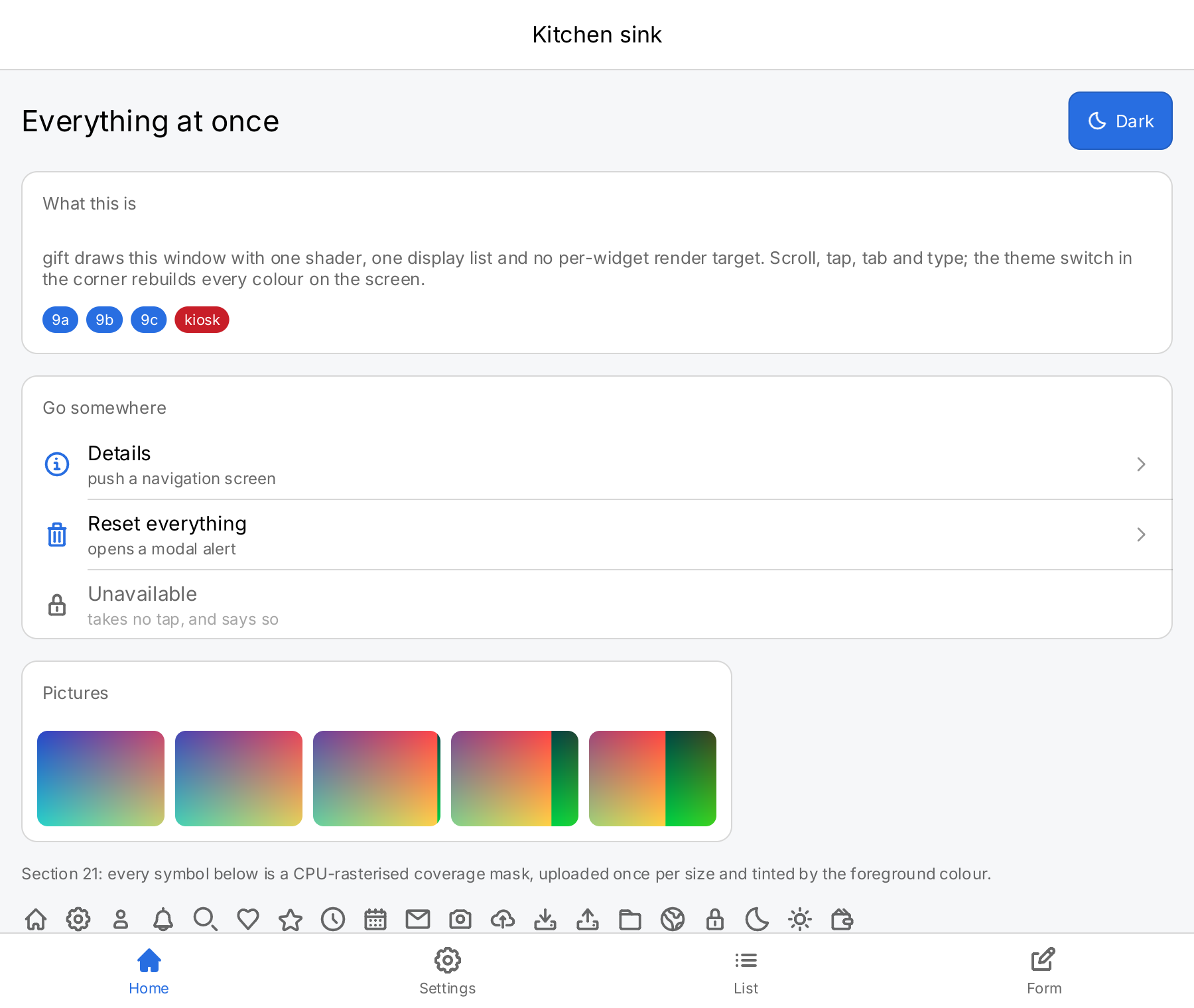
The kitchen sink puts most of gift into one window. Four tabs run along the bottom: a navigation stack you can drill
into, a settings list with every control, a long list next to a virtual list, and a form with a text field, the
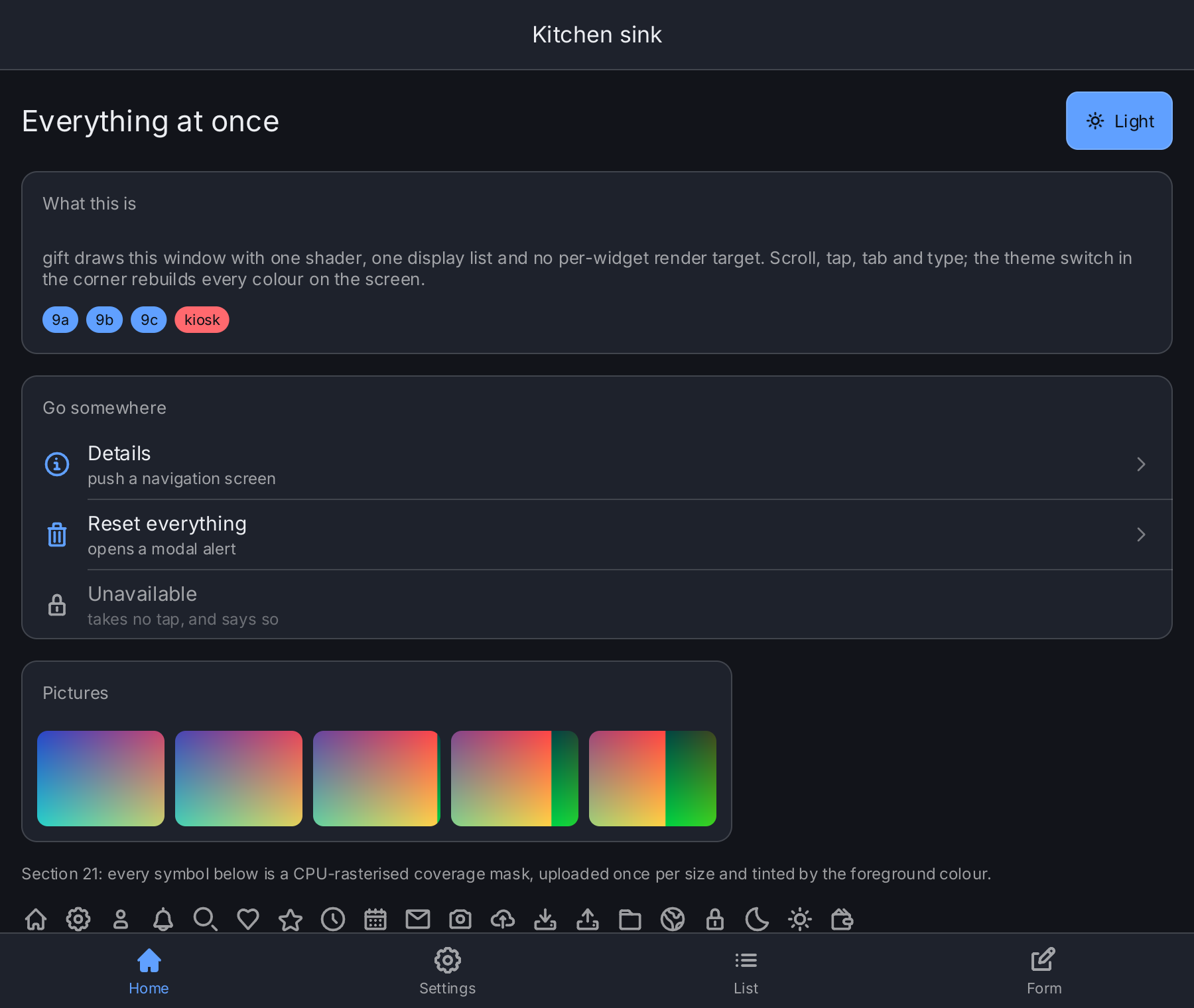
on-screen keyboard, a sheet, a file picker and an alert. A button in the top right corner of the Home tab switches
the whole window between the light and the dark theme. The views name semantic colors such as ui.ColorAccent and
ui.ColorSecondaryLabel, and the current theme resolves them, so the switch passes no color to any view.
Each tab is a gift.Component with a rebuild scope of its own, and it reads only the
state slots it shows. A flip of a toggle on the Settings tab therefore rebuilds that tab and not the other three.
An inactive tab stays mounted, so a slot that two tabs read rebuilds both: Nudge it along writes the progress,
which the Home tab reads for its Details screen. The comment on Screen in the source explains the measurement behind that
choice.
What to try
- Home: tap Details to push a screen onto the navigation stack, then Go deeper to push another one. Go back with the back button in the navigation bar. The escape key pops a screen too, also when nothing holds the focus, but not while the alert is open. Tap Reset everything to open a modal alert. The Unavailable row is disabled and ignores taps. Below the rows, five pictures load through the image pipeline, and a strip of twenty icons scrolls sideways.
- Settings: flip the toggles, drag the volume slider, pick a quality in the segmented control. Nudge it along advances the progress bar by ten percent, and Busy switches an indeterminate progress bar on and off.
- List: scroll two hundred rows built as an ordinary
ui.List, or switch the segmented control to aui.VirtualListwith one hundred thousand rows. A tap on a row writes a line that the Form tab shows. - Form: tap the text field. The on-screen keyboard comes up because the program turns it on with
ui.SetOnScreenKeyboard(nil, true), and the rest of the window is laid out above it. Press enter or Save to greet the name you typed. Show a sheet slides up a sheet, Pick files opens the file picker in a sheet, starting in your home directory. - Theme: tap Dark or Light in the top right corner of the Home tab.
Run it
From the repository root:
go run ./cmd/example-kitchensinkOn first start, the program writes five small sample PNGs into gift/kitchensink below your user cache directory
and shows them on the Home tab. The window opens at 900 × 760 logical pixels.
The -icons flag prints the icon cache counters once per tick for the first one and a half seconds: drawn frames,
and icon masks rasterized, uploaded and resident. It shows how a screen with many new icons fills in over a few frames,
because gift uploads only a limited number of icon masks per drawn frame.
go run ./cmd/example-kitchensink -iconsTo get frame timings, build with the giftmetrics tag and set GIFT_METRICS, as described in
Diagnostics:
GIFT_METRICS=1 go run -tags giftmetrics ./cmd/example-kitchensinkCode
kitchensink.go
// The demo's views live alongside main and their golden tests in this package.
// Screenshots of the running demo use giftauto, not an importable UI copy.
package main

import (
	"fmt"
	"image"
	"image/color"
	"image/png"
	"io/fs"
	"os"
	"path/filepath"
	"strconv"
	"strings"
	"time"

	"github.com/worldiety/gift"
	"github.com/worldiety/gift/asset"
	"github.com/worldiety/gift/geom"
	"github.com/worldiety/gift/icon/outline"
	"github.com/worldiety/gift/icon/solid"
	"github.com/worldiety/gift/ui"
	"github.com/worldiety/gift/ui/filepicker"
)

// App is the application the theme switch asks to rebuild.
//
// It is a package variable for the reason cmd/example-counter gives for the
// same compromise: [ui.SetTheme] needs the [gift.App], the switch is built
// deep inside a view function, and threading the handle through every builder
// would be noise in a demo whose subject is something else. The command sets
// it before the first frame; a test sets it to the harness's App.
var App *gift.App

// Pictures are the sources the Home tab shows. [Samples] generates them.
//
// They are a package variable and not a state slot because they never change
// after start-up: the command fills them in before the window opens and a test
// fills them in before it mounts.
var Pictures []asset.Source

// Files is what the form tab's file picker browses, and FilesStart the
// directory in it the picker opens in. The command sets them to the whole disk
// and the home directory; a test sets a file system of its own. A nil Files
// leaves the picker's button disabled.
var (
	Files      fs.FS
	FilesStart = "."
)

// --- the application state ----------------------------------------------------

// Screen is the root view function. Everything the application knows is a
// state slot read here and written by a closure below; nothing is stored in a
// widget, which is the one-way data flow of the project plan, section 5.
//
// # Every tab is a component, and that is the whole point of this file
//
// The obvious spelling of this program is one root function that reads all ten
// slots and builds all four tabs. It works, and it is wrong, and the earlier
// version of this file said the opposite in a comment: "the other three tabs
// are not dirty and are not rebuilt at all". They were. A dependency is
// registered on the *scope* that read the slot, so a root that reads
// everything is a root that is invalidated by everything, and a root rebuild
// rebuilds all four tabs including the three nobody can see.
//
// Measured on this demo at 900x760, the rebuild one tap on the Settings
// "Nudge it along" row causes — it writes one float:
//
//	before   702 µs   6255 allocations   (a full root rebuild, all four tabs)
//	after     70 µs    485 allocations   (Settings and Home, which both show it)
//
// On a Raspberry Pi 4 at this project's ×10 derate that is 7.0 ms against
// 0.70 ms: 42 % of a 60 Hz frame against 4 %, for one tap. A slider drag pays
// it on every frame of the drag, which is where it stops being an academic
// figure.
//
// So each tab is a [gift.Component] with a scope of its own, and each one
// reads the slots it actually uses. The root reads two: the selected tab, and
// whether the alert is up — the two things the root itself has to decide. A
// write to any other slot now reaches exactly the tabs that show it — for the
// progress float that is Settings and Home, whose card carries the same bar,
// and Home is rebuilt although it is hidden, because a hidden tab stays
// mounted; see ui.TabBarView. The list and form tabs are left alone.
// TestATapOnASettingsRowRebuildsOnlyTheTabsThatShowIt next door is that
// property as a test.
//
// The alert is deliberately still a root dependency. The modal layer is
// outermost, so the root is the scope that has to know; opening a dialog is a
// once-in-a-while action and a full rebuild there is the honest price of
// having the scrim cover the tab bar.
func Screen(ctx *gift.Context) gift.View {
	st := state{
		tab:      ctx.State("tab", 0),
		depth:    ctx.State("depth", 0),
		alert:    ctx.State("alert", false),
		sheet:    ctx.State("sheet", false),
		picking:  ctx.State("picking", false),
		on:       ctx.State("on", true),
		notify:   ctx.State("notify", false),
		volume:   ctx.State("volume", 0.62),
		quality:  ctx.State("quality", 1),
		progress: ctx.State("progress", 0.35),
		busy:     ctx.State("busy", false),
		saved:    ctx.State("saved", ""),
		virtual:  ctx.State("virtual", 0),
		from:     ctx.State("from", ui.TimeOf(9, 0)),
		to:       ctx.State("to", ui.TimeOf(10, 30)),
		day:      ctx.State("day", ui.DateFrom(time.Now())),
	}
	// The two the root itself decides with, and nothing else; see above.
	ctx.Read(st.tab)
	ctx.Read(st.alert)
	ctx.Read(st.sheet)
	ctx.Read(st.picking)

	body := ui.TabBar(st.tab.Get(), st.tab.Set,
		ui.Tab("Home", outline.Home, st.tabComponent("home")).SelectedIcon(solid.Home),
		ui.Tab("Settings", outline.Cog, st.tabComponent("settings")).SelectedIcon(solid.Cog),
		ui.Tab("List", outline.List, st.tabComponent("list")).SelectedIcon(solid.ClipboardList),
		ui.Tab("Form", outline.Edit, st.tabComponent("form")).SelectedIcon(solid.Edit),
	)

	// The modal layer is outermost, so its scrim covers the tab bar as well.
	// A dialog that leaves the tab bar live is a dialog the user can walk
	// away from, which is the opposite of modal.
	// The alert view is built whether or not it is on the screen, and
	// ui.ModalView.Presented decides. Passing nil to close would unmount it,
	// and an unmounted dialog cannot be seen to leave; see that method. The
	// price is a handful of nodes that stay mounted and hidden after the
	// first time the alert is opened.
	alert := ui.Alert(
		"Reset everything?",
		"Every setting on this screen goes back to its default. This cannot be undone.",
		ui.AlertCancel("Cancel", func() { st.alert.Set(false) }),
		ui.AlertDestructive("Reset", func() {
			st.on.Set(true)
			st.notify.Set(false)
			st.volume.Set(0.62)
			st.quality.Set(1)
			st.progress.Set(0.35)
			st.busy.Set(false)
			st.saved.Set("")
			st.alert.Set(false)
		}),
	)

	// The keyboard is an overlay over the whole application and is the last
	// child, so it is drawn last and hit tested first. It draws nothing at all
	// while no field has the focus, and while it is showing the rest of the
	// window — the modal host with the tabs and the tab bar — is laid out in
	// the space above it, so no form needs room of its own for it; see
	// ui.Overlay.AvoidKeyboard.
	//
	// [ui.Window] is the first thing here and not a detail: gift paints
	// nothing an application did not ask for, so without it the gaps between
	// the cards are transparent black — which is what this demo shipped as,
	// on thirty to forty per cent of its pixels, while every golden of it
	// looked right because the harness cleared its own canvas. See ui.Window.
	// The sheet is outside the modal host, so it is drawn over the alert and
	// hit tested before it: an alert opened from inside the sheet would come
	// up under it rather than over it, which is why nothing in the sheet
	// opens one.
	return ui.Window(
		ui.Sheet(
			ui.Modal(body, alert).
				Presented(st.alert.Get()).
				OnDismiss(func() { st.alert.Set(false) }),
			st.sheetContent(),
		).
			Presented(st.sheet.Get()).
			OnDismiss(func() { st.sheet.Set(false) }),
		ui.OnScreenKeyboard(),
	).Align(geom.Bottom)
}

// state is the handful of slots the screens read and write. It is a struct of
// slots and not of values, so a screen builder can hand a setter to a control
// without the root having to thread one through.
type state struct {
	tab, depth, quality *gift.State[int]
	virtual             *gift.State[int]
	alert, on, notify   *gift.State[bool]
	sheet, picking      *gift.State[bool]
	busy                *gift.State[bool]
	volume, progress    *gift.State[float64]
	saved               *gift.State[string]
	from, to            *gift.State[ui.TimeOfDay]
	day                 *gift.State[ui.Date]
}

// tabComponent wraps one tab's screen in a [gift.Component], which is what
// gives it a rebuild scope of its own, and subscribes that scope to the slots
// that tab reads and no others.
//
// [gift.Context.Read] registers a dependency and [gift.State.Get] deliberately
// does not — Get is what an event handler uses, where reading a value must not
// subscribe anything. The screen builders below are ordinary methods that have
// no Context, so they use Get; the Read calls here are what makes a write to
// one of those slots reach this tab. Getting this wrong has two failure modes
// and both are silent:
//
//   - too few Reads and a write invalidates nothing. The value is correct, the
//     handler runs, and the screen does not move.
//   - too many Reads — the mistake this file used to make at the root — and a
//     write invalidates screens that do not depend on it. Everything looks
//     right and the frame costs an order of magnitude more than it should.
//
// The list tab reads only which of its two lists is showing, and that is not an
// oversight: otherwise it only *writes* the saved slot, which the form tab
// displays. It is therefore built once per switch and never otherwise, which is
// the right answer for two hundred rows.
func (s state) tabComponent(which string) gift.View {
	return gift.Component(which, func(ctx *gift.Context) gift.View {
		switch which {
		case "home":
			ctx.Read(s.depth)
			ctx.Read(s.progress)
			return s.home()
		case "settings":
			ctx.Read(s.on)
			ctx.Read(s.notify)
			ctx.Read(s.volume)
			ctx.Read(s.quality)
			ctx.Read(s.progress)
			ctx.Read(s.busy)
			return s.settings()
		case "list":
			ctx.Read(s.virtual)
			return s.longList()
		case "form":
			ctx.Read(s.saved)
			ctx.Read(s.from)
			ctx.Read(s.to)
			ctx.Read(s.day)
			return s.form()
		}
		panic("no such tab: " + which)
	})
}

// nameEditor is the retained text buffer of the form's field.
//
// An editor is the model: it is mutated in place by typing, so whatever holds
// it only has to hold the same pointer for as long as the field lives. Inside
// a component that is ui.Editor, which keeps the pointer in a state slot of
// that component. The form here is built by a method with no Context of its
// own, so it is a package variable instead: a program with several fields
// keeps several of these, or one per record; a program with one window and
// one field keeps one here.
var nameEditor = ui.NewTextEditor("")

// --- tab one: navigation, cards, images ----------------------------------------

// home is a navigation stack. The stack holds no history — see
// ui.NavigationStackView — so "push" here is the depth going up by one and
// "pop" is it going down, and the list of screens is derived from it.
func (s state) home() gift.View {
	depth := s.depth.Get()
	screens := make([]ui.ScreenSpec, 0, 3)
	screens = append(screens, ui.Screen("Kitchen sink", s.overview()))
	if depth >= 1 {
		screens = append(screens, ui.Screen("Details", s.details()))
	}
	if depth >= 2 {
		screens = append(screens, ui.Screen("Deeper", ui.VScroll(
			ui.Card(
				ui.Text("There is nothing down here.").Foreground(ui.ColorSecondaryLabel),
				ui.Text("Tap the back affordance, or press escape.").
					FontSize(13).Foreground(ui.ColorSecondaryLabel),
			).Header("The end"),
		).Padding(16).Flex(1)))
	}
	return ui.NavigationStack(func() { s.depth.Set(max(0, s.depth.Get()-1)) }, screens...).
		BackIcon(outline.AngleLeft)
}

func (s state) overview() gift.View {
	return ui.VScroll(
		ui.HStack(
			ui.Text("Everything at once").FontSize(22),
			ui.Spacer(),
			themeSwitch(),
		).Align(geom.Center),

		ui.Card(
			ui.Text("gift draws this window with one shader, one display list and no "+
				"per-widget render target. Scroll, tap, tab and type; the theme switch "+
				"in the corner rebuilds every colour on the screen.").
				FontSize(13).Foreground(ui.ColorSecondaryLabel),
			ui.HStack(
				ui.Badge("9a").Color(ui.ColorAccent),
				ui.Badge("9b").Color(ui.ColorAccent),
				ui.Badge("9c").Color(ui.ColorAccent),
				ui.Badge("kiosk").Color(ui.ColorDanger),
				ui.Spacer(),
			).Gap(6),
		).Header("What this is"),

		// A card wrapping a list: the card supplies the face and the corner,
		// the list supplies the rows and the hairlines, and the card's content
		// padding is zero so that a pressed row reaches both edges.
		ui.Card(
			ui.List(
				ui.Row("Details").
					Icon(outline.InfoCircle).
					Subtitle("push a navigation screen").
					Chevron(outline.AngleRight).
					OnTap(func() { s.depth.Set(1) }).
					Key("details"),
				ui.Row("Reset everything").
					Icon(outline.TrashBin).
					Subtitle("opens a modal alert").
					Chevron(outline.AngleRight).
					OnTap(func() { s.alert.Set(true) }).
					Key("reset"),
				ui.Row("Unavailable").
					Icon(outline.Lock).
					Subtitle("takes no tap, and says so").
					Disabled(true).
					OnTap(func() { panic("a disabled row must never fire") }).
					Key("locked"),
			).SeparatorInsets(ui.RowPadding+22+12, 0),
		).Padding(0).Header("Go somewhere"),

		ui.Card(pictureStrip()...).Padding(12).Gap(8).Header("Pictures"),

		ui.Text("Section 21: every symbol below is a CPU-rasterised coverage mask, "+
			"uploaded once per size and tinted by the foreground colour.").
			FontSize(12).Foreground(ui.ColorSecondaryLabel),
		iconStrip(),
	).Gap(16).Padding(16).Flex(1)
}

func (s state) details() gift.View {
	return ui.VScroll(
		ui.Card(
			ui.Text("This screen is mounted the whole time the one under it is on top, "+
				"and the other way round: neither is unmounted, so neither loses its "+
				"scroll offset or its half typed text.").
				FontSize(13).Foreground(ui.ColorSecondaryLabel),
		).Header("Covered, not unmounted"),
		ui.Card(
			ui.List(
				ui.Row("Go deeper").
					Icon(outline.ArrowRight).
					Chevron(outline.AngleRight).
					OnTap(func() { s.depth.Set(2) }).
					Key("deeper"),
				ui.Row("Progress").Accessory(ui.ProgressBar(s.progress.Get()).Frame(90, 6)).Key("p"),
				ui.Row("Indeterminate").
					Subtitle("holds the device awake while it is mounted").
					Accessory(ui.ProgressBar(0).Indeterminate().Frame(120, 6)).
					Key("i"),
			),
		).Padding(0).Header("More rows"),
	).Gap(16).Padding(16).Flex(1)
}

// pictureStrip is a row of real pictures, drawn through the same pipeline and
// the same GPU texture table the gallery uses.
//
// It is a horizontal scroller and not a plain row, for the reason iconStrip is
// one: a fixed number of fixed width things in a window whose width is the
// user's is an overflow waiting for a narrow window, and the overflow model of
// the project plan, section 7, does not clip it away — it reports it. A demo
// that overflowed at 360 logical pixels of *width* would be a demo that fails
// its own AssertNoOverflow.
//
// The sentence used to say "640 pixels", which was true and was not the claim
// it looked like: this demo was checked down to 640 tall and only to 480 wide,
// and it did overflow at 360 wide — in two other places, not here. See
// TestTheDemoHasNoOverflowAtASmallerWindow, which now sweeps 360 to 1920 at
// three densities.
func pictureStrip() []gift.View {
	cols := make([]gift.View, 0, len(Pictures))
	for i, p := range Pictures {
		cols = append(cols, ui.Image(p).
			Fit(ui.FitCover).
			Frame(96, 72).
			CornerRadius(8).
			Clip(true).
			Placeholder(ui.Fade(ui.ColorLabel, 0.08)).
			Label("sample "+strconv.Itoa(i)).
			Key("pic"+strconv.Itoa(i)))
	}
	if len(cols) == 0 {
		return nil
	}
	return []gift.View{ui.HScroll(cols...).Gap(8).MinHeight(72)}
}

// iconStrip is twenty distinct symbols at one size, which is the exact figure
// the project plan, section 21, uses when it says a screen with more new icons
// than the upload budget fills in over several drawn frames.
func iconStrip() gift.View {
	syms := []ui.Symbol{
		outline.Home, outline.Cog, outline.User, outline.Bell, outline.Search,
		outline.Heart, outline.Star, outline.Clock, outline.CalendarMonth, outline.Envelope,
		outline.CameraPhoto, outline.CloudArrowUp, outline.Download, outline.Upload, outline.Folder,
		outline.Globe, outline.Lock, outline.Moon, outline.Sun, outline.Wallet,
	}
	cols := make([]gift.View, 0, len(syms))
	for i, sym := range syms {
		cols = append(cols, ui.Icon(sym).
			Size(22).
			Foreground(ui.ColorSecondaryLabel).
			Key("icon"+strconv.Itoa(i)))
	}
	return ui.HScroll(cols...).Gap(10).MinHeight(22)
}

// --- tab two: every control of step 9a -------------------------------------------

func (s state) settings() gift.View {
	quality := []string{"Low", "Medium", "High"}
	return ui.VScroll(
		ui.Card(
			ui.List(
				ui.Section("Device").Key("s-device"),
				ui.Row("Screen").
					Icon(outline.DesktopPc).
					Accessory(ui.Toggle(s.on.Get(), s.on.Set).Key("screen-switch")).
					Key("screen"),
				ui.Row("Notifications").
					Icon(outline.Bell).
					Subtitle("two taps, not one").
					Accessory(ui.Toggle(s.notify.Get(), s.notify.Set).Key("notify-switch")).
					OnTap(func() { s.notify.Set(!s.notify.Get()) }).
					Key("notify"),

				ui.Section("Sound").Key("s-sound"),
				ui.Row("Volume").
					Icon(outline.VolumeUp).
					Value(strconv.Itoa(int(s.volume.Get()*100+0.5))+" %").
					Key("volume"),
				ui.Row("").
					Accessory(ui.Slider(s.volume.Get(), s.volume.Set).
						Flex(1).
						Key("volume-slider")).
					Key("volume-row"),

				ui.Section("Quality").Key("s-quality"),
				ui.Row("").
					Accessory(ui.SegmentedControl(s.quality.Get(), quality, s.quality.Set).
						Flex(1).
						Key("quality-control")).
					Key("quality-row"),

				ui.Section("Sync").Key("s-sync"),
				ui.Row("Uploading").
					Icon(outline.CloudArrowUp).
					Value(strconv.Itoa(int(s.progress.Get()*100+0.5))+" %").
					Accessory(ui.ProgressBar(s.progress.Get()).Frame(90, 6).Key("sync-bar")).
					Key("sync"),
				ui.Row("Nudge it along").
					Icon(outline.ArrowRight).
					OnTap(func() {
						v := s.progress.Get() + 0.1
						if v > 1 {
							v = 0
						}
						s.progress.Set(v)
					}).
					Key("nudge"),
				ui.Row("Busy").
					Icon(outline.Refresh).
					Subtitle("an indeterminate bar stays awake").
					Accessory(busyBar(s.busy.Get())).
					OnTap(func() { s.busy.Set(!s.busy.Get()) }).
					Key("busy"),
			).SeparatorInsets(ui.RowPadding+22+12, 0),
		).Padding(0).Header("Settings"),

		ui.Card(
			ui.Text("Every control here is at least 44 logical pixels tall whatever it "+
				"draws, because the target is a touchscreen. The switch inside a row "+
				"takes the tap; the row around it does not also fire.").
				FontSize(12).Foreground(ui.ColorSecondaryLabel),
		),
	).Gap(16).Padding(16).Flex(1)
}

// busyBar is the one accessory that has two shapes, so that the indeterminate
// progress bar can be switched off and the device allowed to go idle.
func busyBar(on bool) gift.View {
	if !on {
		return ui.Text("Idle").FontSize(13).Foreground(ui.ColorSecondaryLabel)
	}
	return ui.ProgressBar(0).Indeterminate().Frame(120, 6).Key("busy-bar")
}

// --- tab three: the long list ------------------------------------------------------

// longListRows is deliberately 200 and the caption says why.
//
// ui.ListView documents two limits: a rebuild of about 280 rows is as much as
// a Raspberry Pi 4 can do in half a frame, and a hard cliff at about 750 rows
// where the shaping cache overflows. Two hundred is inside both with room to
// spare, and a demo that quietly sat on the wrong side of a documented limit
// would be worse than no demo.
const longListRows = 200

// virtualRows is the item count of the list tab's second list: far past both
// limits of ui.ListView, which is the point of ui.VirtualList.
const virtualRows = 100000

// bigList is the retained half of that list. A package variable for the
// reason nameEditor is one: a program with one window keeps one.
var bigList = ui.NewListState()

func (s state) longList() gift.View {
	pick := ui.SegmentedControl(s.virtual.Get(), []string{"200 rows", "100 000 rows"}, s.virtual.Set).
		Key("which")
	if s.virtual.Get() == 1 {
		return ui.VStack(
			ui.VStack(pick).Padding(12),
			ui.Text("A ui.VirtualList has nodes for the visible rows only, so it scrolls "+
				"the same at a hundred thousand rows as at a hundred.").
				FontSize(12).Foreground(ui.ColorSecondaryLabel).PaddingInsets(geom.Insets{Left: 12, Right: 12, Bottom: 12}),
			ui.VirtualList(bigList, virtualRows, func(i int) ui.ListRow {
				id := strconv.Itoa(i)
				return ui.ListRow{
					Title:    "Item " + id,
					Subtitle: "row " + id,
					Value:    durationish(i),
					Chevron:  outline.AngleRight,
				}
			}).OnTap(func(i int) { s.saved.Set("you tapped item " + strconv.Itoa(i)) }).
				Key("virtual").Flex(1),
		)
	}
	items := make([]gift.View, 0, longListRows+8)
	items = append(items, ui.Section("Two hundred rows").Key("head"))
	for i := range longListRows {
		id := strconv.Itoa(i)
		row := ui.Row("Item " + id).
			Subtitle("row " + id).
			Value(durationish(i)).
			Chevron(outline.AngleRight).
			OnTap(func() { s.saved.Set("you tapped item " + id) }).
			Key(id)
		if i%25 == 0 && i > 0 {
			items = append(items, ui.Section("After "+id).Key("sec"+id))
		}
		if i%7 == 3 {
			row = row.Accessory(ui.Badge(strconv.Itoa(i % 9)))
		}
		items = append(items, row)
	}
	return ui.VStack(
		ui.VStack(pick).Padding(12),
		ui.Text("Scrolling this list rebuilds nothing: the offset lives in the "+
			"retained node. Fling it.").
			FontSize(12).Foreground(ui.ColorSecondaryLabel).PaddingInsets(geom.Insets{Left: 12, Right: 12, Bottom: 12}),
		ui.VScroll(ui.List(items...).SeparatorInsets(ui.RowPadding, 0)).Flex(1),
	)
}

// durationish is a stable, varied trailing label, so that the rows are not all
// the same width and the layout is exercised rather than repeated.
func durationish(i int) string {
	return strconv.Itoa(1+i%59) + " min"
}

// --- tab four: the text field, the keyboard and the alert -----------------------

// sheetContent is what the form tab's sheet shows: the file picker, or a few
// words about sheets. Which one is decided when the sheet is opened and not
// when it is closed, so the sheet leaves showing what it showed; closing
// writes only the sheet slot. The picker stays mounted between two openings
// and opens again in the directory it was left in.
//
// It used to be one flag for both, cleared on close, and the picker turned
// into the words about sheets while it slid away.
//
// It is built whether or not the sheet is up, for the reason the alert is;
// see Screen.
func (s state) sheetContent() gift.View {
	if s.picking.Get() && Files != nil {
		return filepicker.New(Files,
			func(paths []string) {
				s.sheet.Set(false)
				s.saved.Set("you picked " + strings.Join(paths, ", "))
			},
			func() { s.sheet.Set(false) },
		).Mode(filepicker.OpenMulti).Start(FilesStart).RootLabel("/").Key("picker")
	}
	return ui.VStack(
		ui.HStack(
			ui.Text("A sheet").FontSize(20),
			ui.Spacer(),
			ui.Button(ui.Text("Done"), func() { s.sheet.Set(false) }).
				MinHeight(ui.ControlHitTarget).Key("sheet-done"),
		).Align(geom.Center),
		ui.Text("It slides up from the bottom edge and takes the input of everything "+
			"underneath. Tap the dimmed screen above it, press escape or tap Done to "+
			"send it back.").
			FontSize(13).Foreground(ui.ColorSecondaryLabel),
	).Gap(12).Padding(16)
}

func (s state) form() gift.View {
	ed := nameEditor
	return ui.VScroll(
		s.timeCard(),

		ui.Card(
			ui.Text("Tap the field. gift's own on-screen keyboard comes up, because "+
				"ui.SetOnScreenKeyboard is on; the field asks for it when it takes the "+
				"focus and dismisses it when it loses it. Put it away with the key in "+
				"its bottom right corner, by tapping anywhere outside it, or with escape.").
				FontSize(12).Foreground(ui.ColorSecondaryLabel),
			ui.TextField(ed).
				Placeholder("Your name").
				OnSubmit(func(v string) { s.saved.Set("hello, " + v) }).
				Key("name"),
			ui.HStack(
				ui.Button(ui.Text("Save").Foreground(ui.ColorOnAccent),
					func() { s.saved.Set("hello, " + ed.Text()) }).
					Style(ui.ButtonStyle{Background: ui.ColorAccent, CornerRadius: 9}).
					MinHeight(ui.ControlHitTarget),
				ui.Button(ui.Text("Reset everything"), func() { s.alert.Set(true) }).
					MinHeight(ui.ControlHitTarget),
				ui.Spacer(),
			).Gap(8),
			ui.HStack(
				ui.Button(ui.Text("Show a sheet"), func() { s.picking.Set(false); s.sheet.Set(true) }).
					MinHeight(ui.ControlHitTarget),
				ui.Button(ui.Text("Pick files"), func() { s.picking.Set(true); s.sheet.Set(true) }).
					Disabled(Files == nil).
					MinHeight(ui.ControlHitTarget),
				ui.Spacer(),
			).Gap(8),
			ui.Text(orDash(s.saved.Get())).FontSize(13).Foreground(ui.ColorSecondaryLabel),
		).Header("Type something"),

		ui.Card(
			ui.List(
				ui.Row("Divider below").Key("d1"),
			),
			ui.Divider(),
			ui.Text("A ui.Divider on its own, outside a list. It is snapped onto whole "+
				"device pixels at every density, which is the one place a rounding "+
				"error is visible to the naked eye.").
				FontSize(12).Foreground(ui.ColorSecondaryLabel),
		).Padding(12).Header("Divider"),
	).Gap(16).Padding(16).Flex(1)
}

// timeCard is a time span on a day: two ui.TimeField and a ui.DateField, with
// the quick picks a time tracker puts next to them. Click into a part and
// type, or step it with the arrows and the wheel; the end is drawn as invalid
// while it is before the start.
func (s state) timeCard() gift.View {
	from, to := s.from.Get(), s.to.Get()
	span := "—"
	backwards := !from.IsZero() && !to.IsZero() && to.Minutes() < from.Minutes()
	if !from.IsZero() && !to.IsZero() && !backwards {
		d := to.Duration() - from.Duration()
		span = fmt.Sprintf("%d:%02d h", int(d.Hours()), int(d.Minutes())%60)
	}
	pick := func(label string, d time.Duration) gift.View {
		return ui.Button(ui.Text(label).FontSize(13), func() {
			start := s.from.Get()
			if start.IsZero() {
				return
			}
			end := start.Duration() + d
			if end >= 24*time.Hour {
				end = 24*time.Hour - time.Minute
			}
			s.to.Set(ui.TimeOfDayAfter(end))
		}).Key("pick-" + label)
	}
	return ui.Card(
		ui.Text("Click a part and type — 0930, 9:30 or 930 — or step it with the arrows "+
			"and the wheel. Shift steps the hours; the minutes move in quarters.").
			FontSize(12).Foreground(ui.ColorSecondaryLabel),
		ui.HStack(
			ui.DateField().Bind(s.day.Binding()).Label("Day").Key("day"),
			ui.Button(ui.Text("Today").FontSize(13), func() { s.day.Set(ui.DateFrom(time.Now())) }).
				Key("today"),
			ui.Spacer(),
		).Gap(8).Align(geom.Center),
		ui.HStack(
			ui.TimeField().Bind(s.from.Binding()).Step(15*time.Minute).Label("From").Key("from"),
			ui.Text("–"),
			ui.TimeField().Bind(s.to.Binding()).Step(15*time.Minute).Invalid(backwards).
				Label("To").Key("to"),
			ui.Text(span).FontSize(13).Foreground(ui.ColorSecondaryLabel).Key("span"),
			ui.Spacer(),
		).Gap(8).Align(geom.Center),
		ui.HStack(
			pick("15 min", 15*time.Minute),
			pick("30 min", 30*time.Minute),
			pick("1 h", time.Hour),
			pick("2 h", 2*time.Hour),
			ui.Spacer(),
		).Gap(8),
	).Header("Time and date")
}

func orDash(s string) string {
	if s == "" {
		return "—"
	}
	return s
}

// --- the theme switch -------------------------------------------------------------

// themeSwitch is the runtime switch of the project plan, section 20. It is the
// same control cmd/example-counter carries, and the comment there explains why
// the face stays the full accent in every state.
func themeSwitch() gift.View {
	dark := ui.CurrentTheme().IsDark()
	label, next, sym := "Dark", ui.DarkTheme(), outline.Moon
	if dark {
		label, next, sym = "Light", ui.LightTheme(), outline.Sun
	}
	face := func(ring float32) ui.ButtonStyle {
		s := ui.ButtonStyle{Background: ui.ColorAccent, CornerRadius: 9}
		if ring > 0 {
			s.Border = ui.Border{Width: ring, Color: ui.ColorOnAccent}
		}
		return s
	}
	return ui.Button(ui.HStack(
		ui.Icon(sym).Size(16).Foreground(ui.ColorOnAccent),
		ui.Text(label).FontSize(13).Foreground(ui.ColorOnAccent),
	).Gap(6).Align(geom.Center), func() {
		ui.SetTheme(App, next)
	}).
		Style(face(0)).
		HoverStyle(face(1)).
		PressedStyle(face(2)).
		MinHeight(ui.ControlHitTarget).
		PaddingInsets(geom.Insets{Top: 7, Right: 14, Bottom: 7, Left: 14}).
		Label("Switch theme")
}

// --- the icon budget trace ----------------------------------------------------------

// TraceIconCache prints the icon cache counters once per tick for a second and
// a half, which is what turns the upload budget of the project plan,
// section 21, into numbers somebody can read.
//
// # Two things that made the first version of this function lie
//
// It read [ui.IconCacheStats] directly from this goroutine. The icon service
// belongs to the UI goroutine, its counters are plain integers written without
// synchronisation, and a reader on another goroutine is entitled by the memory
// model to observe a value that never moves again — which is exactly what
// happened: a plausible looking sequence that froze at eight uploads for ever
// and was very nearly reported as a defect in the upload budget.
// [gift.App.Post] is the seam that exists for this, and the closure below runs
// on the UI goroutine between frames.
//
// It also printed only the cache counters, and a frozen cache has two very
// different causes. Ebitengine does not call Draw for a window that is not
// visible, so a program launched into the background from a terminal paints
// exactly one frame and then stops — with the icons on the screen frozen at
// the first frame's eight. [gift.Diagnostics.Frames] is what tells the two
// apart, so it is printed next to them. Bring the window to the front and the
// sequence continues.
func TraceIconCache(a *gift.App) {
	tick := time.NewTicker(16 * time.Millisecond)
	defer tick.Stop()
	for i := range 90 {
		<-tick.C
		n := i
		a.Post(func() {
			s := ui.IconCacheStats()
			d := a.Diagnostics()
			fmt.Printf("tick %2d  drawn frames=%d  icons rasterised=%d uploaded=%d resident=%d\n",
				n, d.Frames, s.Rasterised, s.Uploads, s.Entries)
		})
	}
}

// --- the sample pictures ---------------------------------------------------------

// Samples writes a handful of small PNGs into dir on first run and returns
// sources over them. It exists so that the example needs no assets, no flags
// and no network and still drives the real pipeline rather than a placeholder.
//
// The directory is a parameter rather than being derived here, so that the
// test next door can point it at a scratch directory instead of writing into
// the developer's cache.
func Samples(dir string) ([]asset.Source, error) {
	if err := os.MkdirAll(dir, 0o755); err != nil {
		return nil, err
	}
	const n = 5
	out := make([]asset.Source, 0, n)
	for i := range n {
		path := filepath.Join(dir, "sample"+strconv.Itoa(i)+".png")
		if _, err := os.Stat(path); err != nil {
			if err := writeSample(path, i); err != nil {
				return nil, err
			}
		}
		out = append(out, asset.File(path))
	}
	return out, nil
}

func writeSample(path string, i int) error {
	const w, h = 320, 240
	img := image.NewRGBA(image.Rect(0, 0, w, h))
	for y := range h {
		for x := range w {
			img.Set(x, y, color.RGBA{
				// At most 40+159+4*14 = 255; a larger step wraps the
				// byte and puts a hard colour band in the picture.
				R: uint8(40 + (x*160)/w + i*14),
				G: uint8(70 + (y*140)/h),
				B: uint8(200 - (x*90)/w - i*20),
				A: 255,
			})
		}
	}
	f, err := os.Create(path)
	if err != nil {
		return err
	}
	if err := png.Encode(f, img); err != nil {
		f.Close()
		return err
	}
	return f.Close()
}
main.go
// Command example-kitchensink is the whole of gift on one screen: the
// navigation of the project plan, section 23, step 9b, the controls of step 9a,
// the list components of step 9c, the text field and on-screen keyboard of
// step 8, the icons of section 21, the image pipeline of section 9 and the
// runtime theme switch of section 20.
//
//	go run ./cmd/example-kitchensink
//	GIFT_METRICS=1 go run -tags giftmetrics ./cmd/example-kitchensink
//	go run ./cmd/example-kitchensink -icons
//
// It is meant to be looked at. Four tabs along the bottom; the first is a
// navigation stack you can drill into and come back from; the second is a
// settings list with every control from step 9a in it; the third is a long
// list next to the number at which a long list stops being a good idea; the
// fourth is a form with a text field, the on-screen keyboard and an alert. The
// button in the top right switches the whole window between light and dark
// without a single colour being passed down anywhere.
//
// # What the -icons flag is for
//
// The texture upload budget of the project plan, section 21, is eight uploads
// per drawn frame, so a screen with more new icons than that fills in over
// several frames. The flag prints one line per tick for the first second and a
// half — the number of drawn frames and the number of icon masks rasterised,
// uploaded and resident — so the claim in section 21 is a measurement in this
// program rather than a sentence in a document.
//
// Measured on the first screen this demo opens on: thirty icon operations
// drawn from twenty-eight distinct masks — two rows end in the same chevron at
// the same size and share one texture. The masks arrive over four or five
// drawn frames, never more than eight in any one of them. Two runs of the real
// program, uploads resident after each drawn frame:
//
//	8, 19, 27, 28
//	5, 11, 19, 27, 28
//
// and the headless test next door, which has no picture thumbnails competing
// for the same budget, measured 8, 16, 24, 28. The first drawn frame is
// therefore visibly incomplete — twenty of the twenty-eight symbols are not
// there yet — and the screen is whole about seventy milliseconds later. On a
// kiosk that is the window opening, which is the one moment where it does not
// matter. TestTheFirstScreenFillsInItsIconsWithinTheUploadBudget in this
// package is that measurement as a test.
//
// The trace also shows the price of the deferral, which section 21 does not
// mention: seventy-eight rasterisations for twenty-eight masks. A mask whose
// upload the budget refuses is not kept, so it is rasterised again on the next
// drawn frame. It is bounded — it only happens while a screen is filling in —
// and it is CPU work on the frames that were already the slowest.
package main

import (
	"flag"
	"fmt"
	"io/fs"
	"os"
	"path/filepath"
	"strings"

	"github.com/worldiety/gift"
	"github.com/worldiety/gift/asset"
	backend "github.com/worldiety/gift/backend/ebiten"
	"github.com/worldiety/gift/internal/example"
	"github.com/worldiety/gift/ui"
)

var traceIcons = flag.Bool("icons", false, "print the icon cache counters once per tick for the first second and a half")

func main() {
	flag.Parse()
	if err := run(); err != nil {
		fmt.Fprintln(os.Stderr, "example-kitchensink:", err)
		os.Exit(1)
	}
}

// run sets up the window around the local views, which the golden tests in
// this package exercise directly.
func run() error {
	if err := example.LoadFont(); err != nil {
		return err
	}
	base, err := os.UserCacheDir()
	if err != nil {
		base = os.TempDir()
	}
	if Pictures, err = Samples(filepath.Join(base, "gift", "kitchensink")); err != nil {
		return err
	}

	// The whole disk, opened in the home directory. An fs.FS path cannot
	// climb above the root it was made from, so rooting the picker at the
	// home directory would make "Up" stop there; a kiosk that wants exactly
	// that roots it at /media/usb instead.
	Files, FilesStart = os.DirFS("/"), "."
	if home, err := os.UserHomeDir(); err == nil {
		if rel := strings.TrimPrefix(filepath.ToSlash(home), "/"); fs.ValidPath(rel) {
			FilesStart = rel
		}
	}

	app := gift.New(gift.Options{Root: Screen})
	App = app

	// The image pipeline. ui.Image draws through whatever is installed here
	// and draws its placeholder when nothing is; see ui.SetImagePipeline.
	pipe := asset.NewPipeline(asset.Config{Deliver: app.Post})
	defer func() {
		pipe.Close()
		// The closures Close produced still have to run: each one releases a
		// thumbnail reference, and the frame loop has stopped by now.
		app.DrainPosts()
	}()
	ui.SetImagePipeline(pipe)

	// The kiosk switch. This is the one line that makes a text field ask for
	// gift's own keyboard when it takes the focus; without it the field is an
	// ordinary desktop field. See ui.SetOnScreenKeyboard.
	ui.SetOnScreenKeyboard(nil, true)

	if *traceIcons {
		go TraceIconCache(app)
	}
	return backend.Run(app, backend.Config{
		Title: "gift kitchen sink", Width: 900, Height: 760,
	})
}
View on GitHub ↗
· run it from the repository root with go run ./cmd/example-kitchensink
Related
Concepts: Views, Modifiers, State, Layout, Theming, Text and fonts, Icons, Images, Input and focus, Navigation, Custom views, Kiosks, Testing.
Components used on the screen:
- Basic: Text, Button, Icon, Image, Badge, Divider, Toggle, Slider, Segmented control, Progress bar, Text field
- Layout: Window, Stack, Spacer, Scroll view, Card
- Lists: List, Row, Virtual list
- Navigation: Navigation stack, Tab bar
- Dialogs: Sheet, Modal, Alert, Keyboard, File picker
- Styling: Colors